
SimpleMusic
🎵 SimpleMusic Proximity 3D Music, Live Streams, Spotify & YouTube Support for Paper/Purpur SimpleMusic is the ultimate music plugin for modern Minecraft…
⬇ Download on Modrinth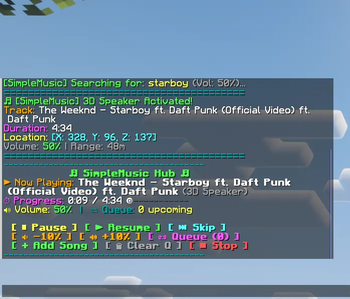

🎵 SimpleMusic
Proximity 3D Music, Live Streams, Spotify & YouTube Support for Paper/Purpur
SimpleMusic is the ultimate music plugin for modern Minecraft servers. It integrates seamlessly with the Simple Voice Chat API to bring true 3D spatial audio, room acoustics, and interactive music controls right into your game.
Whether you want to drop a speaker in your base that plays your favorite Spotify playlist, or have a Twitch live stream follow you around while you explore, SimpleMusic handles it all without lag and with zero client-side mods needed (other than the standard Voice Chat mod)!
🔥 Key Features
🎧 Play Anything, Anywhere
- Spotify & YouTube: Supports direct links to Spotify tracks, albums, and public playlists, as well as YouTube videos and playlists.
- Live Streams: Fully supports live online web radio (Icecast) and Twitch streams.
- Smart Searching: Don't have a link? Just type
/playStarboy and it will automatically find and play the best match.
🔊 True 3D Proximity Audio
- Sound Physics: If a speaker is placed underground or behind thick walls, the audio will dynamically muffle using occlusion filters. Music inside large caves will realistically echo with built-in acoustic reverb.
🎮 Interactive Chat Dashboard
Typing /music hub or /np sends a sleek, clickable control panel directly in chat:
[ ⏸ Pause ] [ ▶ Resume ] [ ⏭ Skip ][ 🔉 Volume - ] [ 🔊 Volume + ]- View your queue, progress bar, and active track all from one easy menu.
🛡️ Isolated Controls
Your music is yours. Running /stopmusic or /volume will only affect the music you started, ensuring you never accidentally stop another player's speaker. Admin commands (/music stopall) are available for server operators.
🛠️ Installation & Requirements
Requirements:
- Paper, Purpur (1.21+ / Minecraft 26.2)
- Simple Voice Chat (Must be installed on both the server and the players' clients).
- (Optional) Configure your Spotify API keys in
plugins/SimpleMusic/config.ymlfor faster, rate-limit-free Spotify playlist parsing.
💻 Commands Cheatsheet
| Command | Aliases | Description |
|---|---|---|
/music hub |
/m, /np |
Opens the interactive clickable music dashboard |
/play <song/URL> |
/p |
Plays a song that of that link |
/volume <1-100> |
/vol, /v |
Change the volume of your active music |
/queue |
/q |
View upcoming songs or add to your queue |
/skip |
/next |
Skips to the next queued track |
/pause / /resume |
Pauses or resumes your music playback | |
/stopmusic |
/mstop |
Completely stops your music and clears your queue |
/music |
all commands |
Built with ❤️ for the minecraft community
- Edition: Minecraft Java
- File type: .jar
- Minecraft versions listed: 1.21, 1.21.1, 1.21.2
- How to install: Install the matching mod loader (Forge, Fabric or NeoForge) for your Minecraft version. → Download the .jar. → Put it in the .minecraft/mods folder and launch that loader profile.
- Where to get it: Opens on Modrinth — not every file is mirrored on our own servers.
Install steps are the general flow for this file type — How to install Minecraft Java mods & modpacks walks through it step by step.
- Ships as SimpleMusic.jar — drop this file into the mods folder
- Download size: 32.8 MB
- Download link checked 12 Sept 2026 — working
These come from our own check of the pack file, not from the source page.