
GuiPlus+
Adds HUD customization mod for Minecraft. Move, scale, lock and recolor the hotbar ,you can edit your health bar to individual hotbar slots with a in-game…
⬇ Download on Modrinth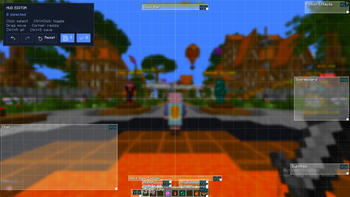
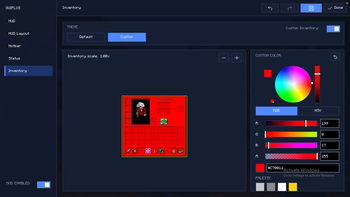
🖥️✨ Gui+ | Your Screen, Your Rules.
Tired of vanilla Minecraft dictating where your health bar lives? Take back control! Gui+ lets you rip the vanilla HUD apart and glue it back together exactly how you want it.
Whether you're a sweaty PvPer who needs health stats glued to your crosshair, or an aesthetic builder who wants a neon-pink inventory, we've got you covered.
🛠️ The "I Do What I Want" Editor
Customize your screen live, without ever leaving your world.
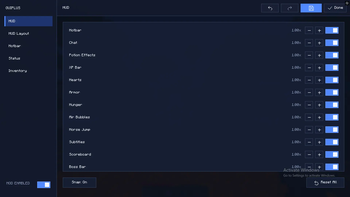
- Drag & Drop: Click, hold, and yeet any vanilla HUD element anywhere on your screen. Yes, anywhere.
- Precision Scaling: Scroll wheel goes brrr. Make your hotbar an absolute unit, or shrink your chat box so small it hides from your responsibilities.
- Grid Snapping: Built-in alignment guides for the perfectionists who will literally cry if the XP bar is one pixel off-center.
- Collapsible Menu: Hide the editor UI with one click so you can admire your handiwork in peace.
⚔️ Big Brain Hotbar System
The most advanced hotbar customizer available. We aren't kidding.
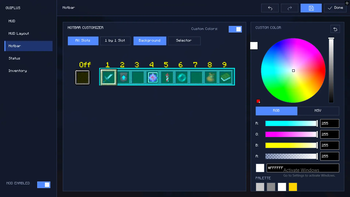
- Slot-by-Slot Control: Don't just move the whole bar—file for a divorce and split the slots up! Create vertical hotbars, 3x3 grids, or scatter them like confetti.
- The "Oops" Button (↻): Made a layout that looks like a Jackson Pollock painting? Hit reset to instantly snap your slots back into a civilized line.
- Smart Selection Box: The active item highlight smoothly chases your custom slot positions, no matter how cursed your layout gets.
🎨 Pimp My Interface
Gui+ goes way beyond just moving things. It's time to paint.
- Point-and-Click Tinting: Open settings, click any element (slots, backgrounds, tabs), and change its color. It's that easy.
- RGB/HSV Color Wheel: Find that exact shade of "Toxic Sludge Green" you’ve always wanted, and save it to your personal palette.
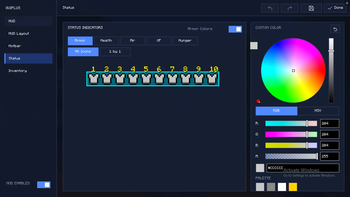
- 1-by-1 Status Colors: Make your first heart red, your second blue, and your third yellow. Color your hunger icons individually. We don't judge.
📋 Split Personalities (Layout Presets)
Change your mind a lot? Save your layouts and swap them instantly.
- Default: Good ol' vanilla. Boring, but reliable.
- Bedrock Style: Shoves your stats to the top corners so you can pretend you're playing on a console.
- Custom Profiles: Make a "Tryhard PvP" layout and a "Chill Farming" layout. Swap 'em like socks.
🔒 Fat-Finger Prevention (Locking)
Set it, lock it, and forget it.
- Quick Toggle: Hover over any element in the editor, press
L, and lock it down. - Visual Feedback: Locked elements turn angry red and disable their drag handles. No more accidentally dragging your armor bar into the void during a boss fight.
⌨️ How To Actually Use It
(All keybinds can be changed in the normal Minecraft Controls menu!)
| What you want to do | How to do it |
|---|---|
| Open the Magic Menu | Press G (Default) or type /guiplus |
| Move Stuff Around | Type /guiplus layout |
| Lock/Unlock a Thing | Press L (While hovering in the Editor) |
| "I Made a Mistake" | Ctrl + Z (Undo) / Ctrl + Shift + Z (Redo) |
| Save & Get Out | Press ESC |
💡 Why Install Gui+?
- ⚔️ PvP Sweats: Put your cooldowns and health directly under your crosshair so you never have to blink.
- 🎬 Cinematic Gamers: Hide everything except your hotbar for those perfectly clean screenshots.
- 💅 Fashion Icons: Match your UI colors to your favorite texture pack.
- ⚡ Potato PC Friendly: Built natively on Fabric so it won't fry your computer.
🤝 The Idiots
MonoBao and Caioxbz.
- Edition: Minecraft Java
- File type: .jar
- Minecraft version listed: 1.21.11
- How to install: Install the matching mod loader (Forge, Fabric or NeoForge) for your Minecraft version. → Download the .jar. → Put it in the .minecraft/mods folder and launch that loader profile.
- Where to get it: Opens on Modrinth — not every file is mirrored on our own servers.
Install steps are the general flow for this file type — How to install Minecraft Java mods & modpacks walks through it step by step.
GuiPlus+ is a free Minecraft Java mod. Compatible with Minecraft 1.21.11. Downloaded 1 times (via Modrinth). Download it and open it directly in the game.