
Crafting Station
A crafting table that shows the chest behind it. Pull ingredients straight from your storage without closing the screen.
⬇ Download on Modrinth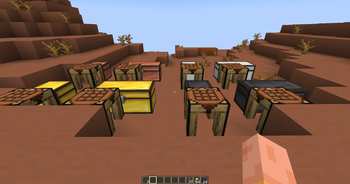
Crafting Station
A crafting table that shows the container behind it. Lay out a recipe and pull the ingredients across without closing the screen or walking back and forth.
How It Works
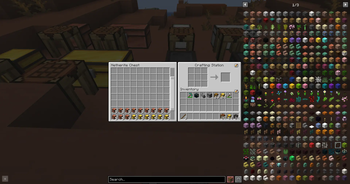
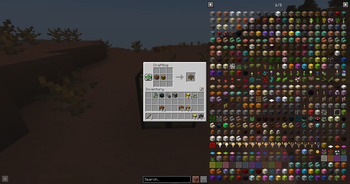
Place the Crafting Station against a container — it faces you when placed, so the block it reads is the one directly behind it. Opening the station shows two halves: the container's slots on the left, under its own name, and the usual 3×3 grid with your inventory on the right.
Both halves are live. Drag or shift-click between them like you would in any container screen. Shift-clicking from the container sends items straight to the crafting grid, which is what you opened the station for.
The grid keeps what you leave in it, so a station can stay set up with a recipe between two visits. A comparator placed against it reads how full the grid is.
Supported Containers
Detection uses the same vanilla helper a hopper uses, so anything a hopper can pull from works here:
| Chest, trapped chest | 27 slots |
| Double chest | 54 slots, shown as one panel |
| Barrel, shulker box | 27 slots |
| Dispenser, dropper | 9 slots |
| Hopper | 5 slots |
| Modded containers | whatever they hold |
The Panel
The panel sizes itself to the container. A hopper behind the station shows five slots, a double chest shows all fifty-four, and anything taller scrolls — mouse wheel or the scrollbar on the right, whose handle is sized to the share you are looking at.
Recipe
Shapeless: 1 Chest + 1 Crafting Table.
Requirements
| Minecraft | 1.20.1 |
| Loader | Fabric ≥ 0.16.10 |
| Fabric API | required |
| Environment | client and server, including dedicated |
License
Released under the MIT License. Play it anywhere, put it in a modpack, read the source and build on it — just keep the copyright notice.
- Edition: Minecraft Java
- File type: .jar
- Minecraft version listed: 1.20.1
- How to install: Install the matching mod loader (Forge, Fabric or NeoForge) for your Minecraft version. → Download the .jar. → Put it in the .minecraft/mods folder and launch that loader profile.
- Where to get it: Opens on Modrinth — not every file is mirrored on our own servers.
Install steps are the general flow for this file type — How to install Minecraft Java mods & modpacks walks through it step by step.
Crafting Station is a free Minecraft Java mod. Compatible with Minecraft 1.20.1. Available via Modrinth. Download it and open it directly in the game.