
PvPDisable
Java mod listed for Minecraft 1.2–26.x. Downloads from the MC Java Mods app on Android.
A plugin that lets admins temporarily disable PvP on the server with /pvpdis (duration), broadcasting countdowns and automatically re-enabling it.
⬇ Download on Modrinth
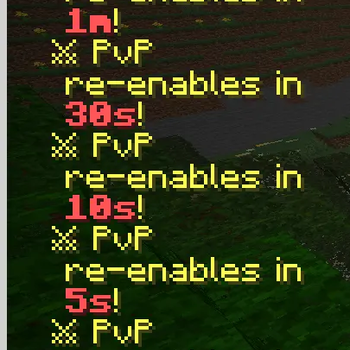
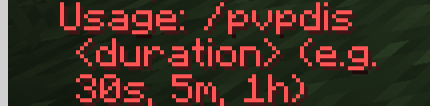
PvP Disable – Simple Temporary PvP Management
PvP Disable is a Minecraft server plugin that helps administrators control when players can fight each other. Administrators can use a command to stop PvP for a certain amount of time and the plugin will take care of everything.
To stop PvP administrators can use the command /pvpdis <duration>. When PvP is stopped players cannot hurt each other which helps prevent fights during events, server preparation or other times when fighting should be stopped.
The plugin tells players how much time is left by sending them messages as the time runs out. When the time is up PvP starts again automatically so administrators do not have to remember to turn it on.
PvP Disable is easy to use. Does not have a lot of extra features. It is great for servers where players work together survive together or fight each other and for servers that have events or need to stop PvP
Features
Stop PvP with
/pvpdis <duration>PvP starts again when the time is up
Players get messages telling them how much time is left
Players cannot hurt each other when PvP is stopped
Good for events and times when players should not be fighting
Simple commands for administrators
Easy to use and does not use a lot of resources
Administrators do not have to turn PvP on
Great for servers where players work together survive together or fight each other
Whether you are starting a season getting ready, for an event giving players a break or just need to stop fighting for a little while PvP Disable is a quick and easy way to manage PvP on your Minecraft server. PvP Disable is a tool for Minecraft server administrators to manage PvP.
- Edition: Minecraft Java
- File type: .jar
- Minecraft versions listed: 1.2.1, 1.2.2, 1.2.3
- How to install: Install the matching mod loader (Forge, Fabric or NeoForge) for your Minecraft version. → Download the .jar. → Put it in the .minecraft/mods folder and launch that loader profile.
- Where to get it: Opens on Modrinth — not every file is mirrored on our own servers.
Install steps are the general flow for this file type — How to install Minecraft Java mods & modpacks walks through it step by step.
- Ships as pvpdisable-1.0.0.jar — drop this file into the mods folder
- Download size: 10 KB
- Download link checked 23 Oct 2026 — working
These come from our own check of the pack file, not from the source page.