
NameHider
Java mod listed for Minecraft 1.21. Downloads from the MC Java Mods app on Android.
⬇ Download on Modrinth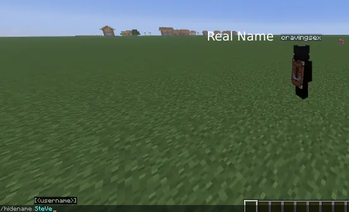
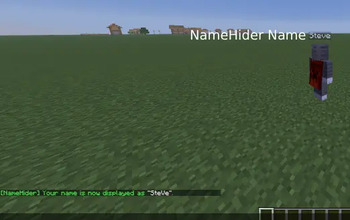
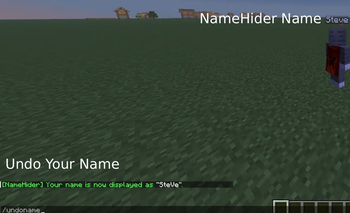
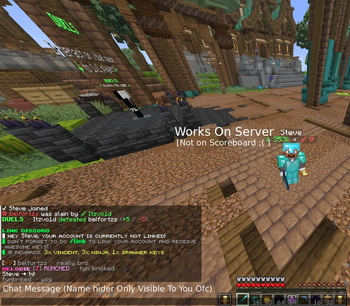
A lightweight, client-side Fabric mod that changes how your own Minecraft name is displayed on your client.
NameHider is purely visual. It does not modify your Minecraft account, UUID, GameProfile, authentication, chat messages, commands, or network traffic.
Other players and servers will always see your real Minecraft username.
✨ Features
- 🏷️ Set a custom local display name with
/hidename - 🔄 Restore your real name with
/undoname - 🎨 Use the selected account's current Java skin and cape
- 🔤 Automatically apply Mojang's official username capitalization when available
- 💾 Save the selected name locally
- 🌍 Works in singleplayer, LAN, and multiplayer
- 🧩 No server-side installation required
- 🔒 Does not modify outgoing messages, commands, packets, UUIDs, or authentication
📦 Installation
- Install Fabric Loader for your Minecraft version.
- Install Fabric API for the same version.
- Download the matching NameHider JAR.
- Place the JAR files into your Minecraft
modsfolder. - Launch Minecraft using the Fabric profile.
NameHider is client-side only. Servers do not need to install it.
Java Requirements
| Minecraft Version | Java |
|---|---|
| 1.21.10 | 21 |
| 1.21.11 | 21 |
| 26.2 | 25 |
💬 Commands
/hidename <name>
Sets your local display name.
/hidename Steve
Allowed characters:
A-Z a-z 0-9 _
Length: 1–16 characters
/undoname
Disables NameHider and restores your real Minecraft name locally.
/undoname
Both commands are handled entirely on your client and are never sent to the server.
YouTube Video
A quick sneak peek for the commands
🎨 Skins & Capes
If the selected name belongs to an existing Minecraft: Java Edition account, NameHider fetches that account's currently equipped skin and cape for your local client.
For example:
/hidename sTeVe
If Mojang finds the account, NameHider automatically applies the official capitalization:
Steve
If the account does not exist:
- Your entered capitalization is kept.
- Your original skin remains active.
- Your original cape remains active.
🔒 Privacy & Multiplayer Safety
NameHider never changes or sends:
- Your real Minecraft username
- UUID
- GameProfile
- Authentication data
- Outgoing chat messages
- Commands sent to a server
- Packets or network traffic
- Server-side data
Your selected display name is stored only on your computer:
.minecraft/config/namehider.json
Nothing from this configuration is sent to a server.
❓ FAQ
Can other players see my hidden name?
No. NameHider only changes your local display. Everyone else continues to see your real Minecraft username.
Does NameHider work on multiplayer servers?
Yes. NameHider is client-side only and does not need to be installed on the server.
Does it work in singleplayer?
Yes. NameHider works in singleplayer, LAN worlds, and multiplayer.
Does NameHider rename my Minecraft account?
No. Your real account name, UUID, and authentication remain unchanged.
Can I use another player's skin?
Yes, locally. If the selected name belongs to an existing Java Edition account, NameHider uses that account's current skin and cape on your client.
Why isn't a name replaced in every possible message?
Minecraft servers can send arbitrary formatted text, especially through chat, scoreboards, plugins, and custom GUIs.
NameHider only modifies safe, local display locations where it can reliably identify your own player. This prevents accidentally replacing another player's name or unrelated server text.
🔒 NameHider changes what you see — not who you are.
- Edition: Minecraft Java
- File type: .jar
- Minecraft version listed: 1.21.10
- How to install: Install the matching mod loader (Forge, Fabric or NeoForge) for your Minecraft version. → Download the .jar. → Put it in the .minecraft/mods folder and launch that loader profile.
- Where to get it: Opens on Modrinth — not every file is mirrored on our own servers.
Install steps are the general flow for this file type — How to install Minecraft Java mods & modpacks walks through it step by step.
- Ships as namehider-1.0.3+1.21.10.jar — drop this file into the mods folder
- Download size: 18 KB
- Download link checked 24 Oct 2026 — working
These come from our own check of the pack file, not from the source page.