
PerceptiFrame
Java mod listed for Minecraft 1.21. Downloads from the MC Java Mods app on Android.
A self-profiling Fabric optimization mod that improves FPS by reducing expensive, barely visible entity details and shadows.
⬇ Download on Modrinth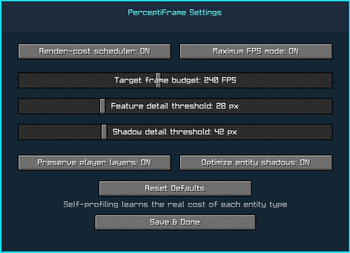
PerceptiFrame
PerceptiFrame is a standalone client-side Fabric optimization mod for Minecraft 1.21.11 with a self-profiling render-cost scheduler.
It measures the real CPU time of individual entity feature passes, learns a moving cost model for every entity type, and compares that cost with the entity's projected screen size. Maximum FPS mode continuously avoids the least visible work with the highest measured cost.
Features
- Self-learning performance model
- Separate measured render cost for every entity type
- Maximum FPS mode
- Pixel-based detail prioritization
- Adaptive entity shadow optimization
- Protection for nearby and outlined entities
- Optional protection for player equipment and cosmetic layers
- Complete in-game settings screen
- F10 settings shortcut
- Optional Mod Menu integration
- Client-side only
- No telemetry or external connections
- No server installation required
- No gameplay, AI, movement, hitbox, networking, or world changes
- No third-party optimization mod is bundled or required
How it works
PerceptiFrame collects eight safe warm-up samples for each entity type. It then calculates how much visible detail is produced for every measured nanosecond of rendering work.
Under Maximum FPS mode, the least visible and most expensive additional entity layers are removed first. Base entity models remain visible.
This is especially useful in mob farms, multiplayer hubs, trading halls, armor stand displays, crowded bases, and areas containing many equipped entities.
Settings
Press F10 or use Mod Menu's Configure button.
Settings include the render-cost scheduler, Maximum FPS mode, target frame budget, feature-detail threshold, shadow-detail threshold, player-layer protection, and entity-shadow optimization.
Settings are saved in config/perceptiframe.json.
Requirements
- Minecraft 1.21.11
- Fabric Loader 0.18.4 or newer
- Fabric API
- Java 21 or newer
Mod Menu is optional.
Compatibility
PerceptiFrame is completely standalone. Mods that completely replace LivingEntityRenderer.render or EntityRenderer.updateShadow may conflict.
Performance notice
Performance improvements depend on hardware, settings, resource packs, world, and visible entity count. PerceptiFrame specifically optimizes entity feature layers and shadows; it cannot fix unrelated chunk-rendering, shader, server, or general GPU bottlenecks.
License
MIT
- Edition: Minecraft Java
- File type: .jar
- Minecraft version listed: 1.21.11
- How to install: Install the matching mod loader (Forge, Fabric or NeoForge) for your Minecraft version. → Download the .jar. → Put it in the .minecraft/mods folder and launch that loader profile.
- Where to get it: Opens on Modrinth — not every file is mirrored on our own servers.
Install steps are the general flow for this file type — How to install Minecraft Java mods & modpacks walks through it step by step.
- Ships as perceptiframe-2.0.0.jar — drop this file into the mods folder
- Download size: 41 KB
- Download link checked 3 Oct 2026 — working
These come from our own check of the pack file, not from the source page.