
GemForge: Tools & Ores
A vibrant Minecraft Bedrock resource pack featuring custom ores, tools, and weapons designed to give your gameplay a fresh and colorful visual style. 💎⚔️
⬇ Download on Modrinth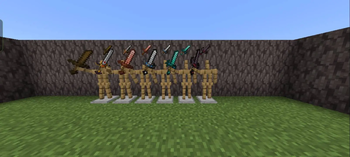
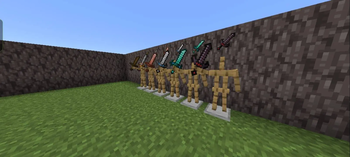
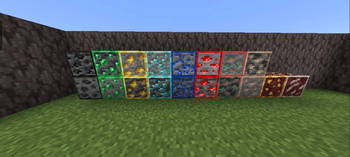
💎 GemForge Tools & Ores
GemForge Tools & Ores is a Minecraft Java Edition resource pack that gives selected vanilla Minecraft textures a gem-inspired visual style.
The pack focuses on visual changes only. It does not add new items, blocks, ores, tools, crafting recipes, mobs, or gameplay mechanics.
✨ Features
- Gem-inspired textures
- Custom-looking tool textures
- Custom-looking ore textures
- Fantasy-inspired visual style
- Resource-pack based — no mods required
- Designed to work with vanilla Minecraft gameplay
🛠️ What does it change?
GemForge modifies the appearance of selected Minecraft resources and equipment while keeping their original Minecraft functionality.
A tool with a GemForge texture still behaves exactly like the original Minecraft tool. The pack does not create new tool types or change their statistics.
Modified ores remain the original Minecraft blocks underneath the texture changes.
📥 Installation
- Download the GemForge .zip.
- Open Minecraft Java Edition.
- Go to Options → Resource Packs.
- Click Open Pack Folder.
- Place the downloaded .zip into the resource-pack folder.
- Return to Minecraft.
- Select GemForge Tools & Ores.
- Click Done.
📌 Compatibility
Minecraft Edition: Java Edition Project Type: Resource Pack Version: 1.0.1
Compatibility may vary between Minecraft versions because resource-pack formats can change between game releases.
👤 Credits
Created by: Akib Hasan Roni Takin Chowdhury
GemForge Tools & Ores is an unofficial Minecraft resource pack.
⚠️ Disclaimer
GemForge Tools & Ores is not affiliated with, sponsored by, or endorsed by Mojang Studios or Microsoft.
- Edition: Minecraft Java
- File type: .zip (resource pack)
- Minecraft versions listed: 1.21.10, 1.21.11, 26.1
- How to install: Download the .zip resource pack — do not unzip it. → Put it in .minecraft/resourcepacks. → Enable it in Options → Resource Packs.
- Where to get it: Opens on Modrinth — not every file is mirrored on our own servers.
Install steps are the general flow for this file type — How to install Minecraft Java resource packs walks through it step by step.
- Downloads as GemForge-Tools-and-Ores-Java-1.0.1.zip
- Download size: 65 KB
- Download link checked 13 Sept 2026 — working
These come from our own check of the pack file, not from the source page.