
Linked sword (from roblox)
A lightweight, purely visual resource pack that replaces the default Vanilla Netherite Sword texture with the iconic Linked Sword design from Roblox. 🗡️…
⬇ Download on Modrinth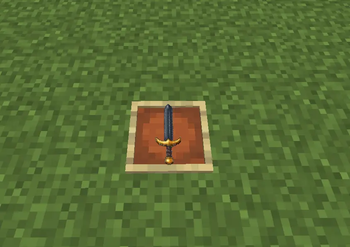
Linked Sword
A lightweight, purely visual resource pack that replaces the default Vanilla Netherite Sword texture with the iconic Linked Sword design from Roblox.
ZIP
🗡️ Features
Roblox Classic in Minecraft: Replaces netherite_sword.png with a clean pixel-art version of the classic Roblox Linked Sword.
ZIP
Pure Vanilla Compatibility: Works directly out-of-the-box in Vanilla Minecraft without requiring OptiFine, Fabric, or any mods.
ZIP
Drop-in & Play: Built using standard resource pack structure (assets/minecraft/textures/item/).
ZIP
📦 Installation
Download the .zip file.
ZIP
Open Minecraft and navigate to Options > Resource Packs > Open Pack Folder.
Move the downloaded .zip file into the folder and move it to the top of your active pack list in-game.
- Edition: Minecraft Java
- File type: .zip (resource pack)
- Minecraft version listed: 1.21.11
- How to install: Download the .zip resource pack — do not unzip it. → Put it in .minecraft/resourcepacks. → Enable it in Options → Resource Packs.
- Where to get it: Opens on Modrinth — not every file is mirrored on our own servers.
Install steps are the general flow for this file type — How to install Minecraft Java resource packs walks through it step by step.
- Downloads as Linked Sword.zip
- Download size: 12 KB
- Download link checked 13 Sept 2026 — working
These come from our own check of the pack file, not from the source page.