






Contrastia
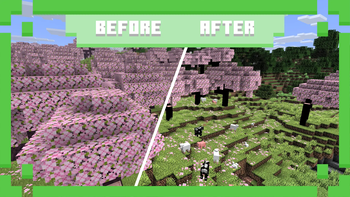
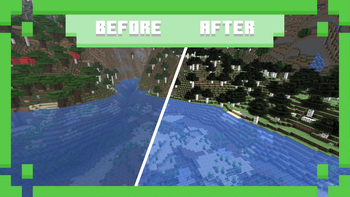
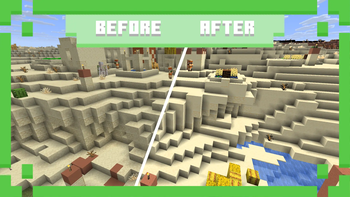
Give Minecraft a bolder and more striking look with enhanced contrast across its vanilla textures! This pack strengthens the differences between light and dark tones, making colors stand out more and giving blocks, items, and the world itself a sharper visual appearance. Whether you're exploring dark caves, building detailed structures, or simply want a more vivid take on vanilla Minecraft, this pack makes every texture pop.
What does this resource pack change?
- Adjusts all shaders
- Replaces all tints
- Recolors all textures

Nothing to show yet :(

| Question | Answer |
|---|---|
| Can I use this in my modpack? | Of course! We do not restrict anyone from using our projects :D |
| Will you port this to version X? | We port our projects only to newer versions from the currently supported version (26.1+) |
| When does this get a new update? | Once I finish it, I cannot say the exact date. |
| Where can I report bugs or suggest my idea? | In our Discord server, you can find it in the links section. |













All rights reserved by IleafDevelopment.
Quick facts
- Edition: Minecraft Java
- File type: .zip (resource pack)
- Minecraft versions listed: 26.1, 26.1.1, 26.1.2
- How to install: Download the .zip resource pack — do not unzip it. → Put it in .minecraft/resourcepacks. → Enable it in Options → Resource Packs.
- Where to get it: Opens on Modrinth — not every file is mirrored on our own servers.
Install steps are the general flow for this file type — How to install Minecraft Java resource packs walks through it step by step.
Verified by MCModsHub
- Downloads as contrastia[1.0]-26.1.zip
- Download size: 4.1 MB
- Download link checked 13 Sept 2026 — working
These come from our own check of the pack file, not from the source page.