
SMP Customizer
Java mod listed for Minecraft 1.21. Downloads from the MC Java Mods app on Android.
⬇ Download on Modrinth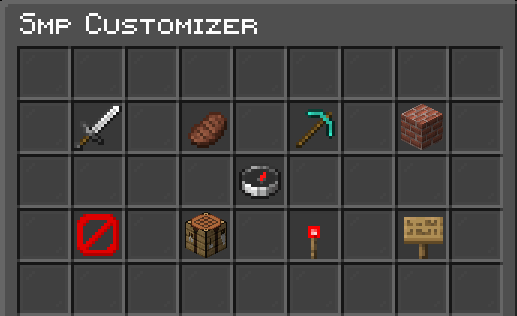
🌟 SMP Customizer
SMP Customizer is a lightweight management plugin that gives server admins control over server rules and mechanics without hurting server performance.
📥 Installation & Using it
Download the latest .jar file.
Drop it into your /plugins/ folder.
Restart your server, and make sure the plugin is GREEN when doing /plugins.
Type /smpcustomizer in game to open the GUI.
Requirements to open the GUI:
- Have 'operator' permission.
- Be in game. This means it cannot be used thru the console.
🎮 Features
Global Toggles:
- PvP ⚔️
- Hunger Loss 🍎
- Block Breaking ⛏️
- Block Placing 👷♂️
- Maintenance Mode 🚫
Custom Recipes: 📃 Design custom recipes using a crafting grid and save them directly to the server.
Item Limits: 🔒 Cap different items to a specific amount, dropping the excess amount on the ground, to prevent losing any valuable items.
Item Banning: ❌ Put items into the GUI to ban them globally and clear them from player inventories.
Dimension Toggler: 🌗 Control access to the Overworld, Nether, and End by blocking all types of dimension traveling methods.
⚙️ Performance
This plugin is designed for performance, so instead of using 10 different plugins for 10 different things, this one plugin can do all 10 of those things, with much better performance.
- Edition: Minecraft Java
- File type: .jar
- Minecraft versions listed: 1.21, 1.21.1, 1.21.2
- How to install: Install the matching mod loader (Forge, Fabric or NeoForge) for your Minecraft version. → Download the .jar. → Put it in the .minecraft/mods folder and launch that loader profile.
- Where to get it: Opens on Modrinth — not every file is mirrored on our own servers.
Install steps are the general flow for this file type — How to install Minecraft Java mods & modpacks walks through it step by step.
- Ships as SMPCustomizer-1.2-RELEASE.jar — drop this file into the mods folder
- Download size: 19 KB
- Download link checked 13 Nov 2026 — working
These come from our own check of the pack file, not from the source page.
Related Java mods

NeoForge Foundry: StoneFactory Edition

MetaGen

SientVisuals-server helper

SilkySpawnersX

CozyCraft 2
