
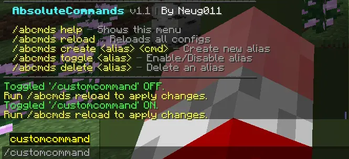
AbsoluteCommands is a lightweight server-side utility plugin that lets you create custom command aliases and series commands to simplify everyday server administration. Instead of typing long, repetitive commands, you define your own shortcuts — and even chain multiple commands into a single one.
This plugin is not a client-side modification. It works entirely on the server and provides no unfair advantage. It is a pure administration tool.
FEATURES
- Custom Aliases — Turn long commands into short, memorable ones.
- Series Commands — Run a batch of commands with a single trigger. Perfect for setting up admin modes, teleport systems, or server maintenance routines.
- Simple JSON Configuration — Add, edit, or remove aliases without touching code.
- Permission Support — Control who can use each alias with Bukkit permissions.
- In-Game Reload — Apply config changes instantly with /abcmds reload — no server restart needed.
Run /abcmds help in game for a guide. Everything you do can be edited in the folder.
Example Config:
[
  {
    "name": "adminmode",
    "command": "gamemode creative %player%",
    "series": false,
    "permission": "abcmds.adminmode",
    "cooldown": 5,
    "enabled": false,
    "as-console": true
  },
  {
    "name": "customcommand",
    "command": "give %player% diamond",
    "series": false,
    "cooldown": 0,
    "enabled": true,
    "as-console": true
  }
]
Have a bug or suggestion? Discord link is right below! Join for beta launches and more stuff :) https://discord.gg/2qpXMgRCZz
Copyright (c) 2026 [Neug011]. All rights reserved.
- Edition: Minecraft Java
- File type: .jar
- Minecraft versions listed: 1.21, 1.21.1, 1.21.2
- How to install: Install the matching mod loader (Forge, Fabric or NeoForge) for your Minecraft version. → Download the .jar. → Put it in the .minecraft/mods folder and launch that loader profile.
- Where to get it: Opens on Modrinth — not every file is mirrored on our own servers.
Install steps are the general flow for this file type — How to install Minecraft Java mods & modpacks walks through it step by step.
- Ships as AbsoluteCommands-1.1.jar — drop this file into the mods folder
- Download size: 19 KB
- Download link checked 14 Sept 2026 — working
These come from our own check of the pack file, not from the source page.