Particle Toggler
A lightweight, client-side Fabric mod for Minecraft that allows you to easily toggle every single particle and weather effects in the game on or off.
Key Features
- In-Game Tabbed GUI Menu: Press
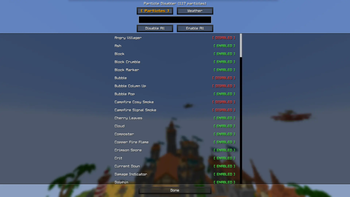
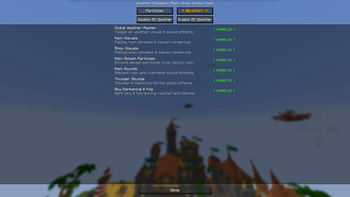
Pin-game to open a clean, interactive manager menu with Particles and Weather tabs. - Weather Disabler:
- Global Weather Toggle: Enable or disable all weather effects with a single click.
- Rain Visuals: Toggle falling rain streaks and column rendering.
- Snow Visuals: Toggle falling snow streaks and column rendering.
- Rain Splash Particles: Toggle particles produced on the ground by falling rain.
- Rain Sounds: Toggle ambient rain sound effects.
- Thunder Sounds: Toggle lightning strike and thunder audio.
- Sky Darkening & Fog: Toggle daytime sky darkening and thick fog during rain/storms.
- Particle Disabler:
- Real-Time Search Bar: Search for any particle by its formatted name (e.g., "Angry Villager", "Campfire Cosy Smoke") or raw ID.
- Per-Particle Toggles: Flip individual
[ ENABLED ]/[ DISABLED ]switches for any particle type in Minecraft. - Mass Actions: Disable All or Enable All particles or weather with a single click.
- In-Game Commands: Full support for
/particledisablerin chat with tab auto-completion for both particles and weather. - Automatic Persistence: Settings automatically save to
config/particle_disabler.json.
Controls & Commands
| Action | Shortcut / Command |
|---|---|
| Open GUI Menu | Press P (configurable in Controls settings) |
| Open Particles Tab | /particledisabler or /particledisabler gui particles |
| Open Weather Tab | /particledisabler weather or /particledisabler gui weather |
| Toggle All Weather | /particledisabler weather toggle or /particledisabler weather toggle all |
| Toggle Specific Weather | /particledisabler weather toggle <rain|snow|splash|rain_sound|thunder_sound|darkness> |
| Enable/Disable Weather | /particledisabler weather enable <option> / /particledisabler weather disable <option> |
| List Weather Status | /particledisabler weather list |
| Reset Weather Settings | /particledisabler weather reset |
| Toggle All Particles | /particledisabler toggle |
| Toggle Particle | /particledisabler disable <particle> or /particledisabler enable <particle> |
| List Disabled Particles | /particledisabler list |
| Reset Particle Settings | /particledisabler reset |
Installation Guide
- Make sure you have Fabric Loader and Fabric API installed for Minecraft
26.1.2(or your corresponding Minecraft version). - Download
particle-disabler-1.0.2.jarfrom the releases or build it from source. - Place the
.jarfile into your.minecraft/modsfolder. - Launch the game!
Building from Source
To compile the mod yourself:
# Clone the repository
git clone https://github.com/faizarii/particle-disabler.git
cd particle-disabler

# Build with Gradle
./gradlew build
The compiled .jar artifact will be located inside build/libs/particle-disabler-1.0.2.jar.
📄 License
This project is open-source and available under the MIT License.
Quick facts
- Edition: Minecraft Java
- File type: .jar
- Minecraft version listed: 26.1.2
- How to install: Install the matching mod loader (Forge, Fabric or NeoForge) for your Minecraft version. → Download the .jar. → Put it in the .minecraft/mods folder and launch that loader profile.
- Where to get it: Opens on Modrinth — not every file is mirrored on our own servers.
Install steps are the general flow for this file type — How to install Minecraft Java mods & modpacks walks through it step by step.
Verified by MCModsHub
- Ships as particle-disabler-1.0.2.jar — drop this file into the mods folder
- Download size: 38 KB
- Download link checked 14 Sept 2026 — working
These come from our own check of the pack file, not from the source page.