Geographical Sun/Time Sync
This mod allows you to configure your geographical coordinates, and then calculates the time that the sun will rise and set today, and syncs those times…
⬇ Download on Modrinth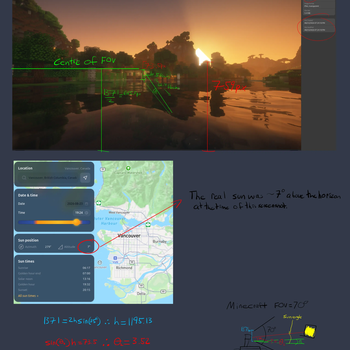
What does this mod do?
This mod syncs the in-game sunrise and sunset to the real world sunrise and sunset. When enabled, it will also force the gamerule to do the daylight cycle to false.
There are other mods that sync with real-time—why should I care about this one?
Other mods that sync with real-time either allow you to manually edit the time of sunrise/sunset or do not take these into consideration. This mod automatically calculates the sunrise and sunset time for you, and then syncs the Minecraft day/night cycle to the real-world's.
What do I have to configure to get it working?
Latitude & Longitude
Your coordinates are required to get an accurate estimate of sunrise/sunset. These can be rough figures, to make things easier.
Negative longitude values are in the Western hemipshere, for reference.
UTC Offset
For the mod to know what to do with your current time, it needs to know how many hours your time differs from UTC/GMT. This could be done automatically, but the ability to configure this allows servers to adjust to the locale of their owner.
What else can I configure?
In addition to the required settings, you can:
Disable the mod - disabling the mod will also re-enable the default daylight cycle.
Adjust your altitude - By default, altitude is 0. This will make it so that the timing of the sunrise/sunset is synced at sea level, both in Minecraft and in the real-world. Adjusting this value makes it so that it syncs the Minecraft sea level sunrise/sunset times to the altitude that you give in either metres or feet.
- Edition: Minecraft Java
- File type: .jar
- Minecraft version listed: 26.2
- How to install: Install the matching mod loader (Forge, Fabric or NeoForge) for your Minecraft version. → Download the .jar. → Put it in the .minecraft/mods folder and launch that loader profile.
- Where to get it: Opens on Modrinth — not every file is mirrored on our own servers.
Install steps are the general flow for this file type — How to install Minecraft Java mods & modpacks walks through it step by step.
- Ships as sync_sunset.jar — drop this file into the mods folder
- Download size: 9 KB
- Download link checked 14 Sept 2026 — working
These come from our own check of the pack file, not from the source page.