
ModsJava
Show me the delay
Client-side Fabric HUD that tracks and displays your action latency, item-switch delay, and network ping in real time. Perfect for PvP and competitive…
⬇ Download on Modrinth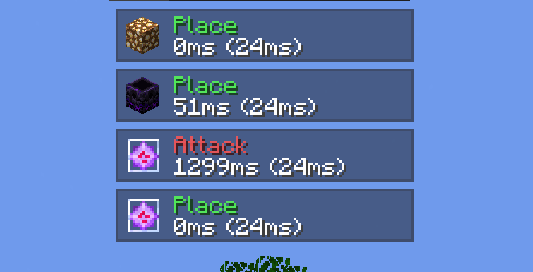
Show Me The Delay is a lightweight, fully client-side Fabric mod that visualizes your mechanical action delay and server latency directly on your screen.
Features
- Action Timing: Tracks delay when placing blocks, breaking blocks, attacking entities, and using items.
- Display Modes: Toggle between item-switch delay, network ping, or a combined view (e.g.,
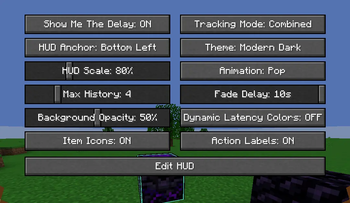
45ms (28ms)). - Customizable HUD: Multiple themes (Modern Dark, Translucent, Slate Outline, Minimal) with smooth animations (Slide, Pop, Fade, Instant).
- In-Game Editor: Move and resize the overlay live with a drag-and-drop screen.
- Dynamic Color Coding: Instantly see latency ranges with green, yellow, orange, and red indicators.
Usage & Controls
- Press
Oor type/delayconfigto open the settings menu. - Click Edit HUD to drag the overlay or scroll with your mouse wheel to adjust scale.
Quick facts
- Edition: Minecraft Java
- File type: .jar
- Minecraft version listed: 1.21.11
- How to install: Install the matching mod loader (Forge, Fabric or NeoForge) for your Minecraft version. → Download the .jar. → Put it in the .minecraft/mods folder and launch that loader profile.
- Where to get it: Opens on Modrinth — not every file is mirrored on our own servers.
Install steps are the general flow for this file type — How to install Minecraft Java mods & modpacks walks through it step by step.
Show me the delay is a free Minecraft Java mod. Compatible with Minecraft 1.21.11. Available via Modrinth. Download it and open it directly in the game.