
ModsJava
Choosey Painter
Adds a Easel and Canvas to the game that lets your turn random paintings into a select painting. Additionally, it's canvas can be filled with any painting…
⬇ Download on Modrinth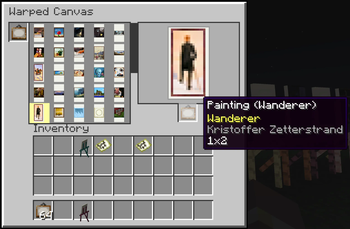
Choosey Painter
Choosey Painter adds a placeable Canvas and Easel that lets you choose which painting you want to display.
No more breaking and replacing them until the correct one appears.
Crafting recipie is
S W S S W S S P S
S = Stick W = wool P = any wood plank
Features
- Place a freestanding Canvas and Easel in your world.
- Shift-right-click the easel to change how the displayed painting fits the canvas.
- Open the canvas and select any available painting to display.
- Insert a painting item into the canvas and choose a specific painting to export.
- Exporting a selected painting produces that exact painting instead of a randomly selected variant.
How to Use
- Place the Canvas and Easel.
- Open the canvas interface.
- Add a crafted painting.
- Select the painting you want to display.
- Collect the New specific painting.
- Shift-right-click the placed easel to cycle through its available fitting options.
Todo: Every Compact [Woods Good] support.
Quick facts
- Edition: Minecraft Java
- File type: .jar
- Minecraft version listed: 1.21.1
- How to install: Install the matching mod loader (Forge, Fabric or NeoForge) for your Minecraft version. → Download the .jar. → Put it in the .minecraft/mods folder and launch that loader profile.
- Where to get it: Opens on Modrinth — not every file is mirrored on our own servers.
Install steps are the general flow for this file type — How to install Minecraft Java mods & modpacks walks through it step by step.
Verified by MCModsHub
- Ships as chooseypainter-0.1.1.jar — drop this file into the mods folder
- Download size: 99 KB
- Download link checked 15 Sept 2026 — working
These come from our own check of the pack file, not from the source page.