
Mine's Better HUD
Mine’s Better HUD improves Minecraft’s inventory, chest, furnace, crafting, and menu interfaces with clean pixel styling, clearer slots, refined buttons…
⬇ Download on Modrinth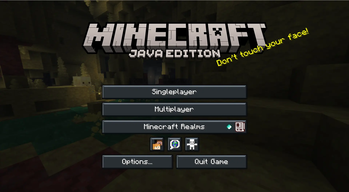
Mine’s Better HUD
Mine’s Better HUD is a client-side visual improvement mod for Minecraft Java Edition that upgrades the vanilla inventory and container interface while keeping the original Minecraft gameplay and layout familiar.
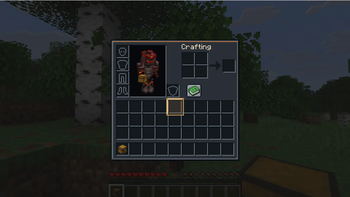
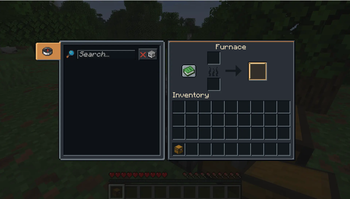
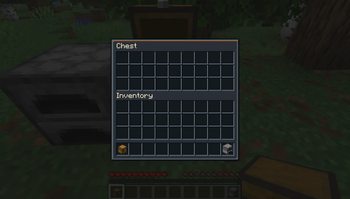
The mod gives Minecraft’s interface a cleaner, darker, and more readable pixel-art style. Inventory screens, chests, furnaces, crafting tables, anvils, enchanting tables, brewing stands, smithing tables, villagers, horses, shulker boxes, hoppers, and other containers receive improved textures with clearer panels, stronger slot separation, and refined borders.
Features
- Redesigned player inventory interface
- Improved chest and storage container screens
- Cleaner furnace, blast furnace, and smoker interfaces
- Refined crafting table and recipe book controls
- Updated anvil, smithing, enchanting, brewing, loom, stonecutter, and cartography interfaces
- Dark charcoal and slate-colored panels
- Crisp pixel-perfect slot borders
- Clearer empty inventory slots
- Improved normal, hovered, selected, focused, and disabled button states
- Refined sliders and text fields
- Improved tooltip and recipe-book textures
- Dedicated furnace progress and flame artwork
- Warm gold highlights for interactive elements
- Better readability for container labels and interface text
- Minecraft’s original slot positions and screen proportions are preserved
- Loading screens, world backgrounds, and general Minecraft backgrounds remain unchanged
Mine’s Better HUD focuses on making Minecraft’s menus feel more polished without turning them into a completely different game. The design stays close to the familiar vanilla interface while adding a more modern, organized, and premium appearance.
The mod does not add new items, blocks, dimensions, recipes, abilities, or gameplay mechanics. It only changes the client-side appearance of supported interfaces, making it suitable for single-player worlds and multiplayer servers.
Compatibility
Mine’s Better HUD is designed for:
- Minecraft Java Edition 26.2
- Fabric Loader 0.19.3 or newer
- Java 25
- Client-side installation
Only the player needs to install the mod. Servers do not need Mine’s Better HUD installed because it does not change gameplay or server mechanics.
- Edition: Minecraft Java
- File type: .jar
- Minecraft version listed: 26.2
- How to install: Install the matching mod loader (Forge, Fabric or NeoForge) for your Minecraft version. → Download the .jar. → Put it in the .minecraft/mods folder and launch that loader profile.
- Where to get it: Opens on Modrinth — not every file is mirrored on our own servers.
Install steps are the general flow for this file type — How to install Minecraft Java mods & modpacks walks through it step by step.
- Ships as Better-HUD-Fabric-26.2-1.3.1.jar — drop this file into the mods folder
- Download size: 147 KB
- Download link checked 15 Sept 2026 — working
These come from our own check of the pack file, not from the source page.