
BuildAid
Pin reference images over your screen with adjustable opacity, plus Litematica-style area selection and a building grid. Client-side, one menu, four keys.
⬇ Download on Modrinth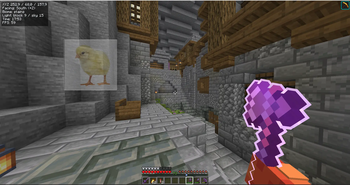
BuildAid
Reference images over your screen while you build — with adjustable opacity.
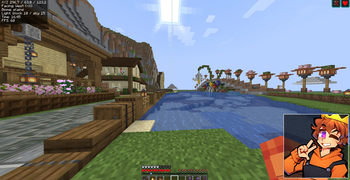
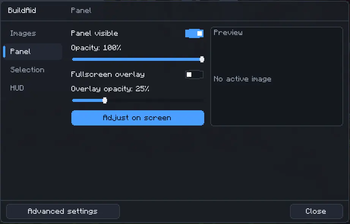
Stop alt-tabbing to look at your reference. BuildAid pins the image inside the game, on a panel you can move, resize and fade, so the reference sits right where you're building. It also brings a Litematica-style area selection, a block-aligned grid and a compact info HUD.
Everything is done from one menu, and only four keys are bound out of the box.
Fully client-side: works in singleplayer and on any server, and sends nothing to the server.
Features
Reference image panel
- Floating panel you drag, resize, zoom and pan with the mouse.
- Opacity slider — turn the reference into a decal over your build.
- Fullscreen ghost overlay for aligning facades and pixel art.
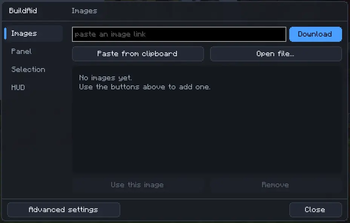
- Add images three ways: paste from clipboard, open a file, or paste a link.
- Gallery with thumbnails; everything you import is kept between sessions.
Area selection (Litematica-style)
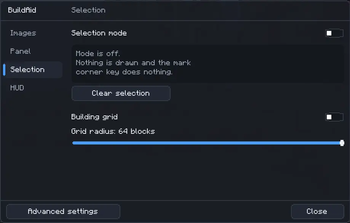
- It's a mode: with it off, nothing is drawn at all.
- Mark two corners by looking at a block and pressing a key.
- Translucent box with an outline, plus corner markers in distinct colours (corner 1 blue, corner 2 orange) that stay visible through the box.
- Shows width × height × depth, total block count and diagonal.
- Corners are marked by key, never by click — breaking and placing blocks keep working normally.
Building grid
Block-aligned guide lines around you, with chunk borders highlighted. Adjustable radius.
Info HUD
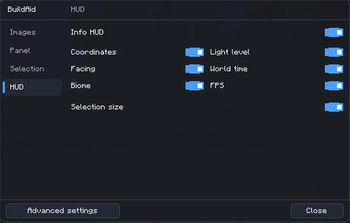
Coordinates, facing, biome, block/sky light level, world time and FPS. Pick exactly which lines you want.
Keys
Only four keys are bound by default:
| Key | Action |
|---|---|
G |
Open the menu |
H |
Show/hide the reference panel |
B |
Toggle selection mode |
M |
Mark a selection corner (while looking at a block) |
Every other action lives in the menu and also appears under Options → Controls → BuildAid with no key assigned, so BuildAid never steals keys from your other mods. Bind the ones you actually use.
Requirements
- Minecraft 26.2
- Fabric Loader 0.19.3+
- Java 25 (required by Minecraft 26.1 and newer)
- Fabric API
- Cloth Config
- Mod Menu — optional
Languages
English and Brazilian Portuguese. The mod follows the language you pick in Minecraft.
BuildAid (Português)
Imagens de referência sobre a tela enquanto você constrói — com opacidade ajustável.
Chega de ficar saindo do jogo para olhar a referência. O BuildAid fixa a imagem dentro do jogo, num painel que você move, redimensiona e deixa transparente, então a referência fica bem onde você está construindo. Vem também com seleção de área no estilo Litematica, uma grade alinhada aos blocos e um HUD de informações compacto.
Tudo se faz por um menu só, e apenas quatro teclas vêm configuradas de fábrica.
Totalmente client-side: funciona em mundo solo e em qualquer servidor, e não envia nada para o servidor.
Funcionalidades
Painel de imagem de referência
- Painel flutuante que você arrasta, redimensiona, amplia e desloca com o mouse.
- Controle de opacidade — transforma a referência num decalque sobre a sua construção.
- Overlay de tela cheia para alinhar fachadas e pixel art.
- Três formas de adicionar imagem: colar da área de transferência, abrir um arquivo ou colar um link.
- Galeria com miniaturas; tudo que você importa fica salvo entre as sessões.
Seleção de área (estilo Litematica)
- É um modo: com ele desligado, nada é desenhado.
- Marque dois cantos mirando num bloco e apertando uma tecla.
- Caixa translúcida com contorno, mais marcadores de canto em cores distintas (canto 1 azul, canto 2 laranja) que continuam visíveis através da caixa.
- Mostra largura × altura × profundidade, total de blocos e a diagonal.
- Os cantos são marcados por tecla, nunca por clique — quebrar e colocar bloco seguem normais.
Grade de construção
Linhas-guia alinhadas aos blocos ao seu redor, com as bordas de chunk destacadas. Raio ajustável.
HUD de informações
Coordenadas, direção, bioma, nível de luz de bloco e de céu, hora do mundo e FPS. Você escolhe exatamente quais linhas quer.
Teclas
Só quatro teclas vêm configuradas:
| Tecla | Ação |
|---|---|
G |
Abre o menu |
H |
Mostra/oculta o painel de referência |
B |
Liga/desliga o modo seleção |
M |
Marca um canto da seleção (mirando num bloco) |
Todas as outras ações ficam no menu e também aparecem em Opções → Controles → BuildAid sem tecla atribuída, então o BuildAid nunca rouba teclas dos seus outros mods. Você atribui só as que usar de verdade.
Requisitos
- Minecraft 26.2
- Fabric Loader 0.19.3+
- Java 25 (exigido pelo Minecraft 26.1 em diante)
- Fabric API
- Cloth Config
- Mod Menu — opcional
Idiomas
Inglês e português do Brasil. O mod segue o idioma escolhido no Minecraft.
- Edition: Minecraft Java
- File type: .jar
- Minecraft version listed: 26.2
- How to install: Install the matching mod loader (Forge, Fabric or NeoForge) for your Minecraft version. → Download the .jar. → Put it in the .minecraft/mods folder and launch that loader profile.
- Where to get it: Opens on Modrinth — not every file is mirrored on our own servers.
Install steps are the general flow for this file type — How to install Minecraft Java mods & modpacks walks through it step by step.
- Ships as buildaid-1.0.0+26.2.jar — drop this file into the mods folder
- Download size: 96 KB
- Download link checked 15 Sept 2026 — working
These come from our own check of the pack file, not from the source page.