TC Smart Veinminer
TC Smart Veinminer is Ore Veinminer, Tree Capitator with Auto-Replant, Quick Crop Harvest, Area Hoe Tilling, Path Flattening, Liquid Pool Gathering…
⬇ Download on CurseForgeThe author built this one for Minecraft 26.40. On other versions it may install and then do nothing.
TC Smart Veinminer
TC Smart Veinminer is an intelligent, automated vein mining addon for Minecraft Bedrock that requires no menus or complex keybinds. It intelligently adapts to your tools and actions to deliver seamless mining, harvesting, and building protection.
Features
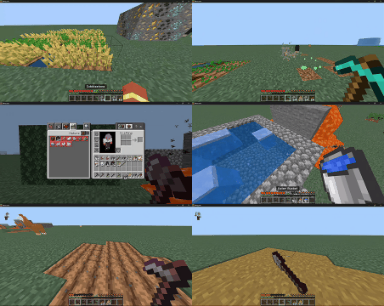
- Ore Vein Mining: Stand and mine with a pickaxe to break the entire connected ore vein instantly. Sneak while mining to break a single ore block.
- Tree Felling and Auto-Replanting: Stand and chop natural trees with an axe to fell the entire trunk and canopy. Saplings are automatically replanted at the base. Sneak to chop a single log block.
- House Protection: Natural tree detection ensures wooden houses, planks, stairs, and glass structures are never accidentally veined.
- Shears Vein: Sneak while using shears to vein harvest leaves, cobwebs, vines, and tall plants as inventory blocks.
- Liquid Collection: Sneak with an empty bucket on water or lava to collect the connected liquid pool across available buckets.
- Area Tilling and Paths: Sneak with a hoe to till connected dirt into farmland. Sneak with a shovel to flatten connected paths into dirt path blocks.
- Smart Crop Harvesting: Harvest mature crops with right-click or normal break to collect yields and automatically replant fresh seeds immediately.
- Automatic Double Doors: Opening one door automatically synchronizes and opens the adjacent matching door.
- Safety Liquid Sealing: Mining near hidden lava or water pockets automatically uses spare cobblestone in your inventory to plug dangerous leaks.
- Durability and Hunger Safety: Mining halts automatically when tool durability drops below safe thresholds or when your hunger bar is too low.
How to Install
- Download the .mcaddon file.
- Open the file to import both Behavior Pack and Resource Pack into Minecraft.
- Activate both packs in your world settings.
Support
Ko-fi: https://ko-fi.com/toancao YouTube: https://www.youtube.com/@toancaomc Discord: https://discord.gg/9rch87H9yM CurseForge: https://www.curseforge.com/members/toancao/projects
- Edition: Minecraft Bedrock
- File type: .mcpack or .mcaddon
- Minecraft version listed: 26.40
- How to install: Download the .mcpack or .mcaddon file. → Open it — Minecraft imports it. → In your world: Behavior Packs → Available → Activate, then the same under Resource Packs.
- Where to get it: Opens on CurseForge — not every file is mirrored on our own servers.
Install steps are the general flow for this file type — How to install Minecraft Bedrock addons & mods walks through it step by step.
- Pack type: .mcaddon — behaviour and resource pack in one file
- Download size: 1.6 MB
- Download link checked 15 Sept 2026 — working
These come from our own check of the pack file, not from the source page.