
Connecto
Java mod listed for Minecraft 1.20–26.x. Downloads from the MC Java Mods app on Android.
Allows whitelisted usernames to join"online-mode: true" servers without a premium account. Make your free servers 7/24 with uptime bot features. with…
⬇ Download on Modrinth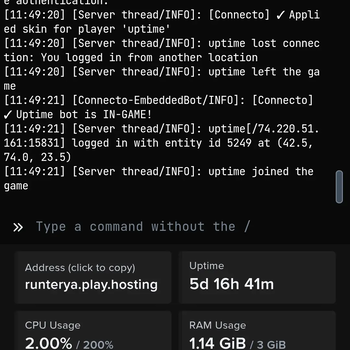
A server side mod which allows "offline" accounts to join "online" servers by bypassing Mojang session verification for whitelisted usernames in the connecto config. Also the mod disabled by default in order to block unwanted connections.
AI used to make this mod.
install the mod on the server and start and stop the server. this will generate the config file.
then edit connecto config accourdingly to your offline username and enable.
after that start your server again. you can connect with all online accounts and whitelisted offline accounts.
you can also manage the mod in-game using /connecto commands (requires op) like /connecto status, /connecto reload, and /connecto whitelist add/remove.
the mod also supports skin fetching for offline players. enable fetchOfflineSkins to automatically get official mojang skins for offline players. if a player doesn't have a mojang skin or if you want a fallback skin for everyone, set defaultOfflineSkinUser to any minecraft username (e.g. defaultOfflineSkinUser=Notch). the default skin is pre-fetched on server start so it doesn't cause any lag when players join.
this mod can be used to bypass free server hostings "active player" limit to not stop the server without needing minecraft another account. also you can use this with mineflayer to connect even without opening offline minecraft instance. the mineflayer bot is available on github as bot.js.
you now can use this mod to make your free servers 7/24 with an uptime bot. The bot is not a real player and not even visible to anyone. enable "uptimeBot" in config. you can set uptimeBotMode to "ALWAYS" (bot stays 24/7) or "SMART" (bot connects only when 0 real players are online and leaves when someone joins). you can customize uptime bot name. also if your hesting service has strict restrictions about the uptime bots there are plenty of settings in config to make it work.
Config for Play.Hosting enabled=true
whitelist=
whitelistPrefix=
fetchOfflineSkins=true
defaultOfflineSkinUser=
uptimeBot=true
uptimeBotMode=ALWAYS
uptimeBotName=uptime
reconnectDelaySeconds=5
botConnectIp=example.play.hosting
botConnectPort=25565
relayProxy=true
relayProxyUrl=connectorelay.onrender.com
securityAlerts=true
if you want you can host your own ConnectoRelay Proxy server. please check: https://github.com/Runteryaa/Connecto/wiki/Relay-Proxy
you probably can use this config for every server hosting with limbo- Edition: Minecraft Java
- File type: .jar
- Minecraft versions listed: 1.20.2, 1.20.3, 1.20.4
- How to install: Install the matching mod loader (Forge, Fabric or NeoForge) for your Minecraft version. → Download the .jar. → Put it in the .minecraft/mods folder and launch that loader profile.
- Where to get it: Opens on Modrinth — not every file is mirrored on our own servers.
Install steps are the general flow for this file type — How to install Minecraft Java mods & modpacks walks through it step by step.
- Ships as connecto-1.3.1.jar — drop this file into the mods folder
- Download size: 40 KB
- Download link checked 6 Oct 2026 — working
These come from our own check of the pack file, not from the source page.