
Pulsar
Pulsar is an async lighting engine for CleanroomLoader. It reimplements Starlight-style lighting algorithms for 1.12.2 and moves most server-side block-light and sky-light propagation off the main server thread.
Unlike vanilla and Alfheim, Pulsar performs most propagation work on dedicated worker threads. Its goal is to provide an actively developed Cleanroom-native alternative to lighting engines such as Alfheim and Phosphor.
Requirements
Features
Pulsar is designed to reduce server-thread stalls when lighting has a large amount of work to resolve, such as during chunk generation, explosions, large building-tool operations, or machine-driven block changes.
- Runs server-side block-light and sky-light propagation on dedicated worker threads.
- Batches large groups of block changes instead of lighting every edit separately.
- Stores completed Pulsar light data in each chunk's NBT, avoiding unnecessary full relights when valid cached chunks are loaded again.
- Keeps Minecraft's standard block-light and sky-light data synchronized, so the additional Pulsar cache can be discarded safely if Pulsar is removed.
- Fixes vanilla propagation and rendering problems involving stairs, slabs, liquids, emissive blocks, paintings, empty sections, and chunk borders.
The largest gains appear under heavy lighting load. At lighter loads, Pulsar's main benefit is lower light-update latency rather than higher TPS.
Fixed Vanilla Issues
Pulsar includes fixes for the following vanilla lighting and rendering issues:
- MC-92
- MC-1531 — smooth lighting across painting tile boundaries. Only paintings are covered; item frames are not.
- MC-3329
- MC-80966
- MC-104532
- MC-116690
- MC-117067
- MC-117094
- MC-249343
Compatibility
Pulsar should work with most biome, cave, world-generation, and dimension mods that use Minecraft's standard chunk and world APIs. Please report combinations that do not work as expected.
Supported integrations
- Celeritas, including face-aware lighting for stairs and slabs.
- Fluidlogged API, including the opacity and emission of fluids stored inside fluidlogged blocks.
- Depths Update, including dimensions that extend below Y=0 or above Y=255.
- [JSON Paintings]
Incompatible
- Alfheim
- Phosphor for Forge
- Hesperus
- Any other mod that replaces or rewrites the lighting engine
- The standard edition of The Aether II, which bundles Phosphor. Use The Aether II: Phosphor Not Included instead.
Unsupported or untested
- CubicChunks is unsupported because it uses a different world-storage model.
- OptiFine is untested and is not currently recommended with Pulsar.
Performance
In controlled tests, Pulsar 0.3.0 achieved lower median lighting-update times than Alfheim 1.6 in all four tested workloads, with the largest gains in skylight updates.
Results depend on your hardware and workload. These improvements do not translate directly into higher FPS or TPS.
Light-update benchmark — Pulsar 0.3.0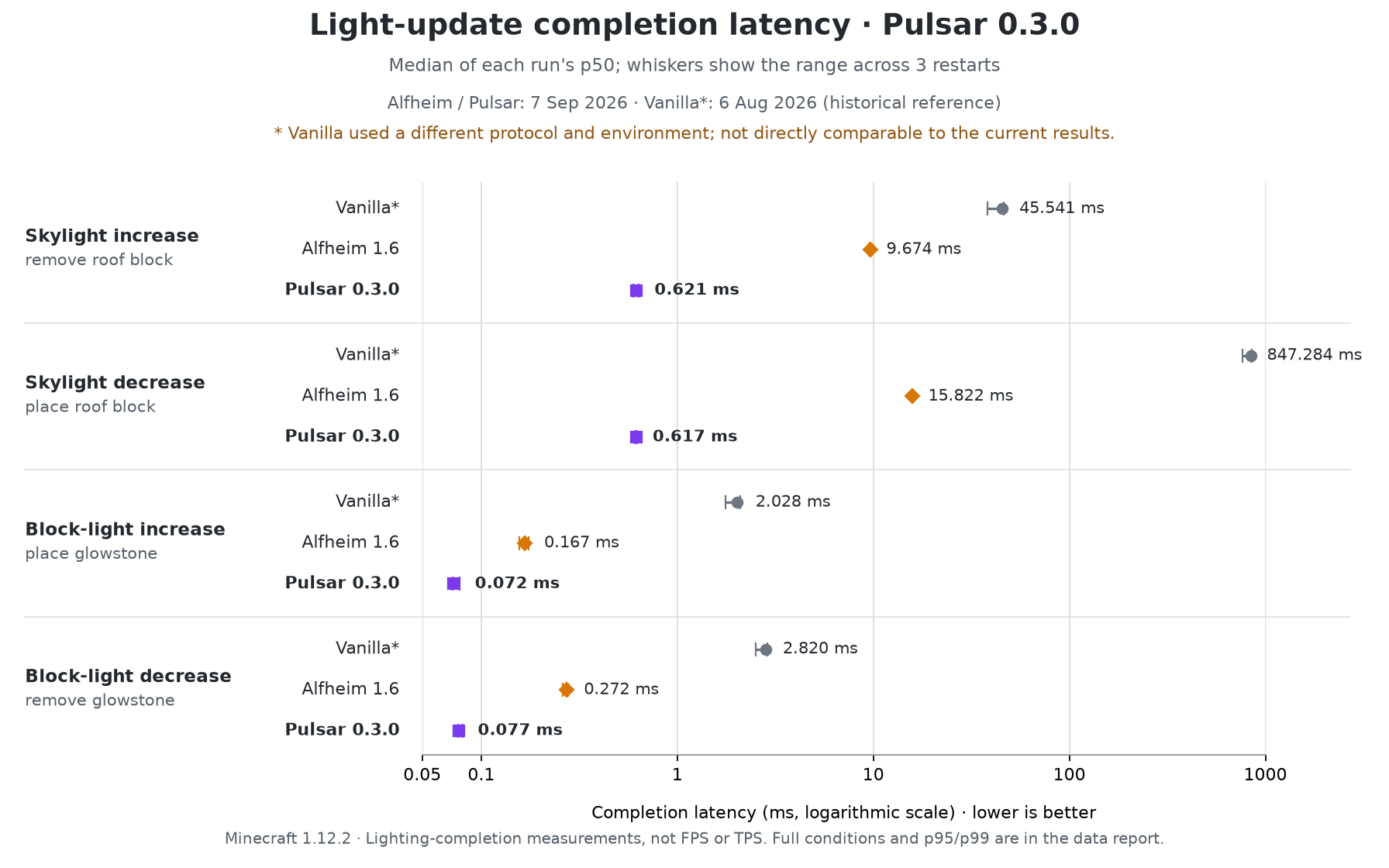
Lower is better. Markers show the median of three run medians; horizontal lines show their range. Each update was timed until lighting completed.
Vanilla shows older measurements under different conditions, provided for reference only.*
Chunk-generation benchmark — historical resultsThis benchmark used Pulsar 0.1.0, not 0.3.0.
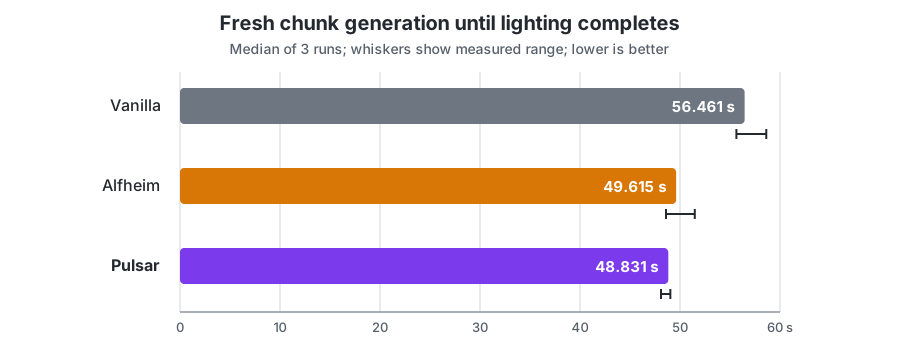
The previous 10,404-chunk test recorded median totals of 48.831 s for Pulsar, 49.615 s for Alfheim, and 56.461 s for Vanilla. This includes terrain generation and lighting.
No new generation-speed comparison is published for 0.3.0 because the latest runs produced differing terrain and lighting results.
Measurement details and raw data
Credits
- Starlight by Spottedleaf, for the architecture and core algorithms on which Pulsar is based
- SuperNova by GTNewHorizons, a Minecraft 1.7.10 port of Starlight that served as the basis for early versions of Pulsar
- Alfheim by Red Studio, as a reference for fixing MC-92
- CleanroomModTemplate by CleanroomMC
- Edition: Minecraft Java
- File type: .jar
- Minecraft version listed: 1.12.2
- How to install: Install the matching mod loader (Forge, Fabric or NeoForge) for your Minecraft version. → Download the .jar. → Put it in the .minecraft/mods folder and launch that loader profile.
- Where to get it: Opens on Modrinth — not every file is mirrored on our own servers.
Install steps are the general flow for this file type — How to install Minecraft Java mods & modpacks walks through it step by step.
- Ships as pulsar-0.3.1.jar — drop this file into the mods folder
- Download size: 162 KB
- Download link checked 16 Sept 2026 — working
These come from our own check of the pack file, not from the source page.