
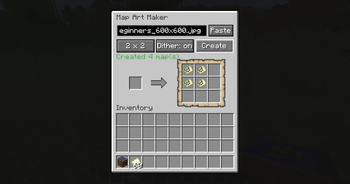
Paste an image link, or drop a picture file onto the block, and get vanilla map art you can craft and place like any other map.
Vanilla maps only ever show terrain. This adds a craftable block that turns any picture into a locked filled map, ready to frame on a wall — either alone or as part of a larger grid for a mural. No admin permissions, no launcher plugin: it's a block and a recipe, built for survival.
Features
- Paste an image URL, or drag a local image file onto the block's screen — both work
- Build 1x1 up to 3x3 grids (up to 9 maps) for larger murals
- Toggle dithering on or off before creating
- Consumes empty maps from your inventory, one per output tile
- The block accepts empty maps from the top or sides and lets a hopper pull finished maps from below, so bulk runs don't need to be babysat
- Finished maps are locked, the same mechanism vanilla uses when you lock a map with glass at a cartography table, so walking around the world with one in hand never overwrites it back into real terrain
- Multiplayer-safe: finished maps are stored server-side, so every player who picks one up sees the same picture
How to use
- Craft a Map Art Maker block (3 sticks, 5 planks, 1 empty map — cartography-table shaped).
- Place empty maps in the input, then either paste an image URL or drop an image file onto the screen.
- Pick a grid size (1x1 to 3x3) and hit Create. Take the finished maps out, or let a hopper do it.
For server admins
When a URL is used, the server is the one that fetches it, so loopback, LAN, and cloud metadata addresses are refused out of the box — a player can't point the machine at your internal network. A config option opens that up if you deliberately host images somewhere private the server should reach.
Not in this version
- No clipboard image paste — only a typed/pasted URL or a dropped file work
- Dithering is a fixed algorithm you switch on or off, not a choice of algorithms
- No automatic item frame placement — you place the finished maps yourself
- No editing or deleting map art after it's created
- No Create contraption integration
No other mods are required.
Bugs and questions: comment on the CurseForge page, or DM @kuronami333 on X.
All Rights Reserved. Free to put in any modpack, on any platform, monetised or not - no permission needed, no credit required. Source is published so you can read exactly what it does: https://github.com/KURONAMI333/map-art-maker
- Edition: Minecraft Java
- File type: .jar
- Minecraft version listed: 26.2
- How to install: Install the matching mod loader (Forge, Fabric or NeoForge) for your Minecraft version. → Download the .jar. → Put it in the .minecraft/mods folder and launch that loader profile.
- Where to get it: Opens on Modrinth — not every file is mirrored on our own servers.
Install steps are the general flow for this file type — How to install Minecraft Java mods & modpacks walks through it step by step.
- Ships as map_art_maker-1.0.0+neoforge-26.2.jar — drop this file into the mods folder
- Download size: 108 KB
- Download link checked 16 Sept 2026 — working
These come from our own check of the pack file, not from the source page.