
SyncCurseCraft
Java mod listed for Minecraft 1.21. Downloads from the MC Java Mods app on Android.
⬇ Download on Modrinth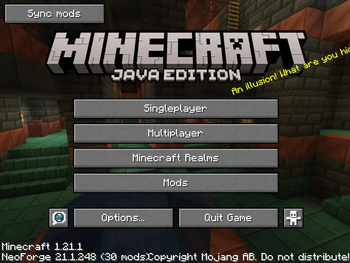
SyncCurseCraft
Your players' mods folder, always matching the server's. No extra ports, no web server, no launcher.
You add a mod to your server. Your friends connect and get kicked for a mismatch, so you paste a download link in the chat, and someone installs the wrong version anyway. SyncCurseCraft removes that whole conversation: the server publishes its mod list, the client compares it against /mods/, and one button fixes the difference.
Why it works where other tools don't
Everything travels over the normal Minecraft port. There is no second HTTP server and no second port to open.
That matters if you rent a server. Hosts like BisectHosting, Aternos or Shockbyte give you port 25565 and nothing else, which rules out every sync tool that expects to serve files over HTTP. SyncCurseCraft rides along with the Server List Ping — the same response your client already reads to show the MOTD and the player count. Your players see the mod list before connecting, without joining and without a login.
The .jar files themselves come straight from the Moddrinth or CurseForge CDNs. Your server never uploads a single mod file, so a 400 MB pack costs it no bandwidth at all.
For players
- Start the game. There is a Sync mods button at the top left of the main menu and the server list. A green dot means the server's list changed.
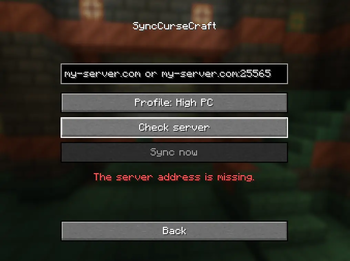
- Type the server address, press Check server.
- Pick your profile:
- Low PC — only the mods the server requires.
- High PC — the required mods plus the client-side extras: shaders, minimap, ambient sound, whatever your admin put there.
- Sync now, then Quit to apply.
- Open the game again. Done.
You always see the full list of what will be installed and what will be removed before anything happens, and the list scrolls if it is long.
For admins
The server creates config/synccursecraft/packs/ with two folders:
LowPC/     required mods, every player gets them
HighPC/    the full High PC profile; anything here and not in LowPC
           becomes an optional client-side mod
Drop your .jar files in and restart, or run /scc generate. Each file is identified on CurseForge by fingerprint, and the manifest is written for you with mod id, hash, size and download URL. Your files are never moved or deleted — those folders are yours.
/scc generate    rebuild the manifest from the pack folders
/scc reload      reload the manifest without restarting
/scc status      show what is being announced, plus any warnings
It also validates the pack for you. If a mod needs a dependency you forgot, the console says so at generation time instead of your players finding out by crashing.
What it will never touch
This is the rule the whole mod is built around, and it is not negotiable:
Only .jar files inside /mods/, and only the ones it installed itself.
Your config/ folder, options.txt, keybinds, shader packs, resource packs, saves and any mod you installed yourself are all left completely alone. There is exactly one exception, and it is shown on screen before it happens: if you have a different version of a mod the server requires, that one is removed — the game will not start with two versions of the same mod loaded.
Security
- Downloads are restricted to a hard-coded allowlist: Moddrinth or
.forgecdn.netand No other host is reachable, whatever a manifest claims. - Every file is verified by SHA-1 and byte size before it is installed. A mismatch and it is discarded, leaving nothing behind.
- File names are validated against path traversal.
- Downloads land in a staging folder and are only moved into
/mods/on the next restart, so a half-finished sync can never leave you with a broken game. - Your CurseForge API key stays on the server. It is deliberately not stored in a NeoForge server config, because those get synced to every client that connects.
Performance
Every download, hash and disk write runs off the render thread. The game does not freeze while it syncs.
Installation
Client — both jars in .minecraft/mods:
| File | What it is |
|---|---|
synccursecraft-<version>.jar |
the mod |
synccursecraft-bootstrap-<version>.jar |
the early boot service |
You need both. They ship separately because NeoForge will not let one jar be an early boot service and a mod at the same time — with the service inside the main jar, the mod does not load at all. If you install through the CurseForge app the second one comes along automatically as a dependency.
Without the bootstrap jar the mod still runs, but it can only add mods, never update or remove ones already loaded. The sync screen warns you if it is missing.
Server — only synccursecraft-<version>.jar in the server's mods folder.
Requirements
Minecraft 1.21.1 · NeoForge 21.1.x · Java 21
No other mods required. No external libraries, nothing shaded in.
Known limits
Some mods need another mod without declaring it anywhere — not in their metadata, not in the Moddrinth API. Iris and Sodium are the known case: if your pack uses Iris, add Sodium to your pack folders by hand. No automatic check can catch that one.
SyncCurseCraft cannot update itself. Putting its own jars in the pack folders is refused on purpose, with a warning in the console. When a new version comes out, tell your players to replace both jars.
Licence: CC BY-NC-SA 4.0 · by el_this_boy
- Edition: Minecraft Java
- File type: .jar
- Minecraft version listed: 1.21.1
- How to install: Install the matching mod loader (Forge, Fabric or NeoForge) for your Minecraft version. → Download the .jar. → Put it in the .minecraft/mods folder and launch that loader profile.
- Where to get it: Opens on Modrinth — not every file is mirrored on our own servers.
Install steps are the general flow for this file type — How to install Minecraft Java mods & modpacks walks through it step by step.
- Ships as synccursecraft-1.21.1-0.1.2.jar — drop this file into the mods folder
- Download size: 159 KB
- Download link checked 6 Oct 2026 — working
These come from our own check of the pack file, not from the source page.