
ModsJava
Gomoku
Java mod listed for Minecraft 1.20. Downloads from the MC Java Mods app on Android.
This is a Paper plugin for Gomoku (five-in-a-row) battles. It supports multiplayer, but currently it is only compatible with version 1.20.4.
⬇ Download on Modrinth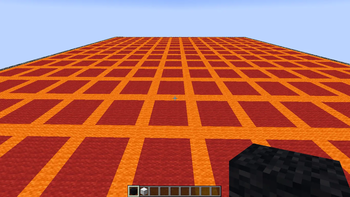
Gomoku (五子棋) is a Minecraft minigame plugin for Paper 1.20.4. Players compete in a classic five-in-a-row board game on custom-built boards inside per-room void worlds.
Features
- Per-room void worlds with async batched board generation — no main-thread stalls
- Wool border preview system (async, chunk-safe)
- 5-in-a-row win detection, turn timer (10s fast phase for first 5 moves, configurable thereafter)
- Player stats: wins / losses / draws / score / win rate / level
- Bilingual: Chinese (zh_cn) and English (en)
- PlaceholderAPI expansion for TAB, scoreboards, holograms, etc.
- Multiverse-Core compatible for world management
- Redstone item to cancel matchmaking, spectator mode
Setup Flow
/gomoku setlobby— Set the main lobby (required before any other command)/gomoku add <room>— Create a void world + room/gomoku playerspawn— Set player spawn point (inside the room world)/gomoku admin dish <size>— Show wool border preview where the board will be built/gomoku admin fill <line> <fill> <border>— Generate the board inside the border/gomoku admin check <black> <white>— Set chess piece names and materials (hotbar slots 0-1)/gomoku save <room>— Enable the room for players
Commands
Admin (gomoku.admin)
| Command | Description |
|---|---|
/gomoku setlobby |
Set lobby spawn at your location |
/gomoku add <room> |
Create a new room with its own void world |
/gomoku build <room> |
Enter room edit mode (teleport, disable room) |
/gomoku admin dish <size> |
Wool border preview (gap=3, async chunk-safe) |
/gomoku admin fill <line> <fill> <border> |
Build board inside the preview border (async batched) |
/gomoku admin check <black> <white> |
Set piece names + read materials from hotbar slots 0-1 |
/gomoku admin back |
Undo last board build |
/gomoku playerspawn |
Set player spawn point (must be in room world) |
/gomoku save <room> |
Enable the room for players (must be in room world) |
/gomoku clear <room> |
Delete room and its world backup |
/gomoku reload |
Hot-reload language, rooms, lobby, stats |
Guards
| Rule | Description |
|---|---|
| Lobby required | All commands except setlobby require lobby to be set first |
| No lobby build | add/build cannot target the lobby world |
| No lobby admin | admin subcommands cannot be used in the lobby world |
| No lobby spawn | playerspawn cannot be used in the lobby world |
| No lobby clear | clear cannot delete the lobby world |
| Save in-room | save must be used inside the room's own world |
| Add after save | If standing in an unsaved room world, save it before adding another |
Player (gomoku.use, default true)
| Command | Description |
|---|---|
/gomoku join <room> |
Join a room |
/gomoku join auto |
Auto-match (priority: waiting rooms > idle rooms) |
/gomoku leave |
Leave current game |
/gomoku stats [player] |
View stats |
Permissions
| Permission | Default | Description |
|---|---|---|
gomoku.admin |
OP | All admin commands |
gomoku.use |
true | Player commands |
PlaceholderAPI
Player placeholders
| Placeholder | Example | Description |
|---|---|---|
%gomoku_room% |
a / — |
Current room name |
%gomoku_state% |
WAITING PLAYING ENDED |
Game state |
%gomoku_opponent% |
xiao_ewsyk / — |
Opponent name |
%gomoku_color% |
Black White Spectating |
Your role |
%gomoku_turn% |
xiao_ewsyk / — |
Whose turn it is |
%gomoku_board_size% |
15 / — |
Board dimensions |
%gomoku_move_count% |
12 / — |
Stones placed |
%gomoku_wins% |
5 |
Total wins |
%gomoku_losses% |
2 |
Total losses |
%gomoku_draws% |
1 |
Total draws |
%gomoku_total_games% |
8 |
Total games played |
%gomoku_winrate% |
62.5% |
Win rate |
%gomoku_score% |
16 |
Score (win +3, draw +1) |
%gomoku_level% |
1 |
Player level |
Server placeholders
| Placeholder | Example | Description |
|---|---|---|
%gomoku_room_count% |
3 |
Total rooms |
%gomoku_enabled_room_count% |
2 |
Enabled rooms |
%gomoku_player_count% |
4 |
Players in games |
Dependencies
- Required: Paper 1.20.4+
- Optional: Multiverse-Core (world management)
- Optional: PlaceholderAPI (TAB / HUD / scoreboard integration)
Links
- Bilibili
- QQ群: 1035560684
License
All Rights Reserved. See LICENSE.txt included in the jar.
Quick facts
- Edition: Minecraft Java
- File type: .jar
- Minecraft version listed: 1.20.4
- How to install: Install the matching mod loader (Forge, Fabric or NeoForge) for your Minecraft version. → Download the .jar. → Put it in the .minecraft/mods folder and launch that loader profile.
- Where to get it: Opens on Modrinth — not every file is mirrored on our own servers.
Install steps are the general flow for this file type — How to install Minecraft Java mods & modpacks walks through it step by step.
File checked by MCModsHub
- Ships as Gomoku-1.0.2.jar — drop this file into the mods folder
- Download size: 90 KB
- Download link checked 6 Oct 2026 — working
These come from our own check of the pack file, not from the source page.