
Command-MCP
Java mod listed for Minecraft 1.20. Downloads from the MC Java Mods app on Android.
Expose your Minecraft server as an MCP (Model Context Protocol) server, letting AI assistants like Claude operate your server remotely — search and run…
⬇ Download on Modrinth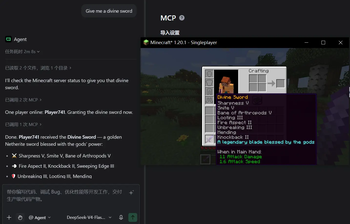
Command MCP
Expose your Minecraft server as an MCP (Model Context Protocol) server, so AI assistants such as Claude can operate your server remotely: search and run commands, use in-game Tab completion, and build datapacks — all through a standard MCP client.
Built for Fabric with zero additional dependencies: the MCP server uses Streamable HTTP transport (POST/GET/DELETE /mcp) with JSON-RPC 2.0, implemented on the JDK's built-in HttpServer and Minecraft's bundled Gson.
Features
- Command access — search registered commands (vanilla and mods), execute commands as console (OP level 4) on the server main thread with captured output, run read-only queries, and get Tab-completion suggestions that match in-game behavior.
- Datapack workflow — inspect server info (version,
pack_format, directory layout), list datapacks, read/write/delete datapack files, and reload with full error reporting (.mcfunction syntax errors, JSON errors, incompatiblepack_format). - Session management —
Mcp-Session-Idbased sessions with idle timeout, SSE keepalive streams, and optionalAuthorization: Bearertoken auth. - In-game awareness — chat notifications when an AI client connects or disconnects.
- Safe defaults — binds to
127.0.0.1only; datapack file writes can be disabled.
Requirements
- Minecraft
1.20.1 - Fabric Loader
>= 0.19.3 - Fabric API
- Java
>= 17
Getting Started
- Drop the mod jar into your
modsfolder and start the game/server. - The MCP server starts automatically:
- Dedicated servers: enabled by default.
- Single-player / client: disabled by default; set
enabled=truein the config to turn it on.
- Point your MCP client at
http://127.0.0.1:8123/mcp(Streamable HTTP).
Example Claude Desktop configuration:
{
  "mcpServers": {
    "minecraft": {
      "type": "http",
      "url": "http://127.0.0.1:8123/mcp",
      "headers": {
        "Authorization": "Bearer <your-token>"
      }
    }
  }
}
Configuration
Config file: config/command-mcp.properties (created with defaults on first launch).
| Option | Default | Description |
|---|---|---|
enabled |
true on dedicated servers, false in client environments |
Whether the MCP HTTP server starts with the game. |
host |
127.0.0.1 |
Bind address. Keep 127.0.0.1 unless you know what you are doing. |
port |
8123 |
Bind port (0 = system-assigned). |
authToken |
(empty) | When non-empty, requests must send Authorization: Bearer <token> or X-Auth-Token: <token>. |
datapackWrite |
true |
Allow write_datapack_file / delete_datapack_file to modify the world's datapacks folder. |
MCP Tools
| Tool | Description |
|---|---|
list_commands |
Search registered commands by name/alias/help text; returns usage templates. |
execute_command |
Execute a command as console (OP level 4) and return captured output. |
query_command |
Run a read-only query command (/list, /time query daytime, /data get, ...). |
get_command_completions |
Tab-completion suggestions for a partial command, matching in-game behavior. |
get_server_info |
Minecraft version, pack_format, datapack directory layout, loaded mods. |
list_datapacks |
Datapacks in the world folder: type, enabled state, provided namespaces. |
read_datapack_file |
Read a UTF-8 text file inside the world's datapacks folder. |
write_datapack_file |
Create/overwrite a datapack file; auto-creates pack.mcmeta and parent directories. |
delete_datapack_file |
Delete a file/directory inside the datapacks folder. |
reload_datapacks |
Reload datapacks and wait, then report success or captured errors/warnings. |
Security Notes
- The server executes commands at OP level 4 — treat MCP access as full server access.
- By default the server only listens on
127.0.0.1. If you expose it over a network, always set anauthToken. - Set
datapackWrite=falseto keep the datapack tools read-only.
Development
./gradlew build
The built jar lands in build/libs/.
License
Released under the GPL-3.0 license. If you use this code in your project, your project must also be open-sourced under a compatible license.
- Edition: Minecraft Java
- File type: .jar
- Minecraft version listed: 1.20.1
- How to install: Install the matching mod loader (Forge, Fabric or NeoForge) for your Minecraft version. → Download the .jar. → Put it in the .minecraft/mods folder and launch that loader profile.
- Where to get it: Opens on Modrinth — not every file is mirrored on our own servers.
Install steps are the general flow for this file type — How to install Minecraft Java mods & modpacks walks through it step by step.
- Ships as command-mcp-1.0.0.jar — drop this file into the mods folder
- Download size: 79 KB
- Download link checked 7 Oct 2026 — working
These come from our own check of the pack file, not from the source page.