
J4mc
j4mc lets you open your singleplayer world to friends without port forwarding. Open your world to LAN, wait a moment, and the mod gives you a public…
⬇ Download on Modrinth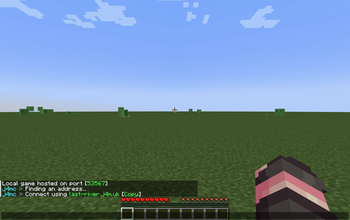
j4mc
j4mc lets you open your singleplayer world to friends without port forwarding.
Open your world to LAN, wait a moment, and j4mc gives you a public *.j4m.uk address that your friends can join through.
Features
- Public
*.j4m.ukaddress for LAN worlds - Works through the j4mc relay backend
- Clickable copy button for the connection address
- Localized messages: English, Russian
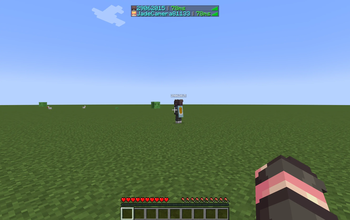
- Ping display in the player list
- Host notification when a player joins through j4mc
How It Works
- Install j4mc.
- Open a singleplayer world.
- Click Open to LAN.
- Wait for j4mc to assign an address.
- Send the ip address to your friends.
Remote server disclosure
j4mc connects to the j4m.uk relay backend when you open a singleplayer world to LAN. The relay assigns a public *.j4m.uk address and forwards Minecraft TCP traffic between your LAN world and players joining through that address.
The relay may process the requested hostname, LAN port, Minecraft account name provided by the client, connection metadata, and tunnel traffic needed to route the connection. The tunnel closes when the LAN world is closed or the client disconnects.
j4mc на русском
j4mc позволяет открыть одиночный мир для друзей без проброса портов.
Открой мир для сети, подожди немного, и j4mc выдаст публичный адрес *.j4m.uk, по которому друзья смогут подключиться.
Возможности
- Публичный адрес
*.j4m.ukдля LAN-миров - Работа через backend-релей j4mc
- Кликабельная кнопка копирования адреса
- Локализация сообщений: русский, английский
- Отображение пинга в списке игроков
- Уведомление создателю, когда игрок заходит через j4mc
- Более короткие адреса, в отличии от e4mc
Как использовать
- Установи j4mc.
- Открой одиночный мир.
- Нажми Открыть для сети.
- Подожди, пока j4mc выдаст адрес.
- Отправь полученный адрес друзьям.
- Edition: Minecraft Java
- File type: .jar
- Minecraft version listed: 26.2
- How to install: Install the matching mod loader (Forge, Fabric or NeoForge) for your Minecraft version. → Download the .jar. → Put it in the .minecraft/mods folder and launch that loader profile.
- Where to get it: Opens on Modrinth — not every file is mirrored on our own servers.
Install steps are the general flow for this file type — How to install Minecraft Java mods & modpacks walks through it step by step.
- Ships as j4mc-forge-26.2-0.1.3.jar — drop this file into the mods folder
- Download size: 968 KB
- Download link checked 17 Sept 2026 — working
These come from our own check of the pack file, not from the source page.