
Craft Goal
Java mod listed for Minecraft 26.x. Downloads from the MC Java Mods app on Android.
⬇ Download on Modrinth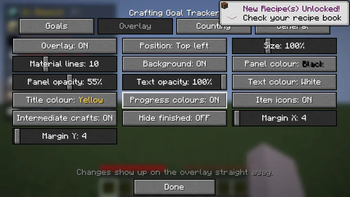
Crafting Goal Tracker automatically calculates the materials needed to craft an item and tracks your progress while you play.
Choose an item, set the amount you want, and the mod shows exactly what you already have and what you still need.
Features
- Set any craftable item as a goal
- Choose the amount you want to craft
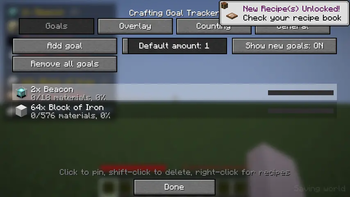
- Track multiple goals at once
- Calculate required materials automatically
- Break down multi-step recipes
- Show missing and completed materials
- Show intermediate crafting steps
- Update progress in real time
Material Tracking
The mod can count materials from:
- Player inventory
- Shulker Boxes
- Open containers
- Bookmarked storage containers
Bookmarked containers allow their stored items to be included in your crafting progress.
Automatic container bookmarking can also be enabled.
Recipe Tracking
Crafting Goal Tracker follows recipe chains automatically:
Target Item → Components → Raw Materials
If a required component also needs to be crafted, the mod can break down its recipe and calculate the materials needed for it.
You can control recipe depth and mark specific items as raw materials to stop them from being expanded further.
If an item has multiple recipes, you can switch between available crafting options.
HUD
Active goals can be displayed directly on your screen.
The HUD can show:
- Required materials
- Current amounts
- Missing amounts
- Completed materials
- Intermediate crafting steps
- Item icons
- Overall progress
The HUD position, size, colors, opacity and number of displayed materials can be customized.
Recipe Support
Recipes can be loaded from:
- Minecraft Recipe Book
- EMI
- REI
- JEI
EMI, REI and JEI are optional.
Languages
- English
- Turkish
Requirements
- Minecraft 26.1–26.2
- Fabric Loader 0.19.0+
- Fabric API
- Java 25
Crafting Goal Tracker is a client-side Fabric mod.
- Edition: Minecraft Java
- File type: .jar
- Minecraft versions listed: 26.1, 26.1.1, 26.1.2
- How to install: Install the matching mod loader (Forge, Fabric or NeoForge) for your Minecraft version. → Download the .jar. → Put it in the .minecraft/mods folder and launch that loader profile.
- Where to get it: Opens on Modrinth — not every file is mirrored on our own servers.
Install steps are the general flow for this file type — How to install Minecraft Java mods & modpacks walks through it step by step.
- Ships as craftgoal-1.0.0.jar — drop this file into the mods folder
- Download size: 115 KB
- Download link checked 7 Oct 2026 — working
These come from our own check of the pack file, not from the source page.