
Roleta Noturna
Every Minecraft night becomes an unpredictable survival challenge.
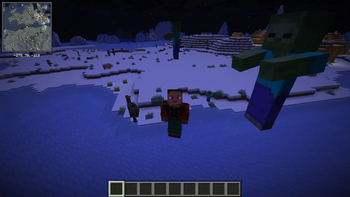
Roleta Noturna assigns a random difficulty level from 1 to 10 at sunset. During the night, procedural waves can summon hostile creatures around each player in the Overworld. Any registered monster can be selected, including creatures added by other mods, mobs from other dimensions, and configurable bosses.
Features
- Random night difficulty from level 1 to 10.
- Procedural waves that continue as players explore new 128-block regions.
- Natural and newly loaded hostile mobs receive the current night's level.
- Health, damage, movement speed, armor, experience, and rewards scale with difficulty.
- Five reward tiers, with special rewards at level 10.
- Configurable boss list, spawn chances, limits, distances, wave interval, and difficulty scaling.
- Brazilian Portuguese and English translations.
- Works in single-player and on dedicated servers.
Default behavior
- One wave attempt every 40 seconds, with a 70% chance for each player.
- Between 1 and 3 extra mobs per successful wave.
- Up to 12 extra mobs per player in each explored 128-block region, reset at dawn.
- Spawns occur between 24 and 48 blocks from the player.
- Bosses have a separate 4% chance and a default limit of one per night.
Previously exhausted regions remain tracked until dawn, preventing players from walking back and forth to create unlimited mobs.
Installation
- Install NeoForge for your Minecraft version.
- Download only the Roleta Noturna file matching that exact Minecraft version.
- Place the JAR in the instance's
modsfolder. - Do not install the 26.1.2 and 26.2 files together.
The gameplay system runs on the logical server. Install the mod on the client for single-player, localized messages, and the in-game configuration screen.
Commands
/roletanoturna statusdisplays the current state and roulette pool sizes./roletanoturna sortearforces a roulette roll near the player and requires gamemaster permission.
Configuration
After the first launch, edit config/roleta_noturna-common.toml or open Mods > Roleta Noturna > Config.
Development disclosure
The project's code and publishing materials received substantial generative-AI assistance. The gameplay screenshot and cropped project icon are original, non-generative captures.
Português do Brasil
Cada noite do Minecraft se transforma em um desafio de sobrevivência imprevisível.
O Roleta Noturna sorteia uma dificuldade de 1 a 10 ao anoitecer. Durante a noite, ondas procedurais podem invocar criaturas hostis ao redor de cada jogador no Mundo Superior. Qualquer monstro registrado pode participar, incluindo criaturas adicionadas por outros mods, mobs de outras dimensões e chefes configuráveis.
Recursos
- Dificuldade noturna aleatória do nível 1 ao 10.
- Ondas procedurais que continuam conforme os jogadores exploram novas regiões de 128 blocos.
- Mobs hostis naturais e recém-carregados recebem o nível atual da noite.
- Vida, dano, velocidade, armadura, experiência e recompensas aumentam com a dificuldade.
- Cinco níveis de recompensas, com prêmios especiais no nível 10.
- Lista de chefes, chances, limites, distâncias, intervalo e escalonamento configuráveis.
- Traduções em português do Brasil e inglês.
- Funciona no modo de um jogador e em servidores dedicados.
Comportamento padrão
- Uma tentativa de onda a cada 40 segundos, com 70% de chance para cada jogador.
- De 1 a 3 mobs adicionais por onda bem-sucedida.
- Até 12 mobs adicionais por jogador em cada região explorada de 128 blocos, reiniciando ao amanhecer.
- Spawns entre 24 e 48 blocos do jogador.
- Chefes possuem chance separada de 4% e limite padrão de um por noite.
Regiões já esgotadas permanecem registradas até o amanhecer, impedindo que andar de um lado para o outro crie mobs ilimitados.
Instalação
- Instale o NeoForge correspondente à sua versão do Minecraft.
- Baixe somente o arquivo do Roleta Noturna correspondente à versão exata do Minecraft.
- Coloque o JAR na pasta
modsda instância. - Não instale os arquivos de 26.1.2 e 26.2 juntos.
O sistema funciona no servidor lógico. Instale o mod no cliente para jogar sozinho, receber as mensagens traduzidas e usar a tela de configuração dentro do jogo.
Comandos
/roletanoturna statusmostra o estado atual e o tamanho das listas do sorteio./roletanoturna sortearforça um sorteio perto do jogador e exige permissão de gamemaster.
Configuração
Depois da primeira inicialização, edite config/roleta_noturna-common.toml ou abra Mods > Roleta Noturna > Config.
Declaração de desenvolvimento
O código e os materiais de publicação do projeto receberam assistência substancial de IA generativa. A captura de gameplay e o ícone recortado são imagens originais, sem geração por IA.
- Edition: Minecraft Java
- File type: .jar
- Minecraft version listed: 26.1.2
- How to install: Install the matching mod loader (Forge, Fabric or NeoForge) for your Minecraft version. → Download the .jar. → Put it in the .minecraft/mods folder and launch that loader profile.
- Where to get it: Opens on Modrinth — not every file is mirrored on our own servers.
Install steps are the general flow for this file type — How to install Minecraft Java mods & modpacks walks through it step by step.
- Ships as roleta_noturna-26.1.2-1.2.1.jar — drop this file into the mods folder
- Download size: 345 KB
- Download link checked 17 Sept 2026 — working
These come from our own check of the pack file, not from the source page.