Unofficial Port | AppleSkin Add-On
Unofficial Bedrock port of AppleSkin: see saturation, exhaustion and the hunger and health any food will restore right on your HUD.
⬇ Download on CurseForge

AppleSkin - Bedrock Edition
AppleSkin is a vanilla-friendly mod originally created for Java Edition. This project is an unofficial Bedrock Edition port that brings AppleSkin's food HUD improvements to Bedrock: see your saturation, exhaustion and exactly how much hunger, saturation and health any food will restore before you eat it.

📜 Credits & Original Project
This addon is an unofficial port. It is not made, endorsed or supported by the original author. All credit for the original idea, design and mechanics goes to squeek502.
- Original project: AppleSkin by squeek502 (CurseForge)
- Original source code: github.com/squeek502/AppleSkin
- Original author: squeek502
- Bedrock port: developed by Lilium Studio.
Please report bugs of this port to Lilium Studio, not to the original AppleSkin author.
⚖️ License
The original AppleSkin is released under The Unlicense (public domain), which allows anyone to use, modify, port and redistribute it, with no restrictions. This port follows that license:
- The only asset taken from the original mod is its saturation overlay icon sheet (
icons.png), which is covered by the same public-domain license. - All the code is new: nothing from the Java source was copied; the mechanics were rewritten in JavaScript for Bedrock.
- The hunger and heart icons used in the HUD are Bedrock's own vanilla textures.
🔄 How This Port Differs From the Original
AppleSkin is a Java Edition mod (Forge/Fabric/NeoForge). This is a Bedrock Edition addon written from scratch, so it works very differently under the hood and has some differences in behavior:
| Original AppleSkin (Java) | This port (Bedrock) | |
|---|---|---|
| Platform | Java Edition mod, needs a mod loader | Bedrock Edition addon (behavior + resource pack), no mod loader or experiments |
| Implementation | Java code that hooks into the game's rendering | Rewritten from scratch with the Script API (@minecraft/server) and JSON UI |
| Health estimate | Uses Java's regeneration rules | Recalculated for Bedrock's regeneration rules (1 saturation point per half heart) |
| Settings | Client config file / config screen | Per-player commands (/lsas:appleskin, /lsas:flashalpha, /lsas:appleskinreset), saved per player |
| Icon shake animation | Overlays shake together with vanilla icons | Overlays stay static (Bedrock doesn't expose the shake to addons) |
See Bedrock Limitations below for the full list of things that can't work exactly like the original.
✅ Features
- Saturation Overlay: Shows your current saturation level as a golden outline over the hunger bar.
- Exhaustion Underlay: Displays your food exhaustion as a progress bar behind the hunger bar, so you know when your next hunger or saturation point will drain.
- Hunger & Saturation Preview: While holding food, the hunger and saturation it would restore flash on your HUD.
- Estimated Health Restored: While holding food, the hearts you would regenerate flash on the health bar, calculated with Bedrock's regeneration rules (1 saturation point per half heart), including golden apple regeneration.
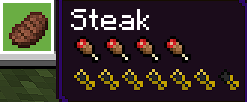
- Food Values in Tooltips: Hunger and saturation icons are added to the lore of food items.
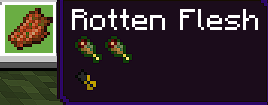
- Rotten Food Indicator: Foods with harmful effects (rotten flesh, spider eye, raw chicken, etc.) show green hunger icons.
- Custom Food Support: Any addon item using the
minecraft:foodcomponent is detected automatically. - Per-Player Settings: Every player can configure their own HUD with commands, just like AppleSkin's client config:
/lsas:appleskin [setting] [true|false]: list or toggle any overlay./lsas:flashalpha [0.0-1.0]: max opacity of the flashing icons./lsas:appleskinreset: restore default settings./lsas:foodstats: show your exact hunger, saturation and exhaustion values.
🖼️ Feature Showcase


🛠️ Addon Specifications (Bedrock)
This port has been optimized for the best possible compatibility and performance:
- No Experiments: Does not require any experimental toggles; it only uses the stable
@minecraft/server2.9.0 Script API. - Compatible Version: Works on version 1.26.0 and above.
- Maximum Compatibility: Does not modify
player.jsonor any vanilla entity. The HUD is added through JSON UI modifications without replacing vanilla elements. - Multiple UI Profiles: Works with both the Classic and Pocket (mobile) UI profiles.
- Scripting & Translations: Settings are saved per player, and all messages are translatable (English and Spanish included).
🎨 Compatibility
- Advanced Netherite: Fully compatible; both HUDs work at the same time.

⚠️ Bedrock Limitations
- Tooltips: Bedrock doesn't allow adding custom tooltip elements, so food values are shown as item lore. Food with lore may not stack with a freshly picked-up item until the lore is applied (a fraction of a second).
- Icon Animations: Vanilla shakes the heart and hunger icons randomly on the client, which addons can't read, so the overlays stay static instead of shaking with them.
- Health Estimate: Only shown on the first row of hearts (up to 20 max health).
- Flash Opacity:
/lsas:flashalphais rounded to the nearest of 5 levels (0.25, 0.45, 0.65, 0.85, 1.0).
Unofficial AppleSkin Bedrock Edition port by Lilium Studio | Original AppleSkin by squeek502
- Edition: Minecraft Bedrock
- File type: .mcpack or .mcaddon
- Minecraft versions listed: 26.0.02, 26.0, 26.3
- How to install: Download the .mcpack or .mcaddon file. → Open it — Minecraft imports it. → In your world: Behavior Packs → Available → Activate, then the same under Resource Packs.
- Where to get it: Opens on CurseForge — not every file is mirrored on our own servers.
Install steps are the general flow for this file type — How to install Minecraft Bedrock addons & mods walks through it step by step.
- Pack type: .mcaddon — behaviour and resource pack in one file
- Manifest requires Minecraft 1.26.0 or newer
- Complete pack — everything it depends on is inside the file
- Download size: 51 KB
- Download link checked 17 Sept 2026 — working
These come from our own check of the pack file, not from the source page.