Universal Camo Blocks
Transform your builds with versatile camo blocks, stairs, slabs, fences, walls, trapdoors, and powerful building tools.
⬇ Download on CurseForge
# Universal Camo
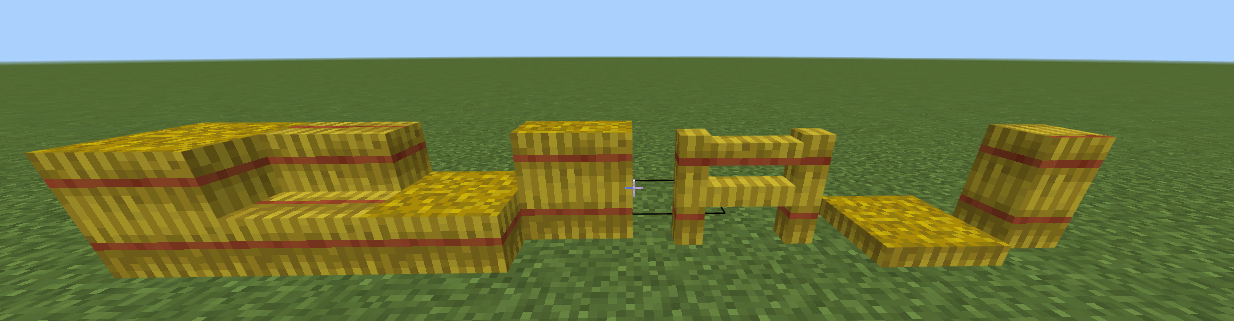
Universal Camo is a Minecraft Bedrock add-on by **kawEduh** that adds camouflage building blocks capable of copying the appearance of compatible vanilla blocks. The sampled block is not consumed.
[https://youtu.be/6Rx-_qgyBw4](YOUTUBE VIDEO!!!)
## Installation
1. Open `Universal_Camo_kawEduh_2.1.3.mcaddon` with Minecraft Bedrock.
2. Activate both the Behavior Pack and Resource Pack in the world.
3. Enter the world and use the Universal Camo Guide for in-game instructions.
The add-on requires Minecraft Bedrock 1.26.40 or newer and uses the stable Script API dependencies declared in its manifest.
## Camo blocks
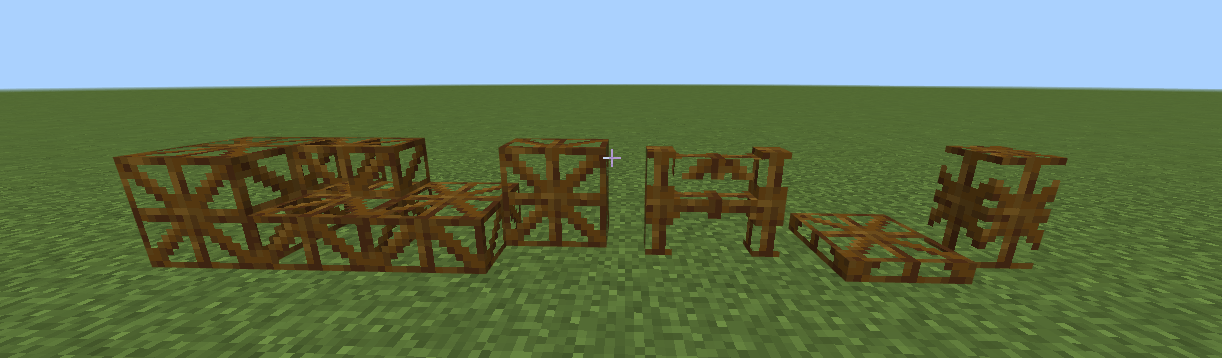
The add-on includes:
- Full camo block
- Passable camo block without collision
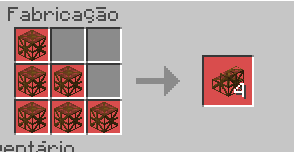
- Connected stairs with straight, inner-corner and outer-corner forms
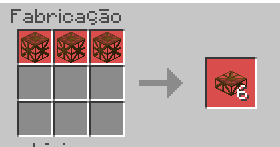
- Bottom, top and double slabs
- Vertical slabs for all four horizontal sides
- Rotatable and openable trapdoors
- Connected fences
- Connected walls
`[print de blocos camu]`
Stairs, vertical slabs, fences and walls have dedicated inventory models. These icon geometries do not change the blocks placed in the world.
## Copying and removing textures
Hold a compatible block and interact with a camo block to copy its appearance. Textures with different faces preserve the north, south, east, west, top and bottom mappings whenever those textures are available.
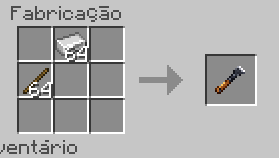
Use the Camo Scraper to remove the copied appearance. Looking at a textured camo block while holding the scraper displays particles around all eight corners.
## Transparency and light
- Glass materials use `blend` and glass-only culling rules.
- Leaves and vines use `alpha_test` without artificial face dimming or ambient occlusion.
- All other materials use `opaque`.
- Recognized luminous blocks preserve an approximate light-emission level.
- Non-glass blocks do not receive glass culling.
## Building tools
### Camo Scraper
Removes camouflage from a camo block and plays removal feedback.
### Copper Wrench
Rotates supported block states. A successful rotation plays the sound associated with the rotated block.
### Texture Trowel
Randomly chooses a valid block from the player's hotbar and places it on the selected face. The chosen block is consumed outside Creative mode, and its own placement sound is played.
### Context Brush
Examines adjacent blocks, selects the most common valid neighbor and replaces the target with that block and state. It uses the replacement block's sound.
### Block Mover
Selects and moves a block to a nearby valid destination while preserving its states. A successful move uses the moved block's placement sound.
### Measuring Tape
Provides construction measurement and visual feedback.
### Cloud Bucket
Places temporary cloud blocks for building assistance.
## Crafting
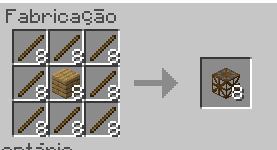
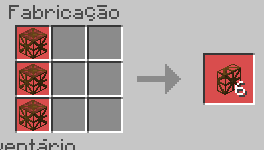
All recipes include unlock conditions. The base camo block recipes use broad vanilla wood tags, including planks, logs, crimson stems, warped stems and wooden slabs. Add-ons that correctly include their wood in those tags can also work with these recipes.
Craftable content includes every camo shape, the guidebook and all construction tools.
## Guidebook
Players receive the guidebook when joining for the first time. Its translated ActionForm pages explain basic use, every shape, every tool, recipes, transparency, compatibility and the paginated list of supported blocks.
## Supported blocks
The generated vanilla catalog currently contains 1,090 compatible block IDs. Netherrack, grass-related blocks, nylium and Nether wart block variants are included. Flowers, saplings, pots and several tiny or unsuitable single-face models are intentionally excluded, while vines are retained.
Minecraft Bedrock does not expose arbitrary texture pixels from every third-party Resource Pack at runtime. Compatibility with another add-on therefore depends on the content and tags that add-on exposes.
## Sounds and feedback
- Applying camouflage uses the sampled block's mapped placement sound.
- Random hotbar placement uses the chosen block's sound.
- Context replacement uses the replacement block's sound.
- Rotation uses the rotated block's sound.
- Block movement uses the moved block's sound.
- Slab merging, vertical-slab placement, trapdoor opening/closing and camouflage removal have dedicated feedback.
## Languages
The add-on includes English, Brazilian Portuguese, Spanish, French, German, Italian, Dutch, Polish, Japanese, Korean, Simplified Chinese and Traditional Chinese language files. All interface and guidebook text uses translatable language keys.
## Credits
Created by **kawEduh**.
Minecraft is a trademark of Mojang Studios. Universal Camo is not affiliated with or endorsed by Mojang or Microsoft.
- Edition: Minecraft Bedrock
- File type: .mcpack or .mcaddon
- Minecraft versions listed: 26.40, 26.50
- How to install: Download the .mcpack or .mcaddon file. → Open it — Minecraft imports it. → In your world: Behavior Packs → Available → Activate, then the same under Resource Packs.
- Where to get it: Opens on CurseForge — not every file is mirrored on our own servers.
Install steps are the general flow for this file type — How to install Minecraft Bedrock addons & mods walks through it step by step.
- Pack type: .mcaddon — behaviour and resource pack in one file
- Manifest requires Minecraft 1.26.40 or newer
- Complete pack — everything it depends on is inside the file
- Download size: 4.1 MB
- Download link checked 18 Sept 2026 — working
These come from our own check of the pack file, not from the source page.