
发光墨汁/Fluorescent Ink
Java mod listed for Minecraft 1.20. Downloads from the MC Java Mods app on Android.
对于森罗物语:酒馆的夜光新娘酒和Galosphere模组的荧光墨团之间的冲突提供了一个折中方案 Regarding the conflict between the Luminous Bride brew from Kaleidoscope Tavern and the Glow Ink Clumps…
⬇ Download on Modrinth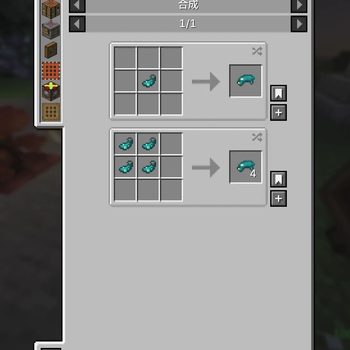
当你添加了森罗物语:酒馆模组与Galosphere模组时就会发现Galosphere模组的荧光墨团的优先级很高,让你酿造不了夜光新娘酒 为解决该问题本模组增加了一个物品:荧光墨水,由发光墨囊合成 在使用该模组后夜光新娘会多出一个配方:4个发光浆果桶+16发光墨汁可以酿造夜光新娘,避免了荧光墨团导致无法酿造 荧光墨水可以用来给告示牌染色(且有独特粒子特效),可以合成荧光展示框,还可以合成晶莹烟花 若未安装森罗物语:酒馆或者Galosphere模组的不要添加(没有额外用处)
When you have both Kaleidoscope Tavern and Galosphere installed, you will find that Galosphere's Glow Ink Clumps take high priority, which prevents you from brewing the Luminous Bride. To resolve this issue, this mod adds a new item: the Glow Int, which is crafted from Glow Ink Sacs. With this mod installed, the Luminous Bride gains a new recipe: 4 Glow Berry Buckets + 16 Glow Ints to brew the Luminous Bride, bypassing the conflict caused by the Glow Ink Clumps. The Glow Int can be used to dye Signs (with unique particle effects), craft Glow Item Frames, and craft Glow Flares. When you have both Kaleidoscope Tavern and Galosphere installed, you will find that Galosphere's Glow Ink Clumps take high priority, which prevents you from brewing the Luminous Bride.When you have both Kaleidoscope Tavern and Galosphere installed, you will find that Galosphere's Glow Ink Clumps take high priority, which prevents you from brewing the Luminous Bride. To resolve this issue, this mod adds a new item: the Glow Int, which is crafted from Glow Ink Sacs. With this mod installed, the Luminous Bride gains a new recipe: 4 Glow Berry Buckets + 16 Glow Ints to brew the Luminous Bride, bypassing the conflict caused by the Glow Ink Clumps. The Glow Int can be used to dye Signs (with unique particle effects), craft Glow Item Frames, and craft Glow Flares. If you do not have Kaleidoscope Tavern or Galosphere installed, please do not add this mod (as it serves no additional purpose without them).
- Edition: Minecraft Java
- File type: .jar
- Minecraft version listed: 1.20.1
- How to install: Install the matching mod loader (Forge, Fabric or NeoForge) for your Minecraft version. → Download the .jar. → Put it in the .minecraft/mods folder and launch that loader profile.
- Where to get it: Opens on Modrinth — not every file is mirrored on our own servers.
Install steps are the general flow for this file type — How to install Minecraft Java mods & modpacks walks through it step by step.
- Ships as fluorescent_ink-forge-1.20.1-v.1.0.0.jar — drop this file into the mods folder
- Download size: 61 KB
- Download link checked 9 Oct 2026 — working
These come from our own check of the pack file, not from the source page.