
RAY TRACING POTATO
Beautiful Minecraft lighting without turning your PC into a baked potato.
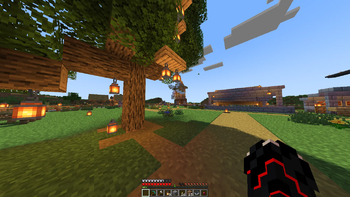
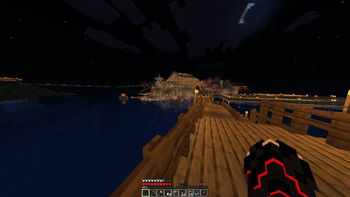
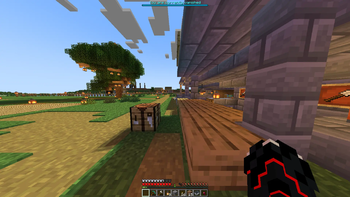
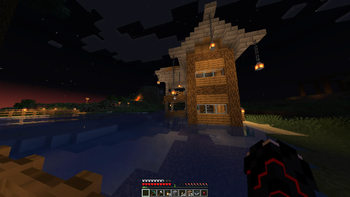
RAY TRACING POTATO is a Minecraft shader pack created by oct2one, designed to enhance Minecraft's visual quality while maintaining good performance.
Whether you're exploring caves, building at sunset, walking through forests, or simply looking to improve Minecraft's appearance on modest hardware, RAY TRACING POTATO aims to provide a balanced combination of visual quality and performance.
FEATURES
- Enhanced lighting and atmosphere
- Improved water visuals
- Better skies and environmental lighting
- Improved shadows
- Enhanced emissive and glowing effects
- Atmospheric effects
- Improved colors and overall visual presentation
- Performance-focused design
- Designed with lower-end hardware in mind
Additional improvements, features, and optimizations are planned for future releases.
PERFORMANCE
RAY TRACING POTATO is designed with performance in mind. Actual performance will vary depending on your hardware and Minecraft configuration.
Performance may be affected by:
- GPU
- CPU
- Minecraft version
- Render distance
- Shader settings
- Resolution
- Installed mods
- World complexity
For improved FPS, consider lowering render distance, shadow quality, or other demanding shader settings.
INSTALLATION
Iris Shaders
- Install Iris Shaders.
- Download RAY TRACING POTATO.
- Launch Minecraft.
- Navigate to:
Options → Video Settings → Shader Packs
- Open the shader pack folder.
- Place the downloaded RAY TRACING POTATO
.zipfile inside the folder. - Return to Minecraft.
- Select RAY TRACING POTATO from the shader pack list.
- Apply the shader and start playing.
OptiFine
If your version of RAY TRACING POTATO supports OptiFine:
- Install OptiFine.
- Launch Minecraft using the OptiFine profile.
- Navigate to:
Options → Video Settings → Shaders
- Open the shader folder.
- Place the RAY TRACING POTATO
.zipfile inside. - Return to Minecraft and select the shader pack.
RECOMMENDED SETTINGS
For lower-end systems:
Resolution: 720p–1080p Render Distance: 6–12 chunks Simulation Distance: 5–8 chunks
If performance is insufficient, consider reducing shadow quality and other demanding shader effects before lowering Minecraft's resolution.
CONTENT CREATORS
You are welcome to use RAY TRACING POTATO in:
- YouTube videos
- Livestreams
- Screenshots
- Reviews
- Shader comparisons
- Minecraft showcases
Monetization of videos and livestreams featuring the shader is permitted.
Credit is appreciated:
Shader: RAY TRACING POTATO by oct2one
Please direct viewers to the official Modrinth or CurseForge project page rather than redistributing the shader file yourself.
REDISTRIBUTION
RAY TRACING POTATO is distributed under an All Rights Reserved license.
You may not reupload, redistribute, sell, republish, or claim RAY TRACING POTATO as your own work.
Modified versions, forks, and inclusion in publicly distributed modpacks require prior permission from oct2one.
Please download RAY TRACING POTATO only from its official distribution pages.
Refer to the included LICENSE.txt for the complete license terms.
BUG REPORTS
If you encounter a graphical issue, compatibility problem, or significant performance issue, please include the following information when submitting a report:
- Minecraft version
- Iris or OptiFine version
- GPU
- Shader version
- Screenshot of the issue
Providing this information makes issues easier to reproduce, diagnose, and resolve.
UPDATES
RAY TRACING POTATO is actively being improved.
Future releases may include:
- Additional performance optimizations
- Lighting improvements
- Better reflections
- Improved water rendering
- Additional customization options
- Bug fixes
- Compatibility improvements
CREDITS
Shader: RAY TRACING POTATO Creator: oct2one Copyright: © 2026 oct2one License: All Rights Reserved
Minecraft is a trademark of Microsoft Corporation.
RAY TRACING POTATO is an independent community project and is not affiliated with, sponsored by, or endorsed by Microsoft or Mojang Studios.
© 2026 oct2one. All Rights Reserved.
- Edition: Minecraft Java
- File type: .zip (resource pack)
- Minecraft versions listed: 1.18, 1.18.1, 1.18.2
- How to install: Download the .zip resource pack — do not unzip it. → Put it in .minecraft/resourcepacks. → Enable it in Options → Resource Packs.
- Where to get it: Opens on Modrinth — not every file is mirrored on our own servers.
Install steps are the general flow for this file type — see the MC Java Mods guides for the full walkthrough.
- Downloads as RT_POTATO_7_Reflective.zip
- Download size: 36 KB
- Download link checked 19 Sept 2026 — working
These come from our own check of the pack file, not from the source page.