
Storywise - Queue System
Java mod listed for Minecraft 1.21. Downloads from the MC Java Mods app on Android.
Can't find any queuing system for your scripted smp? Well, This is Storywise, a queuing system that is simple, Non-Npc, and is different from any other…
⬇ Download on Modrinth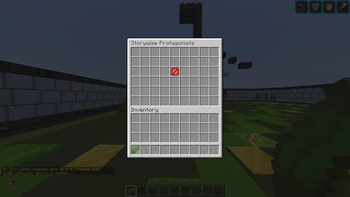
Storywise - Queuing System
A comprehensive queuing system for scripted SMPs where content creators (Protagonists) can recruit players for their recordings.
Overview
Storywise is a plugin designed for SMP servers that host scripted events and recordings. It allows multiple content creators (Protagonists) to open queues, recruit players, and manage their recording sessions seamlessly.
How It Works
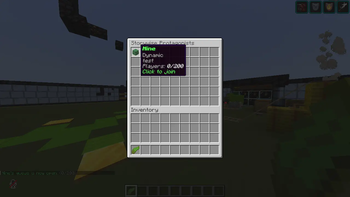
Each Protagonist has their own queue that players can join using a special item. Players receive a Kelp named "Storywise Queue" upon joining or respawning. When a Protagonist opens their queue, all players receive a notification and can right-click their kelp to open the GUI and join. When the recording starts, all queued players are teleported to the scene and the kelp is temporarily removed from their inventory until the recording ends.
Features
- Multiple Protagonists - Admins can add as many Protagonists as they want
- Item-Based System - Players receive a Kelp named "Storywise Queue" that opens the GUI
- Queue Management - Open, close, lock, and manage queues with simple commands
- Recording Sessions - Start and end recordings with automatic teleportation
- Scene Protection - Set boundaries to keep players in the recording area
- Director Tools - Send announcements, titles, and whispers to your queue
- Player Rewards - Configurable rewards for participating in recordings
- VIP Support - Priority queue system for special players
- Blacklist System - Prevent griefers from joining recordings
- Discord Integration - Webhook support for announcements
- Custom Icons - Set custom player heads as icons for Protagonists using IGN or UUID
Commands
Player Commands
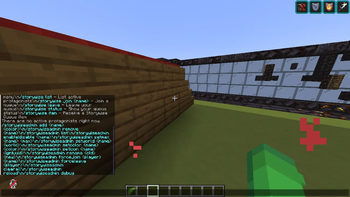
/storywise - Opens the main Protagonist GUI /storywise list - Lists all active Protagonists /storywise join - Joins a specific Protagonist's queue /storywise leave - Leaves your current queue /storywise status - Shows your current queue position /storywise item - Gives you a new Storywise Queue item /storywise help - Shows all player commands
Protagonist Commands
/storywise open [max] [description] - Opens your queue /storywise close - Closes your queue /storywise lock - Locks your queue /storywise start - Starts recording and teleports queued players /storywise end - Ends recording and returns players to spawn /storywise status - Shows who's in your queue /storywise kick - Removes a player from your queue /storywise add - Manually adds a player to your queue /storywise clear - Clears your entire queue /storywise announce - Sends a message to your queue /storywise action [subtitle] - Sends a title to your queue /storywise whisper <message> - Sends a private message to your queue /storywise setlocation - Sets the teleport location /storywise setspawn - Sets the return location /storywise setsafezone - Sets recording boundaries /storywise clearsafezone - Removes recording boundaries</p> <h3>Admin Commands</h3> <p>/storywiseadmin add <name> <color> - Adds a new Protagonist /storywiseadmin remove <name> - Removes a Protagonist /storywiseadmin list - Lists all Protagonists /storywiseadmin enable <name> - Enables a Protagonist /storywiseadmin disable <name> - Disables a Protagonist /storywiseadmin setmax <name> <max> - Sets max queue size /storywiseadmin setworld <name> <world> - Sets recording world /storywiseadmin setcolor <name> <color> - Changes Protagonist color /storywiseadmin seticon <name> <ign/uuid> - Sets a custom head icon for a Protagonist /storywiseadmin rename <old> <new> - Renames a Protagonist /storywiseadmin broadcast <message> - Broadcasts to all queued players /storywiseadmin forcejoin <player> <name> - Force joins a player /storywiseadmin forceleave <player> - Force leaves a player /storywiseadmin clearall - Clears ALL queues /storywiseadmin reload - Reloads the config /storywiseadmin debug - Toggles debug mode</p> <h2>Permissions</h2> <p>storywise.use - Allows using basic commands - Default: true storywise.join - Allows joining queues - Default: true storywise.leave - Allows leaving queues - Default: true storywise.item - Allows getting the Storywise Queue item - Default: true storywise.protagonist.<name> - Allows managing a specific Protagonist - Default: op storywise.admin - Full admin access - Default: op</p> <h2>Item System</h2> <p>Players automatically receive a Kelp named "Storywise Queue" when they:</p> <ul> <li>Join the server</li> <li>Respawn after dying</li> </ul> <p>The item behavior changes based on the current state:</p> <p>Idle - In inventory, right-click opens GUI showing available Protagonists Queue Open - In inventory, right-click opens GUI showing available Protagonists In Queue - In inventory, right-click opens GUI showing your queue status Recording Active - Removed from inventory In Scene - Removed from inventory Recording Ended - Given back to player</p> <h2>Protagonist Icons</h2> <p>Each Protagonist can have a custom player head icon displayed in the GUI. This allows you to use the faces of content creators as visual identifiers.</p> <p>To set an icon:</p> <p>/storywiseadmin seticon <name> <ign/uuid></p> <p>Examples: /storywiseadmin seticon Blaze Dream /storywiseadmin seticon Cipher 069a79f4-44e9-4726-a5be-fca90e38aaf5</p> <p>The icon will appear in the GUI next to the Protagonist's name and queue information.</p> <h2>Configuration</h2> <p>All settings are located in the config.yml file. You can configure:</p> <ul> <li>Protagonist settings (name, color, max queue, world, icon)</li> <li>Item appearance and name</li> <li>Queue timers and limits</li> <li>Recording rules (chat mute, block protection, PvP settings)</li> <li>Rewards for participating</li> <li>Messages and sounds</li> </ul> <h2>Installation</h2> <ol> <li>Download the plugin JAR file</li> <li>Place it in your server's plugins folder</li> <li>Restart your server</li> <li>Configure the config.yml file</li> <li>Add Protagonists using /storywiseadmin add <name> <color></li> <li>Set custom icons using /storywiseadmin seticon <name> <ign/uuid></li> <li>Set up worlds and locations for each Protagonist</li> </ol> <h2>Support</h2> <p>For issues or suggestions, please create a ticket on our GitHub repository.</p> <h2>Requirements</h2> <ul> <li>Paper 1.21.1 or higher</li> <li>Java 21 or higher</li> </ul> <h2>License</h2> <p>This plugin is licensed under the MIT License.</p>
- Edition: Minecraft Java
- File type: .jar
- Minecraft versions listed: 1.21, 1.21.1, 1.21.2
- How to install: Install the matching mod loader (Forge, Fabric or NeoForge) for your Minecraft version. → Download the .jar. → Put it in the .minecraft/mods folder and launch that loader profile.
- Where to get it: Opens on Modrinth — not every file is mirrored on our own servers.
Install steps are the general flow for this file type — How to install Minecraft Java mods & modpacks walks through it step by step.
- Ships as storywise-queue.jar — drop this file into the mods folder
- Download size: 894 KB
- Download link checked 11 Oct 2026 — working
These come from our own check of the pack file, not from the source page.