
OPMonitor — Minecraft Paper Plugin
Broadcasts OP player actions to all online players. Fully config-driven via config.yml.
Features
- Full command monitoring — any command executed by an OP is broadcast (controlled by
monitored-commands) - Creative inventory tracking — picking items from the creative inventory is broadcast in real-time
- Gamemode change detection — both
/gamemodeand F3+F4 switcher are broadcast - OP kills — broadcasts when an OP kills another player
- Exempt players — players listed in
exempt-playersare silently ignored - Cooldown —
cooldown-mslimits broadcast frequency per player (default 0 = none) - Language support — built-in
en/zh_cn, switch vialanguagein config - History logging (optional) — writes all events to a file when
history.enabled: true
Installation
- Download
OPMonitor-1.1.0.jar - Place in your server's
plugins/folder - Restart the server
- Edit
plugins/OPMonitor/config.ymlto your liking - Run
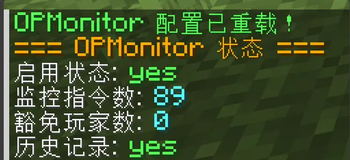
/opmonitor reloadto apply changes
Commands
| Command | Description |
|---|---|
/opmonitor |
Show help |
/opmonitor status |
Show plugin status and monitored command count |
/opmonitor reload |
Reload config and apply changes on the fly |
Permissions
| Permission | Default | Description |
|---|---|---|
opmonitor.admin |
OP | Access to /opmonitor commands |
opmonitor.see |
Everyone | See broadcast messages |
Configuration (config.yml)
enabled: true              # Enable/disable the plugin
language: en               # Broadcast language: en or zh_cn
broadcast-prefix: "&6[OP Monitor] &r"
cooldown-ms: 0             # Cooldown per player in ms, 0 = no cooldown

exempt-players:            # OP players who won't be monitored
  - Tagin_T

history:
  enabled: false           # Write history log to file
  file: "plugins/OPMonitor/history.log"

monitored-commands:        # Commands to broadcast (case-insensitive, no leading /)
  - gamemode
  - tp
  - give
  - ban
  - kick
  # ... 88 commands by default, add or remove as needed
Broadcast Format
[OP Monitor] PlayerName executed OP command: "/gamemode creative"
[OP Monitor] PlayerName picked 64 diamond from Creative
[OP Monitor] PlayerName changed gamemode to CREATIVE
[OP Monitor] PlayerName killed VictimName
- Player name: blue
- Items/args/commands: green
- Commands are wrapped in quotes: PlayerName executed OP command:
"/cmd args"
History Log
When history.enabled: true, all broadcast events are written to history.file (default: plugins/OPMonitor/history.log).
One event per line:
[yyyy-MM-dd HH:mm:ss] Tagin_T picked 1 diamond_block from Creative
[yyyy-MM-dd HH:mm:ss] Tagin_T runed /gamemode creative
[yyyy-MM-dd HH:mm:ss] Tagin_T changed gamemode to CREATIVE
[yyyy-MM-dd HH:mm:ss] Tagin_T killed Hiverfy
Format: [timestamp] playername action-description
Building
Requires JDK 17+. The project ships with Maven Wrapper — no global Maven install needed:
./mvnw clean package -DskipTests
The compiled JAR is at target/OPMonitor-1.1.0.jar.
License
MIT
Quick facts
- Edition: Minecraft Java
- File type: .jar
- Minecraft versions listed: 1.20.4, 1.20.5, 1.20.6
- How to install: Install the matching mod loader (Forge, Fabric or NeoForge) for your Minecraft version. → Download the .jar. → Put it in the .minecraft/mods folder and launch that loader profile.
- Where to get it: Opens on Modrinth — not every file is mirrored on our own servers.
Install steps are the general flow for this file type — How to install Minecraft Java mods & modpacks walks through it step by step.
Verified by MCModsHub
- Ships as OPMonitor-1.1.0.jar — drop this file into the mods folder
- Download size: 14 KB
- Download link checked 21 Sept 2026 — working
These come from our own check of the pack file, not from the source page.