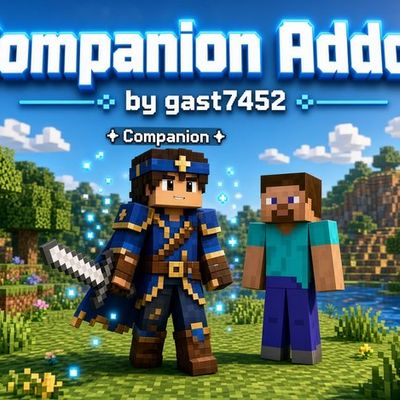
Companion addon
Companion Addon by gast7452 — a personal player-like companion for Bedrock. Spawn it with the Companion Remote, name it, pick a random skin (14 total)…
⬇ Download on CurseForge# Companion Addon — Full Description
**Minecraft Bedrock Edition**
**Author:** gast7452
**Type:** Behavior Pack + Resource Pack (`.mcaddon`)
**Requirements:** Minecraft Bedrock 1.21+, **Beta APIs** (Experiments) enabled
---
## What This Mod Is
**Companion Addon** adds a personal companion to the game — a player-like entity that spawns next to you, follows you, carries out commands, and can help with combat, resource gathering, and everyday tasks.
This is not a normal mob or a vanilla pet. The companion is created **for each player individually**, keeps its own name, skin, and settings, has its own inventory, and is controlled with a special item — the **Companion Remote**.
The mod works in singleplayer and multiplayer: every player has their own companion, their own commands, and their own interface language.
---
## How to Start
1. Install the `.mcaddon` (or both packs manually: Behavior Pack and Resource Pack).
2. In the world settings, enable both packs and **Beta APIs**.
3. Join the world — the **Companion Remote** is added to your inventory automatically.
4. Use the remote → **Create Companion**.
5. Enter a nickname for your companion.
6. It appears next to you with a random skin, a name tag, and a line showing who created it.
If inventory is not kept on death, the remote is given again. If keepInventory is on, an extra remote is not spawned.
---
## Companion Remote
The item is always named **Companion Remote** (English only), no matter which language you pick in the menu.
Using the remote opens the main menu:
1. **Commands** — list of abilities
2. **Inventory** — companion slots
3. **Change Skin (Random)** — random skin from all available ones
4. **Language** — English or Russian
Language is saved per player. Chat messages, buttons, and hints use the selected language. The item name itself always stays English.
---
## Companion Appearance
- Normal player model (Steve / NPC geometry).
- **14 skins**: 5 original + 9 extra.
- On creation, a skin is chosen at random and stays fixed.
- The **Change Skin** button can assign a new random skin from all 14 at any time.
- Above the head you see the nickname and a line like:
`nickname`
`by PlayerName`
- The companion is **immortal** (damage does not apply).
- It walks on the ground, faces the direction of movement, and moves at roughly player walk speed (slightly faster).
- It should not “fly” or sink under blocks, and it does not walk through walls.
- It can pass through plants (grass, flowers, ferns, etc.), but **not** through solid blocks (dirt, grass blocks, stone, leaf blocks, logs, and so on).
---
## Inventory
The companion has **27 slots**, managed through a form (not a buggy native entity inventory).
How to use it:
- **Remote → Inventory**
- or **right-click the companion** (empty hand / non-sword)
Slot logic:
- Hold an item → tap a slot → the item is placed **in that exact slot**.
- If the slot is occupied — items are swapped (the old one returns to you).
- Empty hand + filled slot → you take the item.
- **Slot 1** — the companion’s held weapon (sword).
Items are saved between sessions using dynamic properties.
---
## Weapons and Damage
- Base unarmed damage is high (around **15**).
- In protect mode, damage is even higher (around **30**).
- Any sword (wooden, stone, copper, iron, gold, diamond, netherite) can be:
- put in **slot 1**, or
- given by **right-clicking the companion** while holding the sword.
- The sword is **visible in the companion’s hand**.
- Sword damage is **added** to the companion’s base damage.
- Attacks use a **~1.5 second cooldown** so damage is not spammed every tick.
- On hit, a player-like arm swing animation plays.
---
## Commands and Abilities
All abilities start **off**. The companion does not attack mobs on spawn — only after you turn a mode on.
### Bring Me Home
Walks to your bed, or to your spawn point if you have no bed.
### Protect Me (Toggle)
Finds monsters near you and attacks them.
Can be turned on or off. The menu shows **[ON]** / **[OFF]**.
### Assist Me (Toggle)
The companion attacks **the same entity you just hit**.
Hit a sheep — it finishes the sheep. Hit a hostile mob — it switches to that target.
It does not attack players or other companions.
### Mine Wood
Searches for logs within **±2 blocks** of itself (up, down, and sideways).
Walks to the block and breaks it.
While mining is active, the same button becomes **Stop**.
If no wood is nearby, it says so in chat.
### Mine Stone
Same logic for stone and similar blocks.
The button also switches to **Stop**.
Wood and stone modes do not stack: enabling one clears the other.
### Heal Me
Heals you for about **10 seconds** (gradual health restore).
### Stand Still
Stops in place, looks at you, and does not move.
Other movement / mining / combat modes are cleared.
### Follow Me
Normal following behavior.
### Toggle Bow Shooting
In protect mode, at medium/long range it can shoot arrows.
Arrow damage is boosted (around **~15** per hit with the mod’s logic).
### Teleport to Me
Instantly moves the companion next to you (to open ground).
### Collect Nearby Items
Picks up nearby dropped items and stores them in the companion’s inventory.
### Place Torch
Places a torch at the companion’s feet if there is space.
### Dance
A short “dance” animation in place.
---
## Combat Behavior
- In **Protect**, it looks for monsters near the player.
- Up close it uses melee with cooldown and attack animation.
- Farther away (if bow mode is on) it tries to shoot.
- In **Assist**, it only reacts to the target you hit.
- It is not aggressive by default while modes are off.
---
## Multiplayer and Independence
- Each player has **their own** companion.
- Commands, language, inventory, skin, and modes do not interfere with each other.
- One player can set “Stand Still” while another uses “Follow” / “Protect” — each companion does its own job.
- Right-clicking someone else’s companion does not open its inventory.
---
## Technical Notes (Short)
- Scripts use **@minecraft/server** and forms from **@minecraft/server-ui**.
- State is stored in player dynamic properties (language, companion id, nickname, inventory, modes, weapon).
- Movement uses ground steps with passability checks and body rotation toward the move direction.
- Skins use `mark_variant` 0–13 plus a render controller.
- Held sword uses `equippable` and `enable_attachables` on the client entity.
---
## Install Tips
1. Remove the old pack versions when updating.
2. Import the new `.mcaddon`.
3. In the world: Resource Pack + Behavior Pack + **Beta APIs**.
4. After big updates, it’s best to **recreate** the companion.
5. If skin or sword don’t update, use Change Skin or rejoin the world.
---
## Who This Mod Is For
For players who want more than a simple pet — a permanent companion with a name, skin, inventory, bilingual UI, and a real helper role for exploring, mining, and fighting — without broken infinite damage spam, and with every mode under your control.
**Companion Addon** by **gast7452**.
- Edition: Minecraft Bedrock
- File type: .mcpack or .mcaddon
- Minecraft versions listed: 26.30, 26.40, 26.50
- How to install: Download the .mcpack or .mcaddon file. → Open it — Minecraft imports it. → In your world: Behavior Packs → Available → Activate, then the same under Resource Packs.
- Where to get it: Opens on CurseForge — not every file is mirrored on our own servers.
Install steps are the general flow for this file type — How to install Minecraft Bedrock addons & mods walks through it step by step.
Companion addon is a free Minecraft Bedrock addon. Compatible with Minecraft 26.30, 26.40, 26.50. Downloaded 874 times (via CurseForge). Download it and open it directly in the game.