Required on both client and server.
Chat Bubbles (Forge 1.20.1)
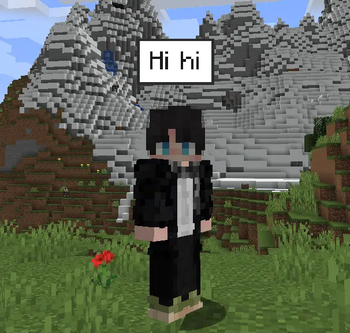
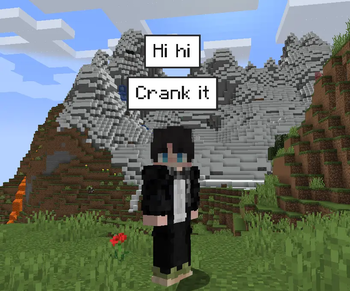
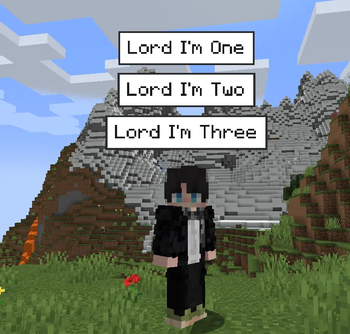
A Minecraft mod for Forge 1.20.1 that shows chat messages as bubbles above players' heads. Inspired by Chat Bubbles NeoForge.
Must be installed on both the client and the server.
Features
- Speech bubbles above players' heads, with stacked messages
- Per-player background, border, and text colors
- Height offset, spacing, and an option to hide the nametag
- In-game settings screen with a live preview
- Server settings (duration, max bubbles, padding)
How to use
- Press C (default) to open the settings
- Or use
/chatbubbles settings
Commands:
/chatbubbles bgColor FFFFFF
/chatbubbles borderColor 2B2B2B
/chatbubbles textColor 1A1A1A
/chatbubbles offset 2.0
/chatbubbles spacing 1.0
/chatbubbles hideNametag true
Hex colors without #.
Development
Requires Java 17 (the default Windows Java 8 install does not work with Forge 1.20.1).
In PowerShell:
$env:JAVA_HOME = "C:\Program Files\Eclipse Adoptium\jdk-17.0.6.10-hotspot"
.\gradlew.bat genIntellijRuns
.\gradlew.bat runClient
.\gradlew.bat build
The built JAR is at build/libs/chatbubbles-1.0.0.jar.
Server config: config/chatbubbles-server.toml.
Quick facts
- Edition: Minecraft Java
- File type: .jar
- Minecraft versions listed: 1.20.1, 1.20.2, 1.20.3
- How to install: Install the matching mod loader (Forge, Fabric or NeoForge) for your Minecraft version. → Download the .jar. → Put it in the .minecraft/mods folder and launch that loader profile.
- Where to get it: Opens on Modrinth — not every file is mirrored on our own servers.
Install steps are the general flow for this file type — How to install Minecraft Java mods & modpacks walks through it step by step.
Verified by MCModsHub
- Ships as chatbubbles-1.0.0.jar — drop this file into the mods folder
- Download size: 52 KB
- Download link checked 23 Sept 2026 — working
These come from our own check of the pack file, not from the source page.