
DonutQuickActions
Java mod listed for Minecraft 1.21–26.x. Downloads from the MC Java Mods app on Android.
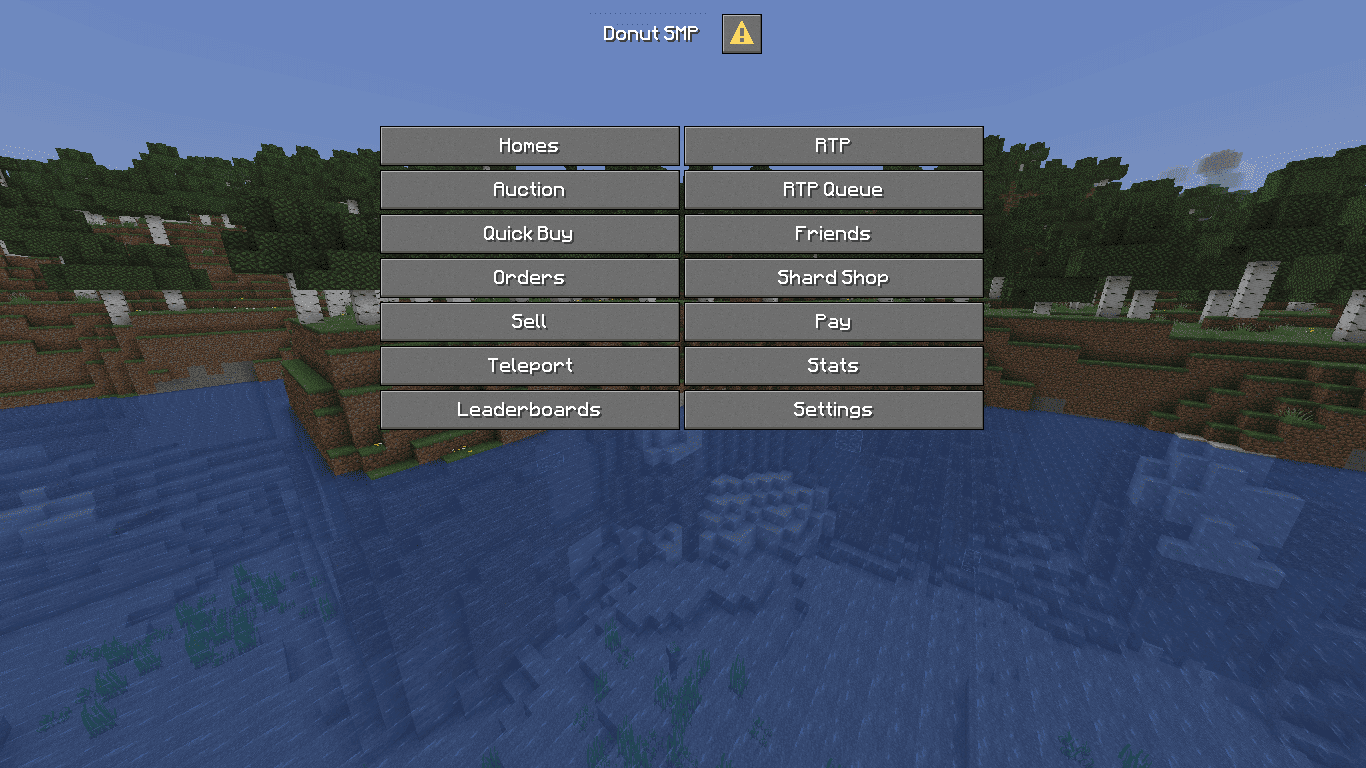
This plugin creates a custom dialog easy adjustment and configuration exactly like the famous server "DonutSMP"
I don't know my version or loader




Please contact me on Discord if you have any suggestions or edits.

DonutQuickActions brings that Quick Actions menu from the famous Server "DonutSMP" straight to your own server
You know when you press G or hit ESC on DonutSMP and that clean menu pops up? Yeah, that one. Same thing here, no client mod, nothing for players to install.

- Real vanilla dialogs, hooked into the G key and the ESC pause screen, same way DonutSMP does it.
- One button can run one thing or a whole list: command, sound, message, delay, then more.
- 15 action types: player commands, op commands, console commands, server switching, links, clipboard, messages, titles, sounds, delays and more.
- PlaceholderAPI works in labels, tooltips and messages.
- Per button permissions, so only who you want can click.
- Folia supported.

Commands
| Command | Permission | Description |
|---|---|---|
/donutquickactions |
donutquickactions.use |
Opens the quick actions menu |
/donutquickactions reload |
donutquickactions.reload |
Reloads the configuration and messages files |
Permissions
| Permission | Default | Description |
|---|---|---|
donutquickactions.use |
Everyone | Required to open the menu and see the command, without it the command is hidden |
donutquickactions.reload |
OP | /donutquickactions reload |
donutquickactions.admin |
OP | Full access to everything (grants use and reload, plus update notices) |

- A folder named
DonutQuickActionsis created in yourpluginsfolder automatically. Inside you will find a cleanconfig.ymlfile.
config-version: "1.0"

update-checker: true

pause-screen-button: true

open-on-join: false
open-on-join-delay: 40

title: "&fDonut SMP"
external-title: "&fDonut SMP"

columns: 2
width: 150

can-close-with-escape: true

body: []

buttons:
  homes:
    label: "&fHomes"
    type: player_command
    command: "homes"
  rtp:
    label: "&fRTP"
    type: player_command
    command: "rtp"
  auction:
    label: "&fAuction"
    type: player_command
    command: "ah"
  rtp-queue:
    label: "&fRTP Queue"
    type: player_command
    command: "rtpqueue"
  quick-buy:
    label: "&fQuick Buy"
    type: player_command
    command: "quickbuy"
  friends:
    label: "&fFriends"
    type: player_command
    command: "friend"
  orders:
    label: "&fOrders"
    type: player_command
    command: "orders"
  shard-shop:
    label: "&fShard Shop"
    type: player_command
    command: "shardshop"
  sell:
    label: "&fSell"
    type: player_command
    command: "sell"
  pay:
    label: "&fPay"
    type: player_command
    command: "pay"
  teleport:
    label: "&fTeleport"
    type: player_command
    command: "tp"
  stats:
    label: "&fStats"
    type: player_command
    command: "stats"
  leaderboards:
    label: "&fLeaderboards"
    type: player_command
    command: "leaderboards"
  settings:
    label: "&fSettings"
    type: player_command
    command: "settings"

- Download the latest version of DonutQuickActions.
- Drop the
.jarfile into your server'spluginsfolder. - Restart your server.
- Done! No additional setup required.

© All Rights Reserved. Created by SirSnaryo
- Edition: Minecraft Java
- File type: .jar
- Minecraft versions listed: 1.21.7, 1.21.8, 1.21.9
- How to install: Install the matching mod loader (Forge, Fabric or NeoForge) for your Minecraft version. → Download the .jar. → Put it in the .minecraft/mods folder and launch that loader profile.
- Where to get it: Opens on Modrinth — not every file is mirrored on our own servers.
Install steps are the general flow for this file type — How to install Minecraft Java mods & modpacks walks through it step by step.
- Ships as DonutQuickActions-Paper-1.0.jar — drop this file into the mods folder
- Download size: 91 KB
- Download link checked 13 Oct 2026 — working
These come from our own check of the pack file, not from the source page.