Leak Prevention
Java resource pack listed for Minecraft 1.21–26.x. Downloads from the MC Java Mods app on Android.
Turns every ore, bedrock, gravel, dripstone block, andesite, granite, diorite and tuff into one dark netherite style block, and locks block rotations, so…
⬇ Download on ModrinthBlackout Pack: Ores and Bedrock
Turns every ore, bedrock, gravel, dripstone block, andesite, granite, diorite and tuff into one dark netherite style block, and locks block rotations, so screenshots and clips can't be used to find your coordinates.
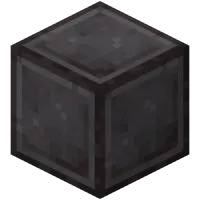
What it does Minecraft rotates many natural blocks based on where they are, and that plus the bedrock pattern can be used to work out where a screenshot was taken. This pack draws 26 blocks with the netherite block texture and locks every random rotation, so those clues are gone. Everything else looks normal.
Blocks that look like netherite (26)
- Overworld ores: coal, iron, copper, gold, redstone, lapis, diamond, emerald
- The deepslate version of each of those 8 ores
- Nether gold ore, nether quartz ore, ancient debris
- Bedrock, gravel, dripstone block, andesite, granite, diorite, tuff
Rotation locked, normal look (34) Stone, deepslate, infested stone, infested deepslate, basalt, netherrack, dirt, dirt path, rooted dirt, grass block, podzol, mycelium, sand, red sand, all 16 concrete powders, sculk, lily pad, sea pickle, turtle egg. Everything else is unchanged.
Install Put the zip in your resource pack folder without unzipping it, move it to the top of the right list, and click Done. Server owners can force it on everyone in server.properties.
Good to know
- Every ore looks the same, so you can't tell coal from diamond by sight.
- It only protects your own screenshots and clips. It does not hide your base from other players or cheaters.
- Minecraft Java Edition 1.21.4 and newer. No mods needed.
Not made by or affiliated with Mojang or Microsoft.
- Edition: Minecraft Java
- File type: .zip (resource pack)
- Minecraft versions listed: 1.21.4, 1.21.5, 1.21.6
- How to install: Download the .zip resource pack — do not unzip it. → Put it in .minecraft/resourcepacks. → Enable it in Options → Resource Packs.
- Where to get it: Opens on Modrinth — not every file is mirrored on our own servers.
Install steps are the general flow for this file type — How to install Minecraft Java resource packs walks through it step by step.
- Downloads as Blackout_OresBedrock.zip
- Download size: 28 KB
- Download link checked 14 Oct 2026 — working
These come from our own check of the pack file, not from the source page.