
Item Collector (by iPao)
Java data pack listed for Minecraft 26.x. Downloads from the MC Java Mods app on Android.
⬇ Download on Modrinth📦 Item Collector
🧲 Automatically collect dropped items into your Chest, Trapped Chest, or Barrel — without using Hoppers!
Item Collector is a lightweight Minecraft Java datapack that turns a normal storage container into an automatic item collector.
Simply place an Item Frame or Glow Item Frame directly above your container and put an Eye of Ender inside the frame. The collector will automatically detect nearby dropped items and attempt to move them into the container.
✨ Features
🧲 Automatic Item Collection
- Automatically collects dropped items from the surrounding area.
- Items are moved directly into the storage container.
📦 Supported Containers
- 🧰 Chest
- 🔴 Trapped Chest
- 🛢️ Barrel
👁️ Easy Activation
- 🖼️ Item Frame + Eye of Ender
- 💡 Glow Item Frame + Eye of Ender
- No special block or custom item required.
🚫 No Hopper Required
- Completely eliminates the need for Hopper-based collection systems.
- Great for farms and compact storage setups.
⚙️ Configurable Collection Range
- ↔️ Horizontal range can be configured.
- ↕️ Vertical range can be configured.
- Adjust the collection area to fit your setup.
✨ Optional Particles
- Enable or disable collection particles.
- Useful for visual feedback or cleaner builds.
🧱 Safe Deactivation
- Removing the Eye of Ender disables the collector.
- Breaking the Item Frame disables the collector.
- Breaking the container stops the collector.
- Normal Minecraft item drops are preserved.
📚 Vanilla Datapack
- No custom mod is required for the datapack itself.
- Designed for Minecraft Java Edition.
🛠️ How to Build a Collector
Build the following structure:
🖼️ Item Frame / Glow Item Frame
            👁️
     Eye of Ender
            ↓
    📦 Chest / Barrel
✅ Requirements
- Place a Chest, Trapped Chest, or Barrel.
- Place an Item Frame or Glow Item Frame directly above it.
- Put an Eye of Ender inside the frame.
- The collector will become active.
🎯 Once activated, nearby dropped items will be detected automatically.
📐 Default Settings
| Setting | Default |
|---|---|
| ↔️ Horizontal Range | 16 blocks |
| ↕️ Vertical Range | ±8 blocks |
| ✨ Collection Particles | ON |
The collection area is centered around the collector container.
🎮 Commands
All commands use Minecraft datapack functions.
📊 Show Status
/function item_collector:status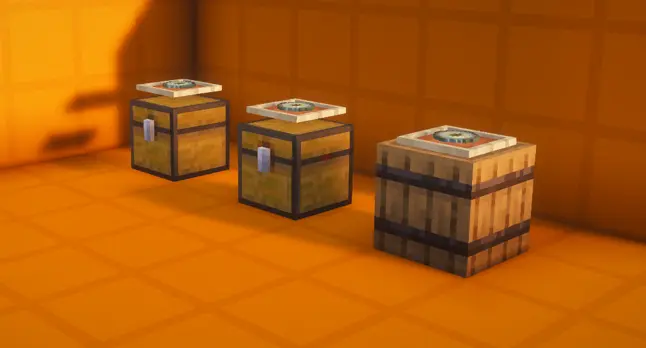
- Edition: Minecraft Java
- File type: .jar
- Minecraft versions listed: 26.1, 26.1.1, 26.1.2
- How to install: Install the matching mod loader (Forge, Fabric or NeoForge) for your Minecraft version. → Download the .jar. → Put it in the .minecraft/mods folder and launch that loader profile.
- Where to get it: Opens on Modrinth — not every file is mirrored on our own servers.
Install steps are the general flow for this file type — see the MC Java Mods guides for the full walkthrough.
- Downloads as Item_Collector_26_2_FIXED_v18.zip
- Download size: 12 KB
- Download link checked 14 Oct 2026 — working
These come from our own check of the pack file, not from the source page.