
The Draftout Russifier
Java mod listed for Minecraft 26.x. Downloads from the MC Java Mods app on Android.
⬇ Download on Modrinth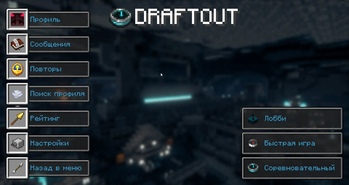
The Draftout Russifier
Описание на русском языке (Нажмите, чтобы развернуть)
Описание мода (Russian)
The Draftout Russifier — это отдельный Fabric-мод, предоставляющий полную и качественную русификацию для соревновательного Minecraft-мода Draftout.
❓ Зачем нужен отдельный мод, а не ресурспак?
Во время соревновательных матчей в моде Draftout принудительно отключаются все пользовательские ресурспаки. Данный мод интегрирует русский язык напрямую в клиент игры, благодаря чему весь интерфейс и цели остаются на русском языке даже во время матчей.
✨ Что переведено (639 строк):
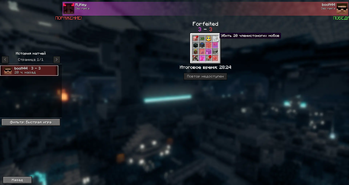
- Все цели (Goals): точный и понятный перевод всех условий (достижения, мобы, размножение, крафты, зелья, урон и др.) с соблюдением канонических названий официальной русской версии Minecraft (тихоня, лавомерка, кадавр, зимогор, хранитель, каменистая земля, незеритовый лом, кузнечный шаблон и т.д.).
- Внутриигровой редактор перевода: возможность редактировать любые строки прямо в главном меню Minecraft с мгновенным применением без перезапуска игры и автосохранением в конфиг.
- Лобби и Рейтинг: интерфейс создания лобби, параметры времени, овертаймы, доски, фильтры и статистика.
- Конструктор досок (Board Builder): все подсказки, кнопки сохранения, загрузки и поиска целей.
- Система повторов (Replays): управление воспроизведением, перемотка, следование за игроком и просмотр моментов выполнения целей.
- Настройки: позиционирование доски, масштаб, подсветка выполненных целей и утилиты.
Установка
- Убедитесь, что у вас установлен Fabric Loader для Minecraft 26.1.1.
- Установите оригинальный мод Draftout
- Установите The Draftout Russifier
- Запустите игру и в настройках языка выберите Русский (Россия).
⚠️ Важное предупреждение (Disclaimer) & Правила Draftout
Перед игрой в соревновательном режиме ознакомьтесь с официальными правилами Draftout (пункт 03: Mod rules).
- Статус модификации: Данный проект является любительской фанатской локализацией и не одобрен официально командой разработчиков Draftout.
- Отказ от ответственности: Мод создан исключительно с целью языковой доступности и не содержит читов, преимуществ или изменений игрового процесса. Однако авторы русификатора не несут ответственности за любые санкции, дисквалификации или блокировки (баны), которые могут быть наложены администрацией серверов Draftout при игре в соревновательном режиме (Competitive). Используйте на свой страх и риск.
- В казуальных режимах и приватных лобби правила устанавливаются создателем комнаты.
📖 About the Mod
The Draftout Russifier is a standalone Fabric localization mod that brings full, high-quality Russian language support to the competitive Minecraft mod Draftout.
❓ Why a mod instead of a resource pack?
In the Draftout mod, custom user resource packs are automatically stripped during matches (PackRepositoryMixin). This mod integrates the Russian localization directly into the game's client environment, ensuring all board goals, lobbies, replay controls, and UI elements stay fully translated in Russian even during active matches.
✨ Features (639 Translated Keys)
- All Bingo Goals: Precise translations for all board objectives (advancements, mob interactions, breeding, unique crafts, potions, combat damage, and survival challenges) matching official Minecraft Russian terminology.
- Lobbies & Leaderboard: Clean translation for lobby creation, timers, overtime, board parameters, and ranking screens.
- In-Game Translation Editor: Customize or tweak any string directly in-game from the main menu with hot-reload and persistent config storage.
- Board Builder: Complete localization of hints, board name inputs, search filters, saving, and loading features.
- Replay System: Fully translated replay controls, player-following shortcuts, seek actions, and goal completion navigation.
- Settings & Preferences: Board positioning, scaling, goal completion opacity, and utility options.
Installation
- Make sure you have Fabric Loader installed for Minecraft 26.1.1.
- Install the original Draftout
- Download The Draftout Russifier
- Launch the game and set your language to Русский (Россия) in the Minecraft Language Settings.
⚠️ Important Disclaimer & Draftout Rules
Please review the official Draftout rules (Section 03: Mod rules) before participating in competitive gameplay:
- Unofficial Project: This translation mod is NOT officially endorsed, approved, or maintained by the Draftout development or moderation team.
- Disclaimer of Liability: This project is created solely for accessibility and language translation. It does not alter game mechanics, provide cheats, or give any gameplay advantages. However, the authors and contributors assume no responsibility for any potential warnings, match disqualifications, or account bans on official Draftout competitive servers. Use at your own discretion.
- In private lobbies and casual games, rules are determined by the lobby host.
- Edition: Minecraft Java
- File type: .jar
- Minecraft version listed: 26.1.1
- How to install: Install the matching mod loader (Forge, Fabric or NeoForge) for your Minecraft version. → Download the .jar. → Put it in the .minecraft/mods folder and launch that loader profile.
- Where to get it: Opens on Modrinth — not every file is mirrored on our own servers.
Install steps are the general flow for this file type — How to install Minecraft Java mods & modpacks walks through it step by step.
- Ships as ruout-1.0.2.jar — drop this file into the mods folder
- Download size: 54 KB
- Download link checked 25 Sept 2026 — working
These come from our own check of the pack file, not from the source page.