
Max Enchantment Star
Java mod listed for Minecraft 26.x. Downloads from the MC Java Mods app on Android.
⬇ Download on Modrinth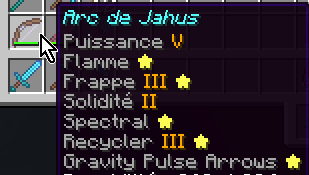
MaxEnchantStar
Adds a ⭐ after an enchantment's name when that enchantment is at its effective maximum level.
The problem this solves
Vanilla tooltips show the enchantment name and level, but never whether that level is the max. On a maxed piece of gear, you still have to remember (or look up) each enchantment's cap. With mods that raise enchantment caps (e.g. NoMaxEnchant) or datapacks that add custom enchantments, the effective maximum canalso differ from what the client assumes or the client can simply be ignorant of the maximum level.
MaxEnchantStar appends a star to every enchantment line that is already at its effective maximum, so maxed enchants are visible at a glance.
Environment
Client-side only. MaxEnchantStar does not need to be installed on the server. It reads the effective maximum enchantment levels provided by NoMaxEnchant when available.
Without NoMaxEnchant providing effective maximum levels, MaxEnchantStar falls back to the maximum level from the local enchantment registry.
The star is purely visual. It does not change anvil behaviour, enchanting table results, or any gameplay rule.
Known limitations
- Effective max source. Without a source of raised maximum levels, the client can only use the registry maximum. If another mod raises the anvil cap without changing the registry, the star stays on the vanilla maximum unless that mod also publishes its effective maximum levels using the protocol supported by MaxEnchantStar.
- Other tooltip rebuilders. Mods that fully replace enchantment tooltip text can still interfere. MaxEnchantStar uses a method wrap so it usually still sees their final text; if a mod never goes through
Enchantment.getNameat all, the star will not appear for that path.
Mechanics
- Target:
Enchantment.getName(RegistryEntry, int), wrapped so the star is applied to whatever text was produced (vanilla or another mod's replacement). - Condition: star is added when
level >= effectiveMaxfor that enchantment. - Effective max resolution:
- If effective maximum levels have been provided by NoMaxEnchant, then use that value for the enchantment.
- Otherwise, fall back to
entry.value().getMaxLevel()from the local registry.
- Formatting: the star is appended as a separate styled fragment so existing colour / style on the name is preserved.
Compatibility
NoMaxEnchant
MaxEnchantStar works particularly well with NoMaxEnchant.
NoMaxEnchant provides MaxEnchantStar with the effective maximum enchantment levels used by the server. This allows MaxEnchantStar to correctly identify maxed enchantments even when their effective maximum is higher than the vanilla registry maximum.
NoMaxEnchant is not a dependency of MaxEnchantStar. If NoMaxEnchant is not installed, MaxEnchantStar simply falls back to the local registry maximum.
Enchantments Normalizer
MaxEnchantStar is compatible with Enchantments Normalizer, that changes how high enchantment levels are displayed, for example displaying CLV instead of the raw enchantment.level.155 text for level 155.
MaxEnchantStar adds the ⭐ to the resulting enchantment text without replacing the level formatting, so the two mods can be used together.
For example:
Sharpness CLV ⭐
NBT Editor
MaxEnchantStar is compatible with NBT Editor.
NBT Editor can display the enchantment's maximum level after the current level, for example:
Sharpness 7/7
MaxEnchantStar preserves the additional /7 information and only adds the ⭐ when the current level has reached the effective maximum.
These mods can therefore be combined, for example:
Sharpness VII/7 ⭐
Configuration
None required for the default behaviour.
MaxEnchantStar uses the effective maximum provided by NoMaxEnchant when available, otherwise it uses the local registry maximum.
Licence
- Edition: Minecraft Java
- File type: .jar
- Minecraft version listed: 26.3
- How to install: Install the matching mod loader (Forge, Fabric or NeoForge) for your Minecraft version. → Download the .jar. → Put it in the .minecraft/mods folder and launch that loader profile.
- Where to get it: Opens on Modrinth — not every file is mirrored on our own servers.
Install steps are the general flow for this file type — How to install Minecraft Java mods & modpacks walks through it step by step.
- Ships as MaxEnchantStar-2.0.0+26.3.jar — drop this file into the mods folder
- Download size: 9 KB
- Download link checked 15 Oct 2026 — working
These come from our own check of the pack file, not from the source page.