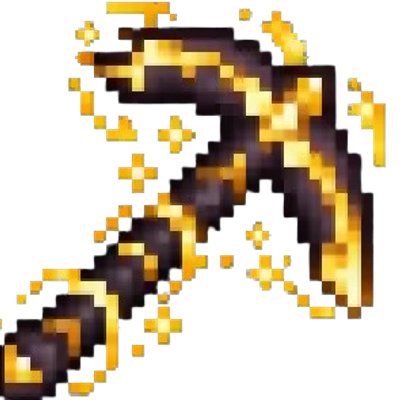
Radiant Orebreaker
The author built this one for Minecraft 26.50. On other versions it may install and then do nothing.
Radiant Orebreaker
Quickstart
- Obtain the item from the Creative inventory under Equipment, or use:
/give @s com_radiant_orebreaker_5dkhyqxo:my_sword - Equip the Radiant Orebreaker in your main hand.
- Mine a supported stone or Nether block.
- The block you mine triggers a 100 × 100 horizontal clearing on the same Y level. Non-ore blocks in that layer are removed, while ores remain in place.
- Look for the radiant particle aura around you while the item is held. The aura only appears when the Radiant Orebreaker is in your main hand.
Overview
The Radiant Orebreaker is a powerful mining tool that clears huge areas without destroying ores. Each successful mining action removes non-ore blocks across a one-block-high, 100 × 100 area centered around the mined block’s position.
Removed blocks are cleared directly and do not drop items. Ores are skipped and remain available for later mining.
What It Adds
- Radiant Orebreaker mining tool
- Large-area clearing across a 100 × 100 block layer
- Protection for vanilla overworld, deepslate, and Nether ores
- Protection for ancient debris
- Radiant particles and a periodic sound while held
- Pickaxe enchantment compatibility
- Netherite repair capability
How To Use
Hold the Radiant Orebreaker in your main hand and mine a block normally.
It works as a fast mining tool on:
- Stone
- Granite
- Diorite
- Andesite
- Deepslate
- Tuff
- Calcite
- Dripstone blocks
- Netherrack
- Basalt
- Polished basalt
- Blackstone
- End stone
- Obsidian
- Crying obsidian
Mining one of these blocks activates the area-clearing effect on the block’s horizontal layer. The clearing area extends 50 blocks in one direction and 49 blocks in the other, creating a 100 × 100 slice.
The tool must be in the main hand for its radiant aura and periodic sound to appear. Holding it in the offhand does not activate these effects.
Crafting And Obtaining
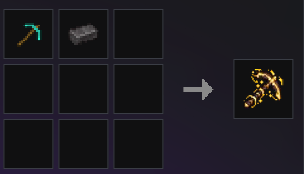
The Radiant Orebreaker is crafted shapelessly with a diamond pickaxe and a netherite ingot. The recipe becomes available after obtaining a diamond pickaxe.
- Edition: Minecraft Bedrock
- File type: .mcpack or .mcaddon
- Minecraft version listed: 26.50
- How to install: Download the .mcpack or .mcaddon file. → Open it — Minecraft imports it. → In your world: Behavior Packs → Available → Activate, then the same under Resource Packs.
- Where to get it: Opens on CurseForge — not every file is mirrored on our own servers.
Install steps are the general flow for this file type — How to install Minecraft Bedrock addons & mods walks through it step by step.
- Pack type: .mcaddon — behaviour and resource pack in one file
- Manifest requires Minecraft 1.26.40 or newer
- Complete pack — everything it depends on is inside the file
- Download size: 126 KB
- Download link checked 25 Sept 2026 — working
These come from our own check of the pack file, not from the source page.