
Andy's Visible Villager Trades
Reveal a villager's generated future offers while keeping them locked, then inspect real carried inventory and recorded villager events with an empty-hand…
⬇ Download on CurseForge
Andy's Visible Villager Trades
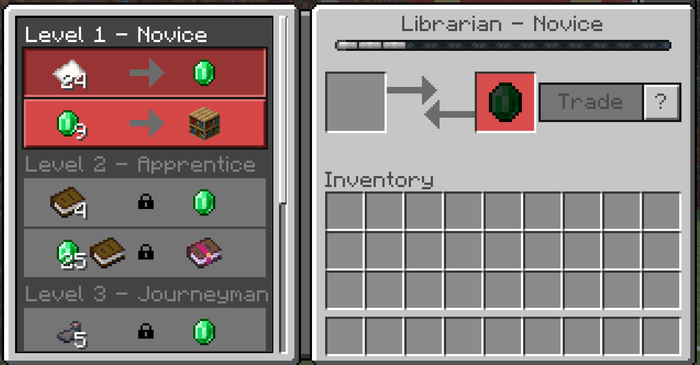
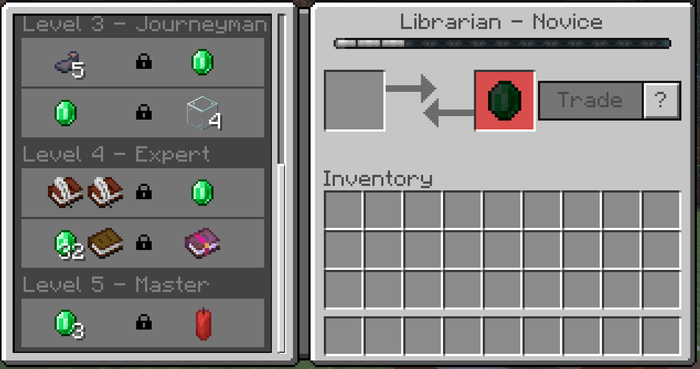
Planning a trading hall should not require leveling every villager just to discover what they might offer later. Andy's Visible Villager Trades reveals the offers Minecraft has already generated for a villager's future profession levels while keeping every unavailable offer locked behind normal progression.
The add-on also includes Villager Details: empty your main hand, crouch, and interact with a supported trader to inspect live status, carried inventory, and carefully labeled events recorded after installation. Minecraft still controls trading, prices, discounts, demand, restocking, villager XP, and progression; this add-on helps you see and understand more without turning trading into a shortcut.
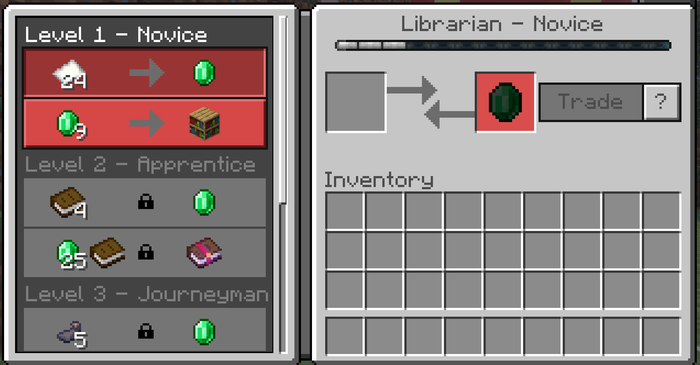
See generated future offers while Minecraft keeps them locked until the villager reaches the required level.
Vanilla-friendly by design
Does not replace villager trade tables, reroll offers, change costs, grant discounts, make trades free, alter restocking, or unlock future levels
Reuses Minecraft's native trade collections, item renderers, tooltips, prices, stock state, tier names, and progression rules
Uses a normal Stick renamed at an Anvil for optional operator controls instead of adding a custom administrative item
No cheats, Beta APIs, experimental gameplay toggles, or required add-on dependencies; commands are optional server-administration tools
Standard graphics and Vibrant Visuals/PBR support
Single-player, multiplayer, Realms, and compatible Bedrock servers
Requirements
Minecraft Bedrock Edition 26.30 or newer
Both Andy's Visible Villager Trades [BP] and Andy's Visible Villager Trades [RP] active on the world
The Resource Pack accepted by joining players so the expanded trade screen can appear
An empty main hand for the Villager Details gesture
A normal Stick and Anvil only if an operator wants the in-game world-settings menu
No required add-on dependencies
The add-on uses stable Script APIs supplied by Minecraft. Players do not need to enable cheats or experimental features. Both pack manifests include the add-on product declaration used for achievement-friendly behavior; achievement eligibility should still be confirmed in a fresh Survival world for the current Minecraft release and active pack set.
Installation
Windows and supported desktop devices
- Download the current
Andys_Visible_Villager_Trades_0.2.0.mcaddonfrom the official project page. - Open the
.mcaddonwith Minecraft Bedrock. - Wait for both Andy's Visible Villager Trades [BP] and Andy's Visible Villager Trades [RP] to import successfully.
- Create a world or edit the intended existing world.
- Activate the Behavior Pack, then confirm the linked Resource Pack is active.
- Enter the world and open a villager's normal trade screen. Scroll through the profession tiers to see its generated future offers.
Android and iOS
Download the .mcaddon, open or share it to Minecraft, allow both packs to import, then activate both linked packs on the intended world. The exact file-sharing steps vary by device and operating-system version.
Consoles through a Realm
Consoles generally do not offer the same local .mcaddon import workflow. Import and activate the add-on on a supported Windows or mobile device, upload that prepared world to a Realm, and join the Realm from the console. Minecraft will deliver the required world packs through its normal Realm process.
Servers and Realms
Install and activate both packs on the world before uploading or starting it. Joining players must accept the Resource Pack so future profession tiers and their locked rows appear correctly. Test the trade screen and Villager Details gesture in a backed-up staging copy before deploying to an established shared world.
Updating
- Back up the world.
- Import the newer
.mcaddonand wait for both pack updates to complete. - Edit the world and verify that matching versions of the Behavior Pack and Resource Pack are active.
- Remove or deactivate obsolete duplicate copies if Minecraft retained them.
- Completely leave and reopen the world before testing the update.
The pack UUIDs and saved world-setting keys are intended to remain stable across compatible updates. Existing observation records are preserved while their stored schema remains supported.
Quick start
- Open any adult villager's normal trading screen.
- Scroll through the visible tier headings to preview its generated future offers. Locked rows remain unavailable until ordinary trading raises the villager's level.
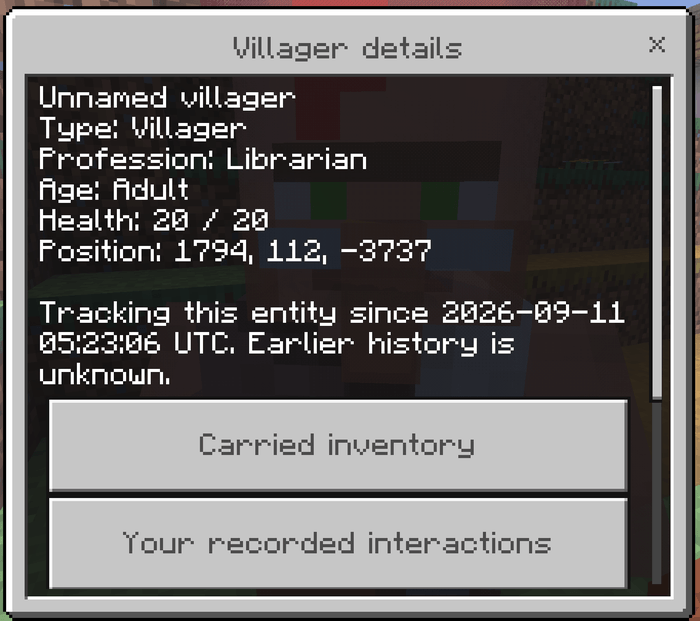
- Close trading, empty your main hand, crouch, and interact with the villager to open Villager Details.
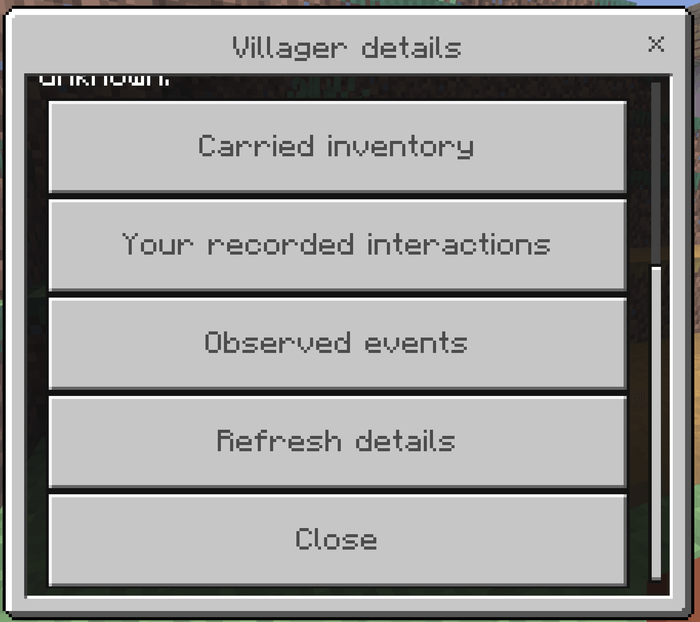
- Choose Carried inventory, Your recorded interactions, or Observed events, then use Refresh details when you want a new live status snapshot.
- If you run the world, keep the default settings for the first session. Adjust them later with the operator control Stick only if your world needs fewer inspector or recording features.
Crafting Recipes
AdminTradeControll (Anvil rename)
Recipe type: Anvil rename — no Crafting Table recipe
- Obtain a normal Stick.
- Rename it at an Anvil to exactly:
AdminTradeControll - While holding it, interact with a block or entity to open the world-settings form.
Exact match required: The name is case-sensitive and must be typed exactly as shown, including the double l at the end of Controll.
What it produces or unlocks: The renamed Stick opens the Villager inspector settings menu. It does not alter trade prices or progression.
Who can use it: Only a current world owner or operator can use the menu. Any player can rename a Stick, but the add-on checks operator permission before displaying or changing world settings.
Visible future trade tiers
What it does: The Resource Pack expands the familiar native villager trade screen so the generated offer collections for later profession levels can be viewed before they unlock. Novice through Master headings, quantities, item icons, enchantment tooltip data, crossed-out prices, demand-adjusted prices, stock state, locks, and villager XP continue to come from Minecraft's own trade interface.
Why and when to use it: Use the preview before committing emeralds, workstations, and space to a trading-hall villager. It helps you compare villagers based on the offers Minecraft already generated without rerolling, replacing, or manufacturing those offers.
Where to use it: Open the ordinary trade screen of a supported vanilla villager. Classic and Pocket interface profiles retain their native row heights and item sizes. Wandering Traders remain tierless because they do not use villager profession progression.
How to use it:
- Interact normally with a villager to open trading.
- Scroll through the profession tiers.
- Hover, focus, or tap an item using the controls provided by the current UI profile to read its native tooltip.
- Trade normally to earn villager XP and unlock later rows.
Suggested starting settings: No world setting is required for this feature. Keep the Resource Pack active and place it above other packs that replace trade_2_screen.json if the future tiers do not appear.
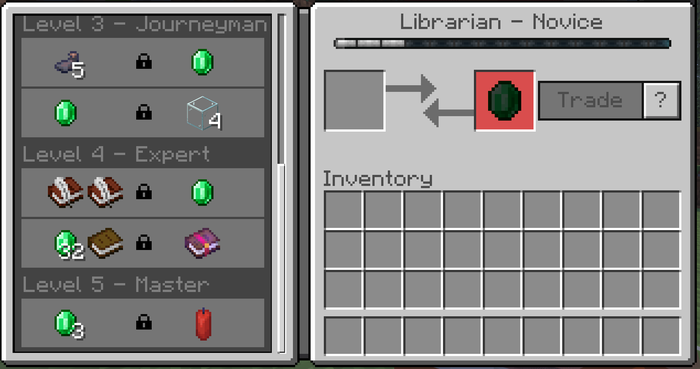
Locked rows are previews only. They have no added purchase mapping and remain read-only until Minecraft unlocks them through ordinary villager progression.
Villager Details
What it does: Villager Details shows a live, read-only status panel for villagers, zombie villagers, and Wandering Traders. Depending on what Minecraft exposes for that entity, it can show name, type, profession, adult or baby state, health, block position, current zombie-villager curing animation state, and when this add-on began tracking the entity.
Why and when to use it: Use the panel when organizing a village, checking an injured trader, distinguishing professions, watching a zombie-villager cure, or reviewing what this installation has observed. Unsupported information is shown as unavailable or omitted rather than guessed.
Where to use it: Stand within eight blocks of the target in the same dimension. The target must be a villager, zombie villager, or Wandering Trader.
How to use it:
- Empty your main hand.
- Crouch and interact with the target.
- Choose a details category, or select Refresh details to read current status again.
- Stay within eight blocks while using the forms. Moving too far away, changing dimensions, or losing the entity closes access safely.
Suggested starting settings: Leave Villager details panel on. The empty-hand requirement prevents the gesture from interfering with leads, name tags, emeralds, spawn eggs, golden apples, and other held-item interactions.
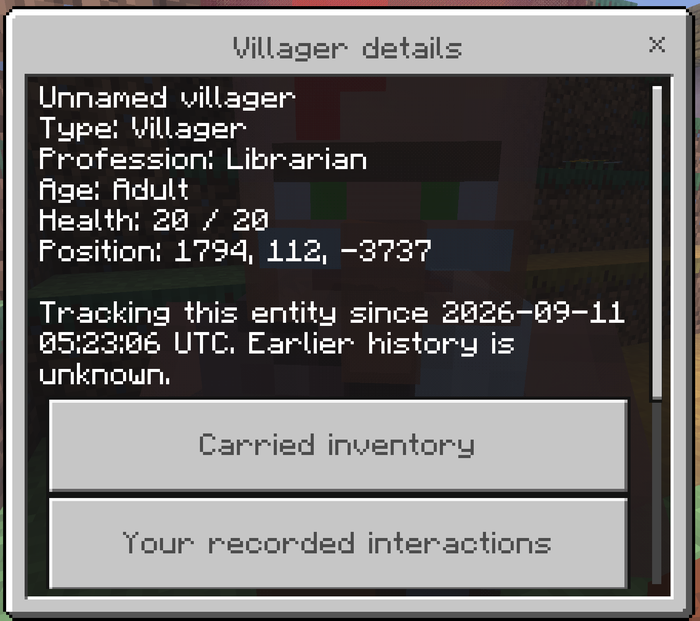
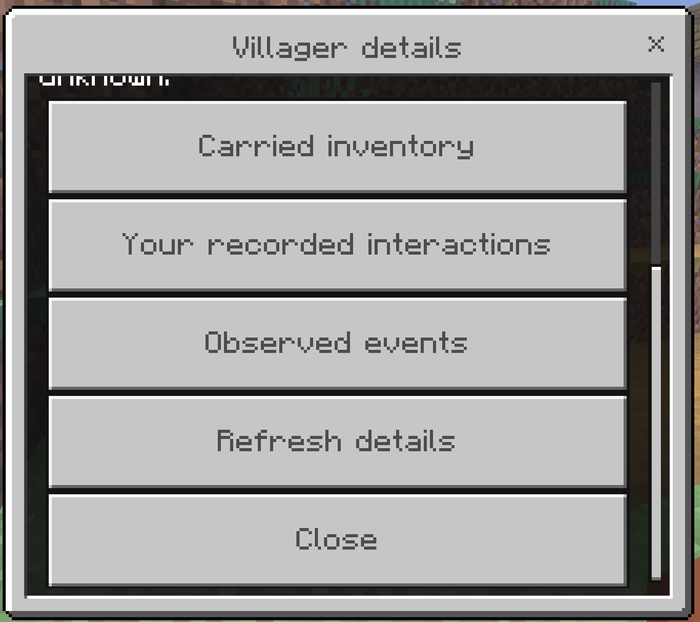
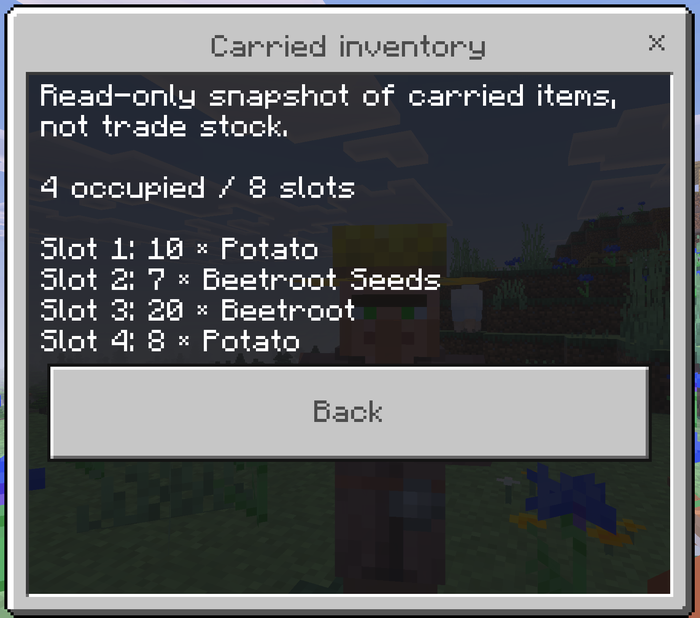
Carried inventory
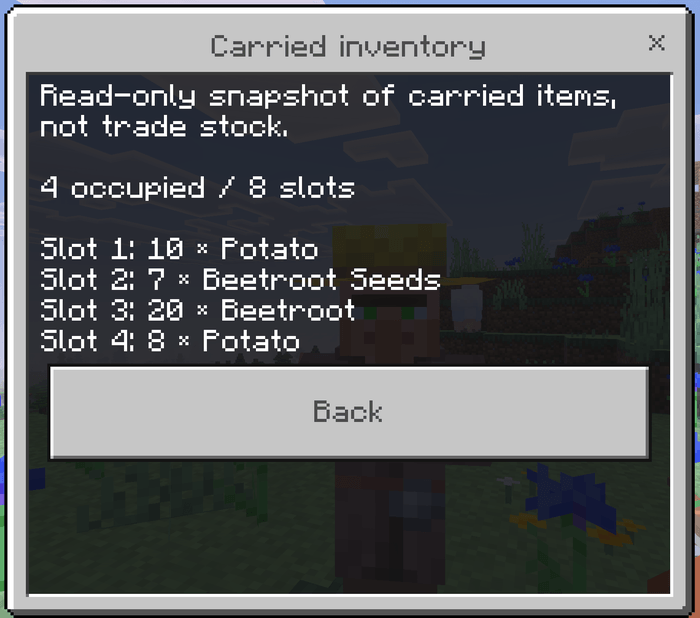
What it does: Displays a fresh, read-only snapshot of the entity's exposed inventory slots, including occupied slot numbers, item names, and stack amounts. This is carried inventory used by vanilla entity behavior; it is not the trade catalogue and does not predict offers.
Why and when to use it: Use it to understand what food or other items a villager is carrying without removing, moving, duplicating, or modifying anything. The panel distinguishes an empty available inventory from an inventory component that Minecraft did not make available.
Where to use it: Open Villager Details for a supported entity while Carried inventory display is enabled.
How to use it: Select Carried inventory. The snapshot is taken after the selection so the displayed contents are current at that moment. Choose Back to return to the main details panel.
Suggested starting settings: Leave the display on. Turn it off only when a server wants a simpler inspector or considers carried contents information that players should discover through ordinary observation.
Your recorded interactions
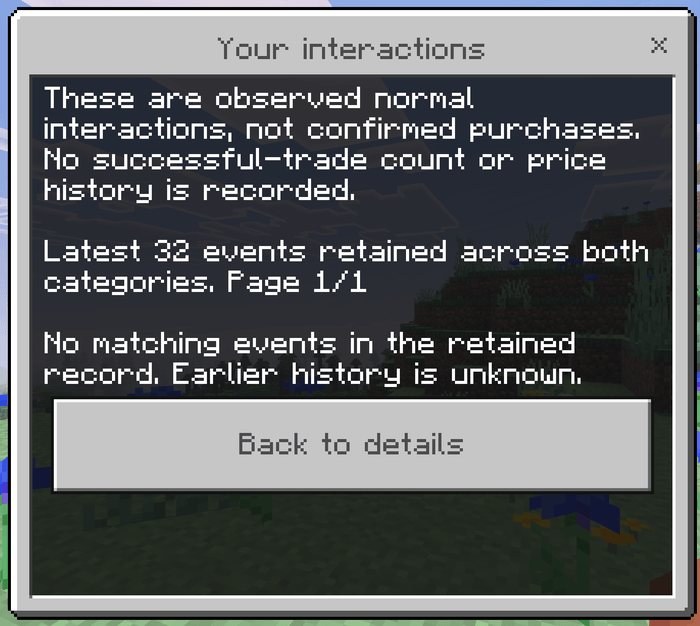
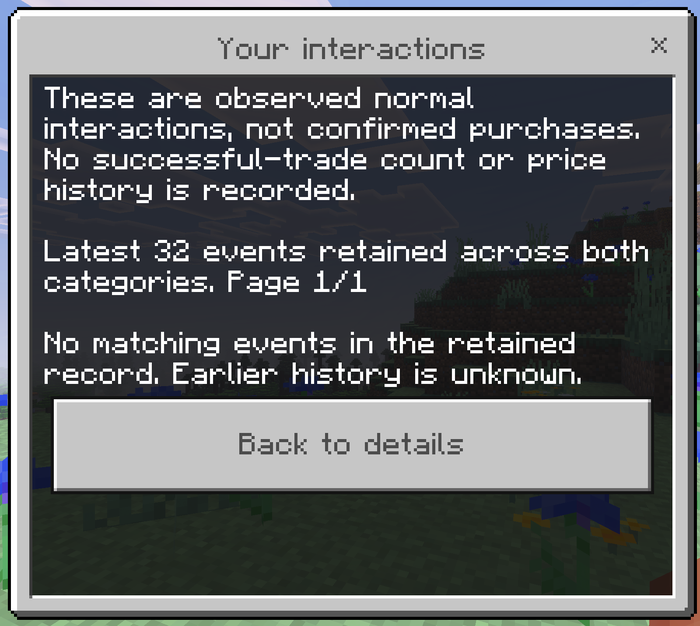
What it does: Records supported normal trading interactions with an entity after tracking is available, then shows only the current player's entries in Your recorded interactions. An empty-hand or emerald interaction may be recorded; interactions with leads, name tags, curing items, and other held objects are excluded from this history.
Why and when to use it: Use the list as a lightweight reminder of when you interacted with that trader. Every entry says purchase unconfirmed because the stable Script API does not expose a completed-trade event, transaction history, or reliable per-villager purchase count.
Where to use it: Open Villager Details for the same tracked entity. Records begin after installation and do not recover earlier history.
How to use it: Select Your recorded interactions and page through the retained entries. Four entries appear per page to keep the form usable on smaller screens.
Suggested starting settings: Leave Record trading interactions on if players want a personal activity trail. Turn it off when the world does not need interaction records; disabling it preserves older entries but stops adding new ones.
Observed villager events
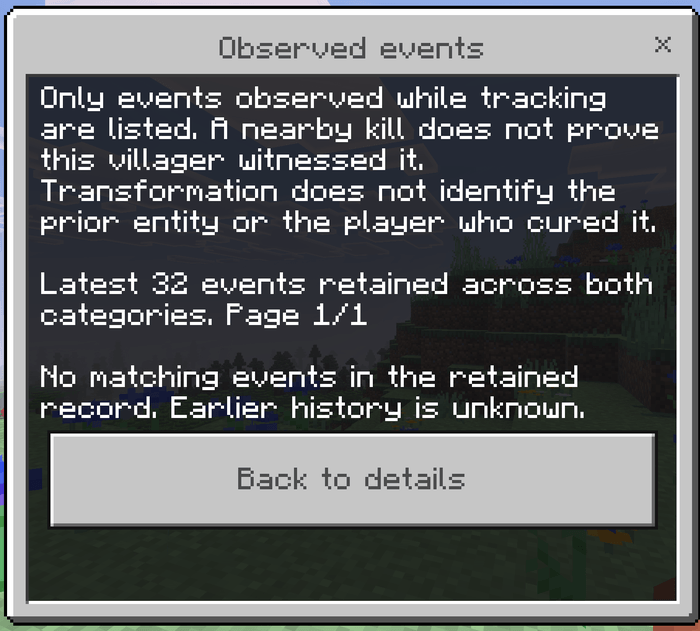
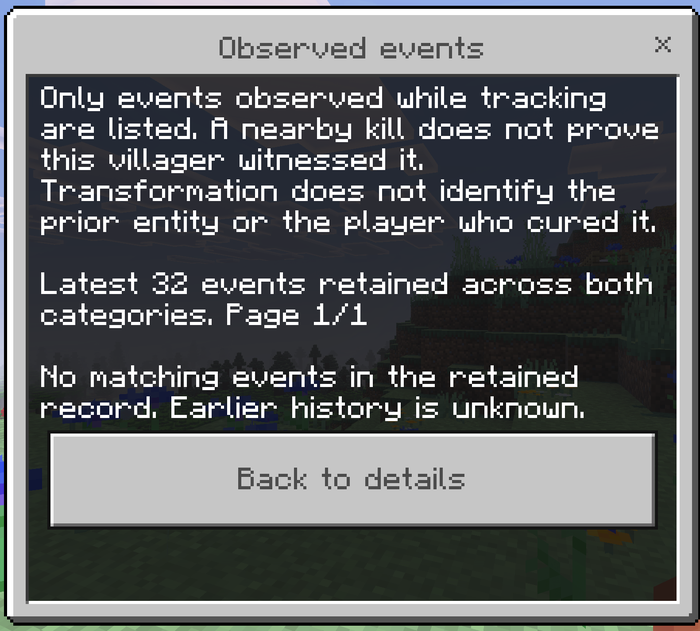
What it does: Records a bounded set of events the stable API can directly observe: player-attributed damage to a supported trader, a player killing a villager within 16 blocks of another tracked villager, curing starting on a zombie villager, and a villager or zombie-villager entity spawning through transformation.
Why and when to use it: Use the list when investigating recent harm, curing activity, or transformations around a village. The wording deliberately states only what the event proves. A nearby death does not prove a villager witnessed it, curing starting does not prove completion, and a transformed spawn does not reveal its predecessor or the responsible player.
Where to use it: Open Observed events from Villager Details. The record belongs to that entity and does not transfer or merge by proximity when one entity transforms into another.
How to use it: Select Observed events and page through the retained entries. The add-on keeps the latest 32 events across interaction and observation categories for each tracked entity.
Suggested starting settings: Leave Record damage and transformation events on for the clearest post-installation history. Disable it when a server does not want event recording; existing entries remain available unless the entity or its stored data is lost.
The add-on does not display or invent a villager reputation score. Minecraft continues to calculate native prices, including increases or discounts caused by vanilla mechanics, and those prices remain visible in the trade screen.
Admin & Operator Guide
Every category of inspector and recording behavior can be turned off by a world owner or server operator. The Resource Pack's future-offer display remains active while that Resource Pack is active because it is a trade-screen presentation feature rather than a scripted world setting.
In-game operator menu
Rename a normal Stick exactly AdminTradeControll, hold it, and interact with a block or entity. A current operator receives the Villager inspector settings form; a non-operator receives a permission message. Changes save immediately for the world, apply to all players, and remain in effect after restart. The menu also includes Reset inspector settings, which restores all four settings to on.
Villager details panel
What it controls: Enables the empty-hand crouch-interact inspector and its recording system. Turning it off prevents new inspector access and pauses all included recording.
Why and when to change it: Turn it off when a world wants only visible future trades or needs to suspend the inspector during troubleshooting.
Suggested starting value: On. Set it off only when intentionally disabling the entire Behavior Pack feature set while leaving the Resource Pack preview available.
Carried inventory display
What it controls: Shows or hides the Carried inventory button in Villager Details. It never changes the actual entity inventory.
Why and when to change it: Turn it off when a server wants status and event history without exposing carried items.
Suggested starting value: On for the complete inspector experience.
Record trading interactions
What it controls: Adds qualified normal interaction entries after installation and exposes Your recorded interactions in the panel.
Why and when to change it: Turn it off when the world does not need player-specific interaction reminders. Previously recorded entries are preserved.
Suggested starting value: On. Explain to players that these entries are interactions, not confirmed trades.
Record damage and transformation events
What it controls: Records supported damage, nearby villager deaths, curing starts, and transformed spawns, and exposes Observed events in the panel.
Why and when to change it: Turn it off when a server does not want those observations retained. Previously recorded entries are preserved.
Suggested starting value: On for village-management worlds; off for servers that want the smallest possible retained history.
Bedrock Dedicated Server / console access
Andy's Visible Villager Trades supports console administration without opening a form. These are stable custom commands with cheatsRequired set to false. BDS console and current in-game operators are accepted; command blocks and initiated command sources are rejected.
| Command | Effect |
|---|---|
andy_trades:status |
Report the current world settings and add-on version |
andy_trades:set <enabled\|inventory\|activity\|observations> <true\|false> |
Change one inspector or recording setting |
andy_trades:reset |
Restore all four settings to their defaults |
andy_trades:menu |
Print command help at the console or open the form for an in-game operator |
Examples:
andy_trades:status
andy_trades:set inventory false
andy_trades:set activity true
andy_trades:set observations true
andy_trades:reset
Suggested base configuration for a new server:
andy_trades:reset
andy_trades:status
That restores and confirms the recommended all-on defaults. Change only the categories your server policy requires.
Compatibility
Minecraft Bedrock Edition 26.30 or newer
Standard graphics and Vibrant Visuals/PBR
Classic and Pocket UI profiles using their native trade-row dimensions and item renderers
Single-player, local multiplayer, Realms, console clients joining through a Realm, and compatible Bedrock Dedicated Servers
Vanilla villagers, zombie villagers, and Wandering Traders for Villager Details; future-tier display applies where the native trade screen exposes the expected collections
No cheats, experimental gameplay toggles, Beta APIs, or required add-on dependencies
Other Resource Packs that replace trade_2_screen.json can conflict. Whichever definition wins the active pack order determines the displayed trade screen. Custom traders are compatible only when they expose the native collections expected by that screen.
The stable API cannot provide confirmed transaction history, earlier entity history, or a reliable villager reputation score. Records begin after tracking starts, retain the latest 32 events per entity, and do not follow an entity through transformation. The add-on never tries to reconstruct missing information from inventory changes, proximity, or price changes.
Troubleshooting
Future tiers do not appear
Confirm Andy's Visible Villager Trades [RP] is active and accepted by the client.
Move it above another pack that changes the villager trade screen, then reconnect.
After a Minecraft UI update, check the official project page for a compatible add-on update.
A locked trade appears clickable
Stop using that build for trading and report the Minecraft version, platform, Classic or Pocket UI, input method, active pack order, and a short video.
Locked purchase rejection is a release-critical behavior; do not assume a visible lock alone makes an offer safe.
Villager Details does not open
Empty the main hand, crouch, stand within eight blocks, and interact again.
Confirm Andy's Visible Villager Trades [BP] is active and the world setting Villager details panel is on.
Close other forms or screens before trying again.
A held-item interaction opens the inspector
- Record the exact item, target, and action, then report it. The inspector gesture is designed to accept only an empty main hand.
Inventory is empty or unavailable
Empty inventory means Minecraft exposed a readable container with no occupied slots.
Inventory unavailable means the target did not expose a valid readable container at that moment.
Neither result represents the villager's trade catalogue.
Recorded history is incomplete
History begins only after this add-on starts tracking that entity.
Each entity retains the latest 32 events across both categories.
Disabled categories do not record new events, though earlier entries remain stored.
Normal interaction is not proof of purchase, and records do not transfer across entity transformations.
Admin controls are denied
Confirm the Stick is named exactly
AdminTradeControll, including capitalization and the final doublel.Confirm the player is currently a world operator.
On a dedicated server, enter the documented commands from the BDS console. Command blocks are intentionally denied.
Achievements or Vibrant Visuals are unavailable
Confirm cheats and all experiments are off and both current packs are active.
Check whether another active add-on changes achievement eligibility or graphics behavior.
Reproduce the issue in a fresh backed-up test world and include the complete active-pack list in the report.
Reporting problems
Include:
Andy's Visible Villager Trades version
Exact Minecraft Bedrock version and platform
Classic or Pocket UI profile and input method
Standard or Vibrant Visuals graphics
Single-player, multiplayer, Realm, or Bedrock Dedicated Server
Active Behavior and Resource Pack order
Target type: villager, zombie villager, or Wandering Trader
Relevant inspector settings and whether the target was already being tracked
Exact reproduction steps and any messages shown
Screenshots or video
Relevant Content Log or server-console entries
Whether the issue repeats in a new backed-up test world with other add-ons disabled
Support AndyTheMakerMC
All of my Minecraft Bedrock add-ons are free to download and use. If one of my add-ons has improved your world, saved you time, or added something you wish Minecraft already had, consider supporting continued development. Your support helps fund the time and tools required to maintain existing add-ons, test new Minecraft Bedrock releases, fix bugs, create documentation and artwork, and continue building new add-ons.
Help me keep these add-ons free, updated, and actively maintained — support through Buy Me a Coffee or a direct donation through Stripe. Prefer another way? Ko-fi · Patreon · GitHub Sponsors. Every bit of support is appreciated, but it is never required.
Enjoying the add-on? Ratings, favorites, recommendations, and kind comments also help more Bedrock players discover Andy's work.
Explore more of Andy's add-ons
Visit AndyTheMakerMC.xyz for more Minecraft Bedrock add-ons, .mcstructure downloads, HoloPrint files, world lore, tutorials, guides, videos, and other creations.
Follow AndyTheMakerMC
Follow @AndyTheMakerMC for new add-on releases, development updates, tutorials, showcases, streams, and more Minecraft adventures, and join the community on Discord and Facebook:
End-user permission
You may download the official, unmodified release of Andy's Visible Villager Trades from its official CurseForge or authorized GitHub project page and install, activate, and use it in personal single-player worlds, multiplayer worlds, Realms, and compatible Bedrock servers.
This permission includes Minecraft's normal automatic delivery of the official, unmodified add-on to players joining a world, Realm, or server where it is active. It does not permit offering the add-on file separately or distributing it as part of a world download, modpack, bundle, mirror, archive, or server download.
Content-creator permission
Content creators may use an official, unmodified release of Andy's Visible Villager Trades in original gameplay videos, livestreams, screenshots, tutorials, reviews, showcases, articles, guides, social posts, and other original content, including monetized content.
Credit to AndyTheMakerMC and a link to the official CurseForge project page are appreciated whenever practical. This permission covers display of normal gameplay and commentary; it does not grant permission to redistribute, modify, extract, or republish the add-on or its assets.
License — All Rights Reserved
All Rights Reserved. Copyright © 2026 Andy / AndyTheMakerMC.
You may not redistribute, reupload, rehost, mirror, resell, sublicense, bundle, repackage, modify and publish, translate, adapt, decompile, disassemble, reverse engineer, extract, or reuse the add-on, its source code, scripts, documentation, branding, textures, models, pack icons, or promotional artwork without prior written permission from the copyright holder.
You may not create derivative works or incorporate any portion of the project into another add-on, Behavior Pack, Resource Pack, application, product, modpack, download, or project without prior written permission. The end-user and content-creator permissions above are limited permissions; they do not transfer ownership or grant redistribution rights.
The promotional artwork is original AI-assisted concept artwork directed for this project. It is not an in-game screenshot.
Minecraft is a trademark of Microsoft Corporation. This project is not affiliated with, endorsed by, sponsored by, or associated with Microsoft or Mojang Studios.
- Edition: Minecraft Bedrock
- File type: .mcpack or .mcaddon
- Minecraft versions listed: 26.30, 26.40, 26.50
- How to install: Download the .mcpack or .mcaddon file. → Open it — Minecraft imports it. → In your world: Behavior Packs → Available → Activate, then the same under Resource Packs.
- Where to get it: Opens on CurseForge — not every file is mirrored on our own servers.
Install steps are the general flow for this file type — How to install Minecraft Bedrock addons & mods walks through it step by step.
Andy's Visible Villager Trades is a free Minecraft Bedrock addon. Compatible with Minecraft 26.30, 26.40, 26.50. Downloaded 81 times (via CurseForge). Download it and open it directly in the game.