
ModsJava
Aps Areas
Java mod listed for Minecraft 1.21. Downloads from the MC Java Mods app on Android.
⬇ Download on Modrinth

APS Areas
APS Areas is a lightweight, server-side Fabric mod that lets server administrators define 3D regions and execute commands automatically when players step inside.
Whether you need server portals, secret triggers, region-based rewards, or custom world events, APS Areas handles it directly on the server with zero client-side mod requirements.
Features
- Custom 3D Regions: Set up areas using two coordinate corners (
x, y, z). - Multi-Command Execution: Run up to 10 distinct commands per area sequentially when a player enters.
- Configurable Check Interval: Adjust how frequently the server checks for players inside regions (in server ticks) to optimize server performance.
- Operator Security: All setup commands are strictly locked to server operators (Permission Level 4).
- Command Placeholders: Supports
{player},{x},{y}, and{z}variables inside configured commands. - Persistent Data: Configured regions and mod settings automatically save to the server's
config/apsareas/folder.
Commands & Permissions
All commands require Operator Permission Level 4.
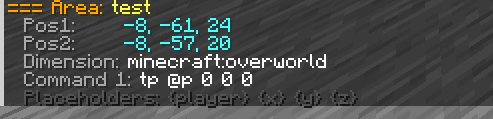
/apsareas create <id> <pos1> <pos2> "<cmd1>" ... [up to 10 commands]— Creates a new area trigger between two corner coordinates./apsareas remove <id>— Deletes an existing area./apsareas list— Displays all active areas, their coordinates, and the current tick check rate./apsareas info <id>— Shows detailed information and configured commands for a specific area./apsareas settickrate <ticks>— Adjusts how often the server scans player positions (default:5ticks)./apsareas reload— Reloads areas and settings directly from the config files.
Quick facts
- Edition: Minecraft Java
- File type: .jar
- Minecraft version listed: 1.21.1
- How to install: Install the matching mod loader (Forge, Fabric or NeoForge) for your Minecraft version. → Download the .jar. → Put it in the .minecraft/mods folder and launch that loader profile.
- Where to get it: Opens on Modrinth — not every file is mirrored on our own servers.
Install steps are the general flow for this file type — How to install Minecraft Java mods & modpacks walks through it step by step.
File checked by MCModsHub
- Ships as apsareas-1.0.1.jar — drop this file into the mods folder
- Download size: 17 KB
- Download link checked 26 Sept 2026 — working
These come from our own check of the pack file, not from the source page.