
BrodcastCraft
Java mod listed for Minecraft 1.20. Downloads from the MC Java Mods app on Android.
⬇ Download on Modrinth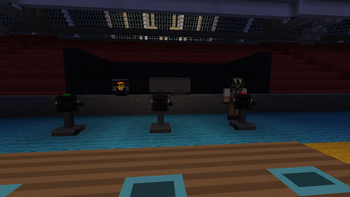
BroadcastCraft
Build the studio. Direct the show. Broadcast it across your Minecraft world.
Point a camera at your friend. Cut to it from the mixer. Someone two thousand blocks away switches on a television and watches it happen live.
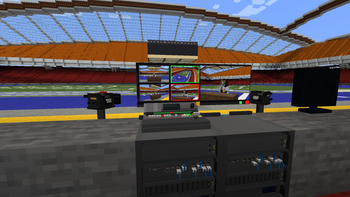
BroadcastCraft is a working television station for Minecraft. The cameras genuinely capture what they are pointed at — rendered from the physical lens, not faked with a texture. A vision mixer decides which camera is on air. Televisions anywhere in the world tune in by channel number and receive the finished programme.
New here? Open the Handbook first
The first item in the creative tab is the Broadcast Handbook. Ten chapters, and a seven-step build-along that takes you from an empty field to a working station in a few minutes — plus a troubleshooting page that tells you what every monitor status colour means.
If you have looked at this mod before and wondered where to start, start there.
How a station works
Three blocks are enough:
- A camera captures the picture.
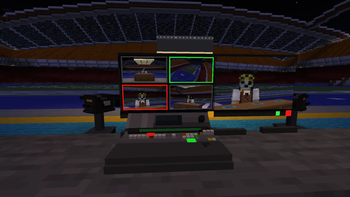
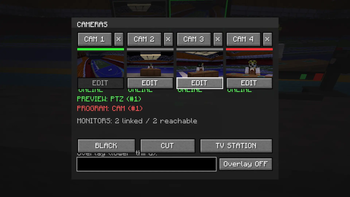
- The Vision Mixer holds up to four cameras and picks which one is on air. Everything you line up sits on Preview (green) until you cut it to Program (red) — the same two-bus setup a real gallery uses.
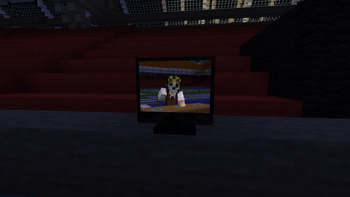
- A Broadcast Monitor shows the crew what is happening: the live output, the shot you are lining up next, one fixed camera, or all four at once.
Link them with the Camera Linking Tool: right-click the source, then the destination. That is the whole wiring system.
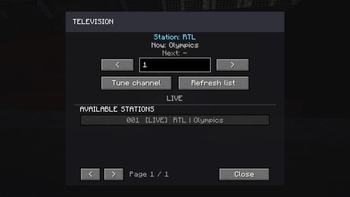
Then publish the mixer's output as a TV station with a channel number and a name, and every television in the world can tune to it.
Cameras
- Pedestal and PTZ cameras, both fully operable
- Right-click to take control: pan, tilt and real optical-style FOV zoom, seeing exactly what the camera sees
- Red Program and green Preview tally lights, so everyone on set knows which camera is live
- Four reusable position presets per PTZ camera
- Custom names and numbers
- Operator locking, so two people cannot fight over one camera
Control room
- Preview/Program buses, CUT and BLACK
- Live thumbnails in the switcher, so you can see what you are cutting to
- Multiview — all four cameras in a 2×2 grid, with red and green borders marking what is on air and what is next
- Graphics overlay — burn a line of text into the Program picture; a name, a score, a headline. It appears only on air, like a real graphics insert
- Redstone output from the mixer, so an ON AIR sign, a door or a lamp can react to whichever camera is live
- Monitors mount on a wall or stand on a desk
Broadcasting
- Named TV stations on channels 1–999
- Working televisions with a channel directory, a paired remote control, and a fullscreen view
- Now/Next programme information published from the mixer
- Filler images — when a station is off air, televisions can show your own PNGs or JPGs instead of a blank screen. A test card, a logo, a slideshow
Audio (optional)
With Simple Voice Chat installed, speak in front of a camera that is on Program and you are heard from every television tuned to that station, anywhere in the world. Stand in front of a Preview camera and nobody hears you — you are not on air, in picture or in sound.
Not installed? Nothing changes; the mod runs exactly the same.
Period look (optional)
Give televisions a PAL or NTSC picture: scanlines and a period colour cast, PAL finer and cooler, NTSC coarser and warmer. Broadcast Monitors stay clean, the way a real gallery looks at clean feeds. Off by default.
Things people build with it
- A news desk with two cameras and a presenter, cut live
- Stadium screens showing a PvP arena from four angles
- A security wall of monitors, each locked to one fixed camera
- A server-wide channel that anyone can tune into from their base
- A control room that is just fun to sit in
Multiplayer
Built for it, not retrofitted. Every action is validated on the server, so what one player switches, everyone sees — and camera, mixer, station and schedule configuration all survive a restart.
A studio works fine for one player, and scales to a production team running a live event.
Requirements
- Minecraft 1.20.1
- Minecraft Forge 47.4.10 or newer
- Java 17
- Install on both client and server
Honest limitations
Shaderpacks (Iris/Oculus) are untested. Monitor screens work by rendering the world a second time into an off-screen texture — exactly the part a shader pipeline replaces. Expect problems for now; compatibility work has not started.
Chunk loading. A camera can only produce a picture while its part of the world is loaded. If nobody is near your studio, distant televisions show a station-offline screen. That is how Minecraft loads the world rather than a bug, and the Handbook explains the practical ways around it.
Where it is going
Talkback and intercom, local video playback with scheduling, more studio equipment, and audio control-room tools. Shader compatibility is on the list.
BroadcastCraft turns broadcasting into a real Minecraft gameplay system — not just decoration.
- Edition: Minecraft Java
- File type: .jar
- Minecraft versions listed: 1.20.1, 1.20.2, 1.20.3
- How to install: Install the matching mod loader (Forge, Fabric or NeoForge) for your Minecraft version. → Download the .jar. → Put it in the .minecraft/mods folder and launch that loader profile.
- Where to get it: Opens on Modrinth — not every file is mirrored on our own servers.
Install steps are the general flow for this file type — How to install Minecraft Java mods & modpacks walks through it step by step.
- Ships as broadcastcraft-0.2.0.jar — drop this file into the mods folder
- Download size: 651 KB
- Download link checked 16 Oct 2026 — working
These come from our own check of the pack file, not from the source page.