
ModsJava
ChatConfirm
Java mod listed for Minecraft 26.x. Downloads from the MC Java Mods app on Android.
⬇ Download on Modrinth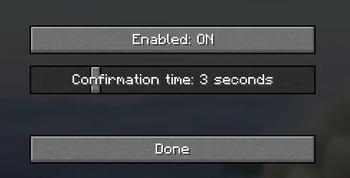
ChatConfirm
ChatConfirm is a lightweight client-side Fabric mod that helps prevent accidentally opening Minecraft chat. Instead of opening immediately, the chat screen only opens after you press your configured chat key twice within the confirmation period.
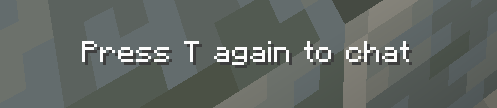
When you press the chat key for the first time, ChatConfirm displays a short reminder such as “Press T again to chat”, automatically using your current Minecraft chat keybind.
Features
- Requires two chat-key presses to open chat
- Displays your configured chat key in the reminder
- Enable or disable the mod with a customizable keybind
- Configurable confirmation time from 1–10 seconds
- Settings screen accessible through Mod Menu or an optional keybind
- Settings are saved between game sessions
- Completely client-side—servers do not need to install it
Requirements
- Minecraft Java Edition 1.21.11
- Fabric Loader
- Fabric API
- Mod Menu is optional but recommended
Created by lnfecting.
Quick facts
- Edition: Minecraft Java
- File type: .jar
- Minecraft version listed: 26.2
- How to install: Install the matching mod loader (Forge, Fabric or NeoForge) for your Minecraft version. → Download the .jar. → Put it in the .minecraft/mods folder and launch that loader profile.
- Where to get it: Opens on Modrinth — not every file is mirrored on our own servers.
Install steps are the general flow for this file type — How to install Minecraft Java mods & modpacks walks through it step by step.
File checked by MCModsHub
- Ships as ChatConfirm-26.2-1.0.jar — drop this file into the mods folder
- Download size: 32 KB
- Download link checked 26 Sept 2026 — working
These come from our own check of the pack file, not from the source page.