




RWR-Discord Webhook
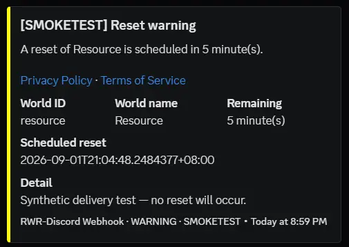
Discord webhook notifications for ResourceWorldResetter — reset warnings and outcomes in your staff channel, without a Discord bot.
Why use it
- See resets coming — configured RWR warning thresholds post to Discord before a resource world regenerates
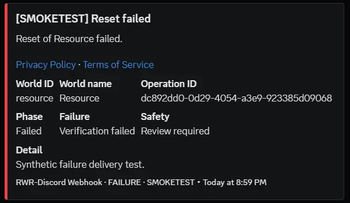
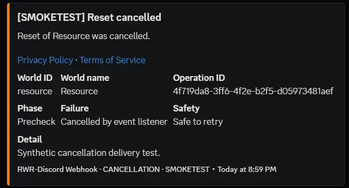
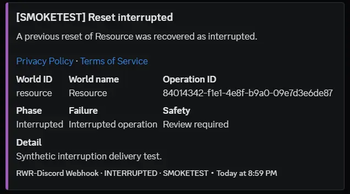
- See how they finished — success, failure, cancellation, or interrupted after a restart or crash
- Ping staff on purpose — optional role and user mentions from an allow-list; off by default
- Keep the server moving — HTTP delivery stays off the Bukkit and Folia server thread
- Survive Discord blips — pending messages retry and resume after a restart
- Keep webhook secrets off the queue file — URLs are redacted from logs and never stored in the durable queue
- One jar for Spigot, CraftBukkit, Paper, Purpur, and Folia
- Loads without RWR — the add-on stays enabled; reset events are forwarded only when
RwrApiis available
Features
Notifications
- Warning embeds: world ID, world name, time remaining, scheduled reset time
- Terminal embeds: operation ID, phase, failure type, safety classification, and detail message
- Configuration confirmation after startup or reload (RWR API status, add-on version, server)
- Intermediate reset phases are never sent
- Toggle warnings, success, failures, cancellations, and interrupted events independently
- Per-category embed colors
Delivery
- HTTPS posts to a Discord incoming webhook you configure (
discord.com/discordapp.com) - Durable queue (up to 500 entries, 24-hour TTL, up to 8 attempts)
- Honors Discord
Retry-Afteron HTTP 429 - Custom webhook username and avatar
- Leave
webhook.urlempty to disable delivery
Mentions and language
- Mentions stay off until you enable them and list Discord role/user IDs
- Locale strings and RWR event text are sanitized so they cannot ping
- Own locale files (
locale: en_US,locales/<code>.yml, English fallback)
This plugin is webhook-only. It does not use a Discord bot token, does not connect to the Discord Gateway, and does not read channels or members.
Getting started
- Install ResourceWorldResetter for your server (Spigot / CraftBukkit → Spigot jar, Paper / Purpur / Folia → Paper-Folia jar).
- Place this plugin’s jar in
plugins/and start the server once. - Set
webhook.urlinplugins/RWR-Discord-Webhook/config.yml. - Reload, then check status.
/rwrdiscord reload
/rwrdiscord status
If ResourceWorldResetter exposes /rwr discord, that is the preferred wording (/rwr discord reload, /rwr discord status). Aliases: rwr-discord, rwr-discord-webhook, rwrwh. Permission: rwrdiscord.admin (default: op).
webhook:
  url: "https://discord.com/api/webhooks/..."
Requirements
- Java 21+
- Minecraft 1.21+ (
api-version1.21) - Spigot, CraftBukkit, Paper, Purpur, or Folia
- ResourceWorldResetter 5.1+ for reset notifications
- A Discord incoming webhook
Addons / integrations
- ResourceWorldResetter — required for reset events. Install the RWR jar that matches your server; you do not install a separate API jar.
- Discord incoming webhooks — the only Discord integration
Metrics
This plugin uses bStats (plugin ID 33788) for anonymous server usage statistics, such as server software version, online player count, and plugin version.
bStats does not receive webhook URLs, Discord message content, world or operation identifiers, or player identities.
Opt out in plugins/bStats/config.yml:
enabled: false
That file is controlled by bStats, not this plugin’s config.yml.
Links
Copyright: Lozaine@TamaWish · BSD 3-Clause
- Edition: Minecraft Java
- File type: .jar
- Minecraft versions listed: 1.21.4, 1.21.5, 1.21.6
- How to install: Install the matching mod loader (Forge, Fabric or NeoForge) for your Minecraft version. → Download the .jar. → Put it in the .minecraft/mods folder and launch that loader profile.
- Where to get it: Opens on Modrinth — not every file is mirrored on our own servers.
Install steps are the general flow for this file type — How to install Minecraft Java mods & modpacks walks through it step by step.
- Ships as RWR-Discord-Webhook-1.1.0.jar — drop this file into the mods folder
- Download size: 418 KB
- Download link checked 26 Sept 2026 — working
These come from our own check of the pack file, not from the source page.