
KoyaGPS
ArrowGuide Showcase GitHub: Text Transcript KoyaGPS KoyaGPS is a lightweight and customizable GPS and navigation plugin for Minecraft servers. It provides…
⬇ Download on Modrinth




GitHub: https://github.com/Alireza009d
Text TranscriptKoyaGPS
KoyaGPS is a lightweight and customizable GPS and navigation plugin for Minecraft servers.
It provides an in-game GPS system that helps players navigate to configured locations through a graphical interface, path-finding guidance, directional arrows, BossBar, and ActionBar navigation displays.
KoyaGPS is designed for servers that want an easy-to-use navigation system for players, quests, destinations, and other gameplay purposes.
Features
🧭 GPS Navigation System
- Allows players to navigate to configured locations.
- Provides directional guidance toward the selected destination.
🗺️ GUI-Based Navigation
- Provides a graphical interface for selecting and managing GPS destinations.
- Includes pagination support for navigation locations.
- Pagination can be enabled or disabled through
config.yml.
🧭 Path Finding
- Provides navigation guidance toward the selected destination.
- Designed to make following a destination easier for players.
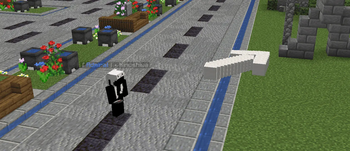
➡️ ArrowGuide
- Displays a directional arrow to help players follow their selected route.
- Includes configurable arrow modes.
- ArrowGuide can be configured through
config.yml. - Arrow visibility can be configured to control whether other players can see navigation arrows.
📊 BossBar Support
- Displays navigation information through the Minecraft BossBar.
- BossBar navigation can be enabled or disabled through the configuration.
💬 ActionBar Support
- Displays navigation updates through the ActionBar.
🚀 Fast Travel
- Allows players to quickly travel to configured GPS destinations.
- Fast Travel can have a configurable cost.
- The cost can be based on the travel distance.
- A permission can be used to bypass the Fast Travel cost.
🌍 Language Configuration
- Plugin messages can be customized through
lang.yml. - The language configuration can be modified to suit different servers and languages.
- Plugin messages can be customized through
⚙️ Highly Configurable
- Multiple navigation features can be enabled, disabled, and customized through configuration files.
🔐 Permission Support
- Provides permissions for administrative features and GPS styles.
⚡ Lightweight
- Designed to provide navigation functionality while keeping the plugin lightweight.
Navigation
Players can select a destination through the GPS system and receive navigation guidance toward it.
Depending on the server configuration, navigation information can be displayed through:
- ArrowGuide
- BossBar
- ActionBar
The available navigation options can be customized by the server administrator.
Fast Travel
KoyaGPS includes a Fast Travel system for configured destinations.
Server administrators can configure a Fast Travel cost, including distance-based pricing.
Fast Travel also supports a permission-based cost bypass.
ArrowGuide
ArrowGuide provides an on-screen directional indicator that points players toward their selected destination.
The ArrowGuide system includes configurable modes and visibility settings.
Server administrators can configure whether navigation arrows are visible only to the player using GPS or can also be seen by other players.
Configuration
KoyaGPS provides configuration options for its navigation and gameplay systems.
Depending on the configuration, administrators can customize:
- GPS destinations
- Navigation displays
- ArrowGuide settings
- Arrow visibility
- BossBar
- ActionBar
- Pagination
- Fast Travel
- Fast Travel costs
- Language and messages
- GPS styles
Permissions
The plugin supports permission-based access to administrative and GPS style features.
Available Permissions
gps.admin— Provides access to administrative GPS features.gps.style.{Style Name}— Allows access to a configured GPS style.
Installation
- Download the latest version of KoyaGPS.
- Place the
KoyaGPS.jarfile into your server'spluginsfolder. - Restart your Minecraft server.
- Configure KoyaGPS to match your server's needs.
- Start using the GPS system.
Compatibility
KoyaGPS has been tested with major Minecraft versions including:
- Minecraft 1.17
- Minecraft 1.18
- Minecraft 1.19
- Minecraft 1.20
- Minecraft 1.20.6
- Minecraft 1.21
The plugin supports Bukkit/Spigot-based Minecraft servers.
Languages
KoyaGPS uses a customizable language configuration file, allowing server administrators to customize plugin messages and adapt the plugin to their preferred language.
Support
If you find a bug, have a suggestion, or need help with KoyaGPS, please contact us through the support Discord.
When reporting a bug, please include your Minecraft version, KoyaGPS version, server software, and a detailed description of the issue.
Links
- Discord: https://discord.gg/aq59NCapQ9
- GitHub: https://github.com/Alireza009d
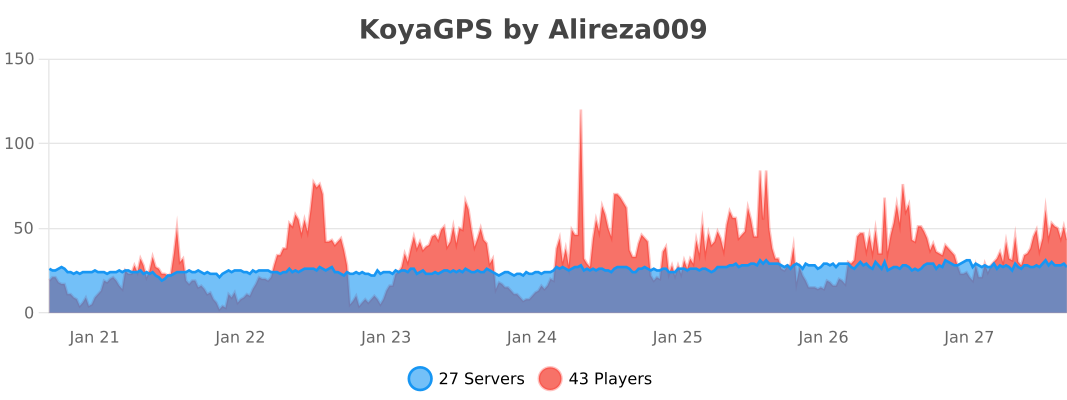
- bStats: https://bstats.org/plugin/bukkit/KoyaGPS/24717
Video
The video above demonstrates the ArrowGuide navigation feature of KoyaGPS.
- Edition: Minecraft Java
- File type: .jar
- Minecraft versions listed: 1.17, 1.17.1, 1.18
- How to install: Install the matching mod loader (Forge, Fabric or NeoForge) for your Minecraft version. → Download the .jar. → Put it in the .minecraft/mods folder and launch that loader profile.
- Where to get it: Opens on Modrinth — not every file is mirrored on our own servers.
Install steps are the general flow for this file type — How to install Minecraft Java mods & modpacks walks through it step by step.
- Ships as KoyaGPS-1.2.0.jar — drop this file into the mods folder
- Download size: 1.2 MB
- Download link checked 27 Sept 2026 — working
These come from our own check of the pack file, not from the source page.