
RWR-PlaceholderAPI
Java mod listed for Minecraft 1.21–26.x. Downloads from the MC Java Mods app on Android.
%rwr_% placeholders for ResourceWorldResetter on Spigot, Paper, Purpur, and Folia. Reset phase, status, and countdown for PAPI consumers.
⬇ Download on Modrinth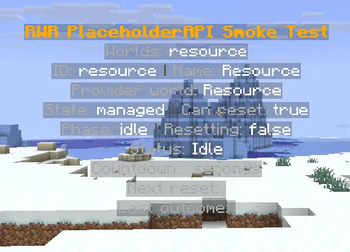












The official PlaceholderAPI add-on for ResourceWorldResetter.
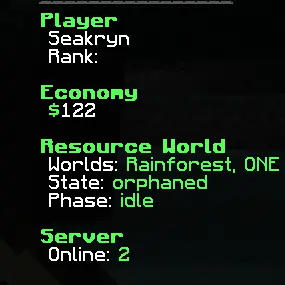
Display managed resource worlds, reset phases, status messages, and countdowns in TAB, scoreboards, holograms, menus, chat, or any other PlaceholderAPI-compatible plugin.
One jar supports Spigot, CraftBukkit, Paper, Purpur, and Folia. Install the ResourceWorldResetter build made for your server platform.
Why use it
- Player-facing reset info without opening admin GUIs or running
/rwr status - Live phase and status for every managed resource world
- Countdown and last outcome after reset warnings and completed resets
- Current-world shortcuts so each player sees their own managed world
- Scoreboard-safe caching so frequent refreshes do not hammer RWR
- Safe when dependencies are missing — falls back until RWR and PlaceholderAPI are ready
- One jar for Spigot, CraftBukkit, Paper, Purpur, and Folia
- Configurable locale, separators, date format, and empty-value fallbacks
Features
Placeholders (rwr)
- Global lists:
%rwr_worlds%,%rwr_world_names% - Per world: id, name, Bukkit world, state, phase, status, can-reset, resetting, countdown, next reset, last outcome
- Player shortcuts when online in a managed world:
%rwr_phase%,%rwr_countdown%, and the other short keys - Underscore-safe world IDs (longest-first match)
Runtime
- Soft-depends on ResourceWorldResetter (or Paper-Folia build) and PlaceholderAPI
- Uses the public RWR API from the running RWR plugin — do not install a separate
rwr-apijar - Snapshot cache (default 1.5s) with immediate invalidation on warning / pre-reset / post-reset
- Locale files under
locales/with English fallback
Admin
/rwrplaceholder reloadand/rwrplaceholder status- Permission:
rwrplaceholder.admin(default: op) - Aliases:
/rwrpapi,/rwrph
Getting started
- Install ResourceWorldResetter 5.1+ (Spigot jar or Paper-Folia jar for your server) and PlaceholderAPI 2.11.7+.
- Drop
RWR-PlaceholderAPI-1.1.0.jarintoplugins/. - Start once to generate
plugins/RWR-PlaceholderAPI/config.yml. - Use
%rwr_...%in any PlaceholderAPI consumer.
Example (TAB / scoreboard line):
Resource: %rwr_name% | Phase: %rwr_phase% | Reset in: %rwr_countdown%s
Or pin a configured world ID:
%rwr_world_resource_phase% · %rwr_world_resource_countdown%s
Countdown, next-reset, and last-outcome fill in after a warning or post-reset event in the current session. After a restart they stay empty until the next event.
Requirements
- Java 21+
- Minecraft 1.21.4+ (including 26.x)
- Server: Spigot, CraftBukkit, Paper, Purpur, or Folia
- ResourceWorldResetter 5.1+
- PlaceholderAPI 2.11.7+
Integrations
- ResourceWorldResetter — required host plugin (SpigotMC · CurseForge · wiki)
- PlaceholderAPI — required for placeholder parsing
- Any PlaceholderAPI consumer (TAB, holograms, menus, chat, etc.)
Metrics
RWR-PlaceholderAPI uses bStats for anonymous server usage statistics (plugin ID 33789).
Disable collection globally in plugins/bStats/config.yml by setting enabled: false, then restart the server. This add-on has no separate metrics toggle.
Links
Licensed under the BSD 3-Clause License.
- Edition: Minecraft Java
- File type: .jar
- Minecraft versions listed: 1.21.4, 1.21.5, 1.21.6
- How to install: Install the matching mod loader (Forge, Fabric or NeoForge) for your Minecraft version. → Download the .jar. → Put it in the .minecraft/mods folder and launch that loader profile.
- Where to get it: Opens on Modrinth — not every file is mirrored on our own servers.
Install steps are the general flow for this file type — How to install Minecraft Java mods & modpacks walks through it step by step.
- Ships as RWR-PlaceholderAPI-1.2.0.jar — drop this file into the mods folder
- Download size: 80 KB
- Download link checked 27 Sept 2026 — working
These come from our own check of the pack file, not from the source page.