
Vault HUD
Java mod listed for Minecraft 1.21. Downloads from the MC Java Mods app on Android.
Aim at a trial chamber vault to see its state, whether it is ominous, the key it needs - and whether YOU have already claimed it, tracked per world.
⬇ Download on Modrinth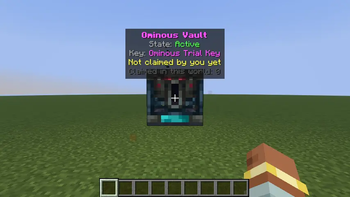
VaultHUD
Aim at a trial chamber vault and instantly know: its state, whether it is ominous, which key it needs - and whether you have already claimed it.
Features
- HUD panel above the crosshair when aiming at a vault (up to 8 blocks)
- State: Inactive / Active / Unlocking / Ejecting loot
- Normal vs Ominous vault + the exact key required
- Per-world claim tracking: when you use the right key on an active vault, the mod remembers it (
config/vaulthud.json), so revisiting a trial chamber weeks later you instantly see "Claimed by you" - Claimed-vault counter for the current world
/vaulthudto toggle,/vaulthud clearworldto reset the current world's claims
Versions
One JAR for Minecraft 1.21.8 - 1.21.11 (Fabric).
Install
- Fabric Loader + Fabric API for your MC version
- Drop the JAR into
.minecraft/mods/
How it works
Client-side only. Vault state and the ominous flag are block state properties (visible to the client); claims are recorded locally when you right-click an active vault with the matching key.
- Edition: Minecraft Java
- File type: .jar
- Minecraft versions listed: 1.21.8, 1.21.9, 1.21.10
- How to install: Install the matching mod loader (Forge, Fabric or NeoForge) for your Minecraft version. → Download the .jar. → Put it in the .minecraft/mods folder and launch that loader profile.
- Where to get it: Opens on Modrinth — not every file is mirrored on our own servers.
Install steps are the general flow for this file type — How to install Minecraft Java mods & modpacks walks through it step by step.
- Ships as vaulthud-1.0.0-mc1.21.8-1.21.11.jar — drop this file into the mods folder
- Download size: 11 KB
- Download link checked 27 Sept 2026 — working
These come from our own check of the pack file, not from the source page.