
Vivecraft Sable Compat
Java mod listed for Minecraft 1.21. Downloads from the MC Java Mods app on Android.
Makes Vivecraft VR work while standing on a Sable sub-level. VR teleport lands where you aimed instead of dropping you into the void, and VR melee hits…
⬇ Download on Modrinth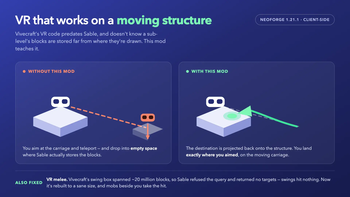
Makes Vivecraft VR work properly while you are standing on a Sable sub-level — a moving, physics-driven structure such as a ship or a train carriage.
Client-side only. It works on unmodified servers.
What it fixes
VR teleport drops you into the void. You aim at a spot on the moving structure, teleport, and fall through empty space far away from it. Vivecraft aims with a block raycast, so on a sub-level it picks a destination in the far-off region where Sable actually stores the structure's blocks — then writes that position to you directly.
VR melee hits nothing. Swinging at a mob standing next to you does nothing, and the log fills with errors. Vivecraft's swing search box is built from two different coordinate frames at once, so it spans ~20 million blocks. Sable refuses any query that large and returns no targets at all.
Both are the same underlying problem: Sable keeps a sub-level's blocks somewhere far from where it draws them, and Vivecraft's VR code predates Sable and does not know that.
Requirements
- Minecraft 1.21.1 · NeoForge 21.1.228+
- Vivecraft (verified against
1.21.1-1.3.15-neoforge) - Sable 2.0.5+
Neither is bundled — install them yourself. Sable's PolyForm Shield licence does not permit redistribution.
Reporting a problem
The mod logs its own diagnosis: whether each fix loaded, and for every teleport, the
destination Vivecraft chose versus the one actually used. Play, quit normally, and send
logs/latest.log — that one file is usually enough. See
TESTING.md.
Source · PolyForm Shield 1.0.0
- Edition: Minecraft Java
- File type: .jar
- Minecraft version listed: 1.21.1
- How to install: Install the matching mod loader (Forge, Fabric or NeoForge) for your Minecraft version. → Download the .jar. → Put it in the .minecraft/mods folder and launch that loader profile.
- Where to get it: Opens on Modrinth — not every file is mirrored on our own servers.
Install steps are the general flow for this file type — How to install Minecraft Java mods & modpacks walks through it step by step.
- Ships as vivecraft_sable_compat-0.2.2.jar — drop this file into the mods folder
- Download size: 13 KB
- Download link checked 17 Oct 2026 — working
These come from our own check of the pack file, not from the source page.